IPTV Smarters Parental Control: PIN, Locks and Child Profiles
IPTV Smarters parental control is a feature of IPTV Smarters Pro that, in its developer's words, lets you "restrict access to selected content or sections" of the player. The developer's pages we read list it as a feature but publish no step-by-step guide and no default PIN, and say features vary by device and app version. Turn it on in the app's settings, lock the sections your child should not open, then back it up with a device limit such as a Google TV children's profile.
This page belongs to our checklist for vetting an IPTV provider in the UK. Everything about third-party apps and devices below comes from the developers' pages, the app stores and Google's and Apple's help pages as we read them on November 18, 2026.
What does IPTV Smarters parental control do?
It restricts parts of the player. The IPTV Smarters Pro features page, on getiptvsmarters.com, describes parental controls as a way to "restrict access to selected content or sections", and the developer's guide to the app says they help you "manage access to selected areas or content within the player".
Three more points from the developer's pages matter for parents:
- It depends on your version. The developer writes that feature availability can vary by platform and app version, and its smart TV post says "managing parental controls when supported".
- Categories come from your provider. The features page says you browse content "through categories supplied by the user's source", so what you can lock is the list of groups your provider sends.
- Profiles may help. The features page lists multiple users or profiles to "manage different viewing configurations where supported".
How do you set an IPTV Smarters parental control PIN?
Open the app's settings, find the parental control option, create a code and choose what it locks. The developer's pages we read do not show the menu, so the wording can differ between versions; use these steps as a checklist rather than exact labels.
- Sign in first. Add your playlist or login, so the categories you want to lock are loaded.
- Open settings and look for parental control.
- Create a code that only adults know, and write it down somewhere safe.
- Lock each section. Live TV, films and series are separate sections in the app, so check the categories in each one.
- Test it. Leave settings, open a locked category and confirm the app asks for the code.
A locked category only covers the channels your provider filed in it, so look through the unlocked groups after setup and whenever the list changes.
Is there a default IPTV Smarters parental control password?
Not one we could find. None of the IPTV Smarters Pro pages we read publishes a default PIN or password, so treat any code you see quoted on other sites with caution and set your own.
If you forget the code you set, the developer's site has a contact page. Removing and reinstalling an app normally deletes its saved settings along with your playlists on that device, so keep a copy of your login before you try that.
How do other IPTV players handle parental control?
Most players name a parental lock in their listing, but few explain it. This is what each listing or developer page says.
| Player (publisher) | What the listing or developer says | PIN named? |
|---|---|---|
| IPTV Smarters Pro (getiptvsmarters.com) | "Restrict access to selected content or sections" | No |
| TiviMate (Armobsoft FZE), Google Play | "Parental controls: Manage access easily to ensure a safe viewing environment" | No |
| Lume (Philipp Bischoff), developer's site | "Mark child profiles, restrict categories, and protect them with a PIN" | Yes |
| IPTV Streamer Max (HOLD-APPS - FZCO), App Store | "Parental control via pin code" | Yes |
| GSE SMART IPTV (droidvision), App Store | "Support: Parental control" | No |
Lume's developer says multiple profiles are part of its paid Pro tier, while the free tier holds 1 profile. TiviMate's listing says it is designed for Android TV and remote control, not phones or tablets. If the player you use has no lock at all, the device-level controls below still work.
How do you set up a Google TV children's profile?
Add a child from your profile picture on the home screen, choose the apps they can use, then turn on the child lock. Google's help page "Use parental controls on Google TV" gives these steps, and notes that children's profiles may not be available in some regions or on some devices.
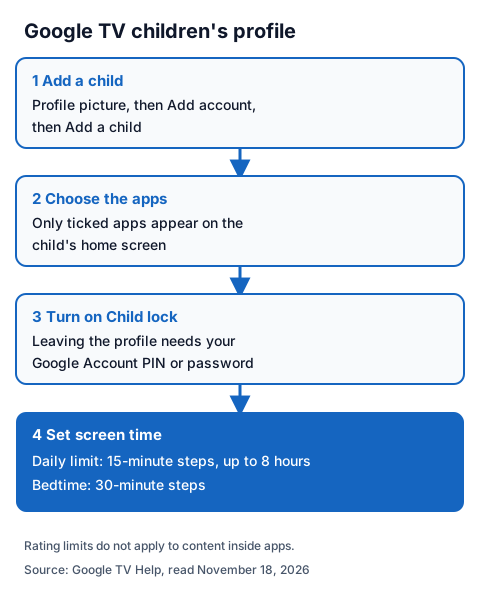
- From the home screen, go to your profile picture, then Add account and Add a child.
- Choose the apps for the child's home screen. Leave the IPTV player off unless you want them to use it.
- Turn on Child lock under All settings, Accounts and profiles, your child's profile. Leaving the profile then needs your Google Account PIN or password.
- Under the same profile, Screen time sets a daily limit in 15-minute steps up to 8 hours, and a bedtime in 30-minute steps.
One limit matters for IPTV: Google says its content restrictions by rating do not apply to content recommended inside apps or to search results from apps, and adds that apps may offer their own restriction options. If you allow a player on the child's profile, its own lock is what filters the channels. Our Chromecast and Google TV guide covers installing a player there.
What about iPhone, iPad and Fire TV?
On iPhone and iPad, Apple's Screen Time can block the player app entirely. Fire TV has its own settings, but we could not read Amazon's help pages today, so we do not list its steps.
Apple's help page on parental controls says to give your child their own Apple Account in your Family Sharing group. Then, in Settings, tap Family, your child's name and Apps & Websites, enter your Screen Time passcode, select an app and tap Block App. Apple says a blocked app is not deleted, only dimmed on the Home Screen, and that Ask to Buy, which sends you a request before your child downloads an app, is on by default for children under 13.
For Fire TV, check Amazon's own help before you hand over the remote; our Fire TV Stick IPTV guide covers the player side.
How do you set up a child-safe IPTV profile?
Combine three layers: a device profile that opens only the apps you choose, a player lock or child profile, and a login your child does not have.
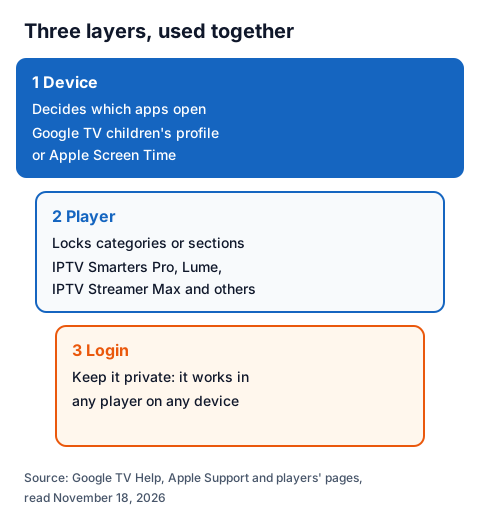
- Device: create the Google TV children's profile or Screen Time limits above.
- Player: lock every category your child should not open, or use a player with child profiles, such as Lume's Pro tier.
- Login: keep the server URL, username and password off your child's own devices.
- Check the list: which children's categories appear depends on your provider. Look through them during a trial instead of relying on a channel list.
What can parental controls not do?
They cannot stop someone who has the login. An IPTV login works in any player that accepts it, on more than one device, so a teenager with the username and password can sign in to a player with no lock.
Category locks also follow your provider's labels, and new groups can appear when a list changes. Device profiles decide which apps open, not what plays inside them, so use the player lock and the device limit together.
Using IG IPTV with parental controls
An IG IPTV login works in IPTV Smarters Pro and any player that accepts Xtream Codes or M3U. After payment, the login (server URL, username and password, or playlist and portal details) is sent on WhatsApp, and 24/7 WhatsApp support can help you enter it.
A standard plan streams on one screen at a time; the multi-room upgrade gives 2 to 4 simultaneous streams on one login, so a child's TV and yours can play at once. UK plans start from £15 a month. Use the 24-hour free trial with no card to check the categories and the lock in your player, and see the IG IPTV UK plans for every price.
Frequently Asked Questions
Does IPTV Smarters have parental control?
Yes. The developer lists parental controls among IPTV Smarters Pro's features, and says features can vary by platform and app version.
What is the default IPTV Smarters parental control PIN?
We found no default PIN or password on the developer's pages. Set your own code in the app's settings and keep it where only adults can find it.
Can a child get around a player lock?
Yes, if they have the login and another device or player. Keep the login private and add a device limit such as a Google TV children's profile or Screen Time.
Do Google TV content restrictions block IPTV channels?
No. Google says rating restrictions do not apply to content inside apps. Hide the player on the child's profile, or rely on the player's own lock.
Does IG IPTV include children's channels?
The channel list comes from the live lineup, and we do not promise any channel. Check the children's categories during the 24-hour free trial, before you pay. Our page on whether IPTV is legal explains what to look for in any service.
Sources
- getiptvsmarters.com home, features and download pages, and its blog posts "What Is IPTV Smarters Pro? A Complete Guide to the Media Player" (September 11, 2026), "Discover IPTV Smarters Pro: Latest Version, Design & Features" (September 15, 2026) and "Discover User-Friendly Media Features for Smart TVs" (October 28, 2026), read November 18, 2026.
- Google Play listing "TiviMate IPTV Player" (Armobsoft FZE), UK store, read November 18, 2026.
- Apple App Store data, UK store, for "IPTV Streamer Max" (HOLD-APPS - FZCO), "GSE SMART IPTV PRO" (droidvision) and "Lume: IPTV Player, Xtream, M3U" (Philipp Bischoff), read through Apple's lookup service November 18, 2026.
- getlume.org home and pricing, read November 18, 2026.
- Google TV Help: "Use parental controls on Google TV", read November 18, 2026.
- Apple Support: "Set up parental controls to manage your child's iPhone or iPad", read November 18, 2026.
- IG IPTV plan prices and terms (igiptv.tv), read November 18, 2026.
Couldn't read: Amazon's Fire TV parental control help pages (Amazon did not serve them to our reader); www.iptvsmarters.com (the domain did not resolve); the IPTV Smarters Pro Google Play listing (the page returned "not found"); the exact parental control menu and any default code in IPTV Smarters Pro (not on the developer's pages we read).