Live Channels App on Android TV: What It Does and How to Use It
The Live Channels app is Google's live TV guide and player for Android TV. Its Google Play listing says it shows channels from sources such as a built-in tuner or IP-based tuners in one place, "without switching your TV input source". It has no channels of its own: other apps, called TV inputs, add them. To watch an IPTV subscription in it, install an input app such as TVirl, add your playlist and programme guide there, and the channels then appear inside Live Channels.
Live Channels is one of the apps in our guide to free live TV apps, and this page goes deeper into how it works. Everything about Google's app and third-party apps below comes from their Google Play listings and Google's Android documentation, read on November 17, 2026.
What is the Live Channels app?
Live Channels is a free app from Google LLC for watching live TV on Android TV. The listing describes it as an app to "watch your favourite news, sports, movies and TV shows from various channel sources such as built-in tuner, IP-based tuners and more", shown "instantly on your Android TV".
The listing shows it was last updated on 21 Dec 2022, with more than 50 million downloads. It explains the three permissions the app asks for:
| Permission | Why Google says the app needs it |
|---|---|
| Location | To provide a complete programme guide for TV channels |
| Storage | To load poster art for programmes |
| TV listings | To show a programme guide and a channel banner |
Its data safety section says no data is shared with third parties, while the app may collect location, personal info and three other data types. The listing does not say which countries or channels it covers, because the channels depend on the inputs you add.
Where does Live Channels get its channels?
From TV input apps, through a part of Android called the TV Input Framework (TIF). Google's Android Open Source Project documentation describes a system TV app that shows live content, and separate TV inputs, "an app representing physical or virtual tuners and input ports", that supply the channels.
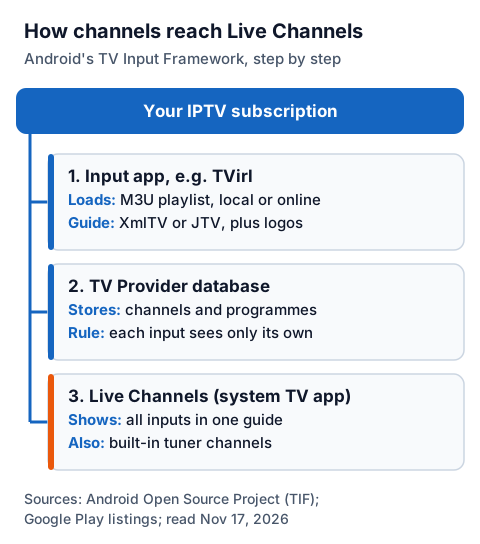
| Part of the framework | What Google's documentation says it does |
|---|---|
| TV input | An app representing a tuner or input; an IPTV input app is one example |
| TV Provider | A database of channels, programmes and their permissions |
| TV Input Manager | Lets the TV inputs talk to the TV app |
| TV app | The system app you watch in, which "can't be replaced by a third-party app" |
| Parental control | Blocks channels and programmes |
Two details from that documentation explain how it behaves. Each input can only see its own channels and programmes in the TV Provider database. And Android's developer guide says an input app must offer a setup screen, which the system opens when it cannot find any channels for that app. So when you add a new input, you set it up in that input's own screen, and Live Channels shows the result.
How do you watch IPTV in Live Channels?
Install an IPTV input app, give it your playlist, then select it as a source in Live Channels. TVirl is the input app made for this: its Google Play listing says it "integrates IPTV channels from your internet provider or online service right into 'Live Channels'".
- On your Android TV, install Live Channels and TVirl from Google Play.
- Open TVirl and load your M3U playlist, either from an internet address or a local file, as its listing describes.
- In TVirl, add your provider's programme guide (EPG) in XmlTV or JTV format, so the guide shows what is on.
- Open Live Channels and set up channel sources. Choose TVirl and let it finish its setup screen.
- Your IPTV channels now sit in the Live Channels guide alongside any other inputs, such as a built-in tuner.
We could not check the exact menu names on screen today, and they can vary by device. If channels show without programme details, the guide link is the usual cause: our guide on how to add an EPG source, player by player, explains how channel IDs in the playlist must match those in the guide file.
TVirl's listing is clear about one point: it "does not provide any 'free' access to IPTV". You need a service you have bought, and free playlists shared online are not one; we do not link them.
What can TVirl play?
TVirl plays what your device's decoders support. Its listing lists the following formats and features.
| Area | What the TVirl listing says |
|---|---|
| Playlists | M3U, local or from the internet |
| Programme guide | XmlTV and JTV formats, plus channel logos |
| Streaming protocols | Multicast/UDP, DASH, HLS, HTTP Progressive, RTMP |
| Containers | MPEG-TS, mp4 |
| Codecs | h264, h265, MPEG-2, AC-3, MP2, MP3 and others, "depends on decoders installed on the device" |
The listing also shows in-app purchases, more than 500 thousand downloads, a last update on 23 Jun 2026, and a data safety section saying no data is collected or shared. It does not list prices for the in-app purchases, so check them in Google Play before buying.
Does Live Channels work on Google TV or Fire TV?
Live Channels is published on Google Play for Android TV. We could not read Google's help pages on Google TV's live TV features today, so check Google Play on your Google TV device to see whether it is offered for your model.
Fire TV devices do not use Google Play; they use Amazon's Appstore. We could not check Amazon's Appstore today, and we do not recommend installing copies of Google's app from third-party download sites. On newer Fire TV models that run Vega OS, AFTVnews reports that installing apps from outside Amazon's Appstore is not possible at all.
On a Fire TV, use an IPTV player from the Amazon Appstore instead; our IG IPTV Fire TV Stick page walks through setup. On a Chromecast, check whether your Chromecast model can get IPTV.
Live Channels or a standalone IPTV player?
It depends on whether you want one guide for everything. Live Channels plus an input app puts IPTV next to your tuner channels in the system guide; a standalone player keeps IPTV in its own app with its own guide and settings.
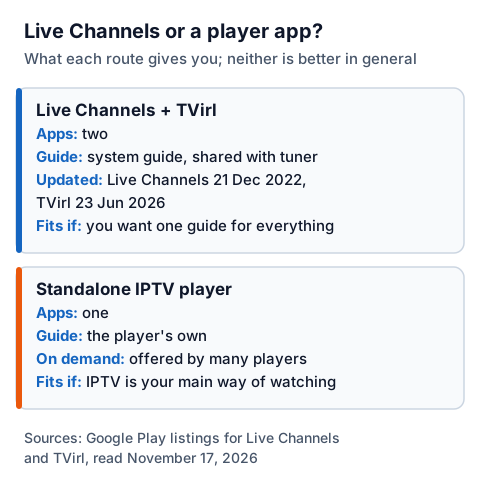
| Live Channels with TVirl | Standalone IPTV player | |
|---|---|---|
| Apps to install | Two | One |
| Guide | The system guide, shared with tuner channels | The player's own guide |
| Last Google Play update | Live Channels: 21 Dec 2022; TVirl: 23 Jun 2026 | Varies by player |
| Films and series on demand | Not described in either listing | Offered by many players; check the listing |
| Suits you if | Your TV has a tuner and you want one guide | IPTV is your main way of watching |
Neither is better in general. Our IPTV players by device page covers standalone players, and the Android TV box IPTV guide covers setup on boxes.
Using an IG IPTV playlist in Live Channels
After payment, IG IPTV sends your login on WhatsApp: a server address, username and password, or playlist details. Load the playlist into TVirl as above, and ask our 24/7 WhatsApp support for the details if you are unsure which link to use.
Your login works on as many devices as you like, with one stream at a time on a standard plan. Picture quality is up to 4K where the channel broadcasts it and your device can decode it, and UK plans start from £15 a month. The 24-hour free trial needs no card, so you can see how the channels look in Live Channels before paying.
Frequently Asked Questions
Is the Live Channels app free?
Yes. Google's Live Channels app is free on Google Play. Some input apps that feed it, such as TVirl, offer in-app purchases.
Does Live Channels come with any channels?
No. It shows channels from sources such as a built-in tuner or IP-based tuners. You add channels by installing input apps.
Can I add an M3U playlist to Live Channels?
Not directly. Add it to an input app such as TVirl, which loads M3U playlists and passes the channels to Live Channels.
Is Live Channels on Firestick?
Live Channels is published on Google Play for Android TV, and Fire TV devices use Amazon's Appstore instead. On a Fire TV, use an IPTV player from the Amazon Appstore.
Why is my Live Channels guide empty?
The guide comes from the input app. Add your provider's programme guide link in that app, in XmlTV or JTV format for TVirl, and check the channel IDs match.
Sources
- Live Channels, Google Play, read November 17, 2026
- TVirl. IPTV for Android TV, Google Play, read November 17, 2026
- TV Input Framework, Android Open Source Project, read November 17, 2026
- Develop a TV input service, Android Developers, read November 17, 2026
- These are the Fire TVs that don't support sideloading or Downloader due to Vega OS, AFTVnews, read November 17, 2026
Couldn't read: Google's Android TV and Google TV help pages on live TV (the pages we tried returned "not found"); Amazon's Appstore search (blocked the request); the Live Channels menus on a real device.