Android Box IPTV Player: Choosing One, Setting It Up and Recording
An Android box IPTV player is an app that plays the login your provider sends you; it brings no channels of its own. On an Nvidia Shield or a Chromecast with Google TV you install the player from Google Play, while Formuler boxes come with their own MYTVOnline player. Recording depends on both the app and the box: TiviMate's Play listing names recording, Formuler's MYTVOnline3 records one programme while you watch another, and either way you need free storage and, to record a different channel, a second stream.
This page is part of our guide to watching IPTV on every device and covers Android TV boxes only; the BuzzTV L1, a box that runs Linux instead of Android, has its own review. For players on phones, PCs and smart TVs too, see our overview of IPTV player apps.
What does an Android box IPTV player actually do?
An IPTV player is a front end for a login you already have. You type in an Xtream Codes login (server URL, username and password), paste an M3U playlist link or point it at a portal, and it lays out the channels, films, series and TV guide that the login unlocks. Google's own Live Channels app for Android TV is a guide rather than a player of this kind, and shows your channels only after an input app such as TVirl adds the playlist.
TiviMate's Google Play listing calls it "a media player only" that "does not provide any content", and adds that a paid upgrade unlocks app features, not channels. GSE Smart IPTV's listing says the app contains no playlists except samples. What you can lawfully watch is decided by the service behind your login, not by the player; our page on whether IPTV is legal explains that difference.
So choosing a player comes down to three questions: is it in your box's own app store, does it accept the login type your provider sends, and does it record if you want to record?
Which Android box runs which player?
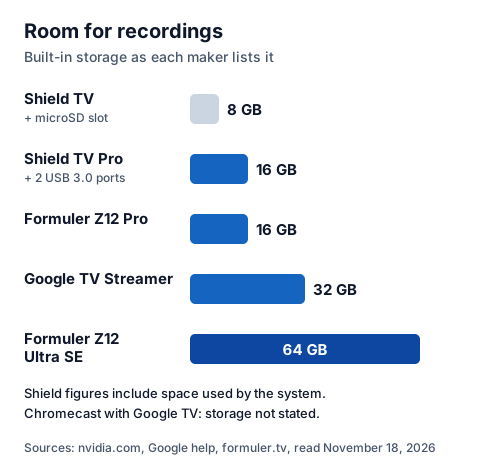
The box decides where your player comes from. The Nvidia Shield and Google's streamers install apps from Google Play; Formuler's Z-series boxes ship with Formuler's own MYTVOnline player, which Formuler says is available only on its boxes. Storage matters too, because recordings live on the box or on a drive you attach.
| Box | System, as the maker lists it | Where the player comes from | Storage |
|---|---|---|---|
| Nvidia Shield TV | Android 11 powered by Android TV | Google Play Store | 8 GB, part used by the system; microSD slot |
| Nvidia Shield TV Pro | Android 11 powered by Android TV | Google Play Store | 16 GB, part used by the system; two USB 3.0 ports for flash or hard drives |
| Chromecast with Google TV (4K or HD) | Google TV | Apps tab or search on the Google TV home screen | Not stated on Google's pages we read; 2 GB memory (4K), 1.5 GB (HD) |
| Google TV Streamer (4K) | Android TV OS | Apps tab or search on the Google TV home screen | 32 GB; 4 GB memory |
| Formuler Z12 Pro | Formuler's own interface | MYTVOnline 4, built in | 16 GB |
| Formuler Z12 Ultra SE | Formuler's own interface | MYTVOnline 4, built in | 64 GB, with internal recording |
Nvidia lists 4K HDR playback at 60 frames per second for both Shield models, and Google lists up to 4K HDR at 60 fps for the Chromecast with Google TV (4K) and the Google TV Streamer; the HD Chromecast stops at 1080p. Whether a channel arrives in 4K is down to the channel; our guide to what IPTV UHD needs, from HDR formats to line speed covers the rest of the chain. If you still use an older Chromecast without a remote, it cannot install a player at all; our page on whether you can get IPTV on a Chromecast covers that case.
Which IPTV player apps can you install today?
Store listings change, so check before you buy a box for one app. This is what the official stores showed on November 18, 2026, from Google Play's UK store unless noted.
| Player | Store status we found | What the listing names |
|---|---|---|
| TiviMate IPTV Player (Armobsoft FZE) | Listed on Google Play; in-app purchases | M3U, Xtream Codes and Stalker Portal; TV guide, catch-up, recording, multiview; built for Android TV, not touch screens |
| iMPlayer TV IPTV Player (HzApps) | Listed on Google Play; in-app purchases | Phones and large screens; recent release notes mention EPG settings |
| GSE SMART IPTV PRO (droidvision) | Listed on Google Play at £2.39 | Xtream Codes API, XMLTV guide files, Chromecast; no recording named |
| IPTV Smarters Pro | The Google Play address we used returned "not found"; the developer's site did not load | Several apps use the "Smarters" name under different publishers, so check the publisher |
| OTT Navigator | The main Google Play listing returned "not found"; the developer's companion app is listed | The companion app manages OTT Navigator's paid features on devices without Google Play |
| MYTVOnline 3 and 4 (Formuler) | Built into Formuler boxes | Live TV, recording, timeshift, picture-in-picture |
If a player is not in your box's own store, we do not link a download from elsewhere. That includes the original Perfect Player, which has left Google Play; our page on Android IPTV Perfect Player and what to install instead explains the options. Our reviews of iMPlayer and MYTVOnline3 go deeper on each app. NexTv, a French-made player for Xtream Codes and 1-Stream logins, is also listed on Google Play in the UK.
How do you set up an IPTV player on an Android box?
Install the player from the box's store, choose the login type your provider sent, enter it exactly, and let the channels and guide load. On a Shield that means the Google Play Store; on a Google TV device, Google's help pages say to search for the app or browse the Apps tab and select Install.
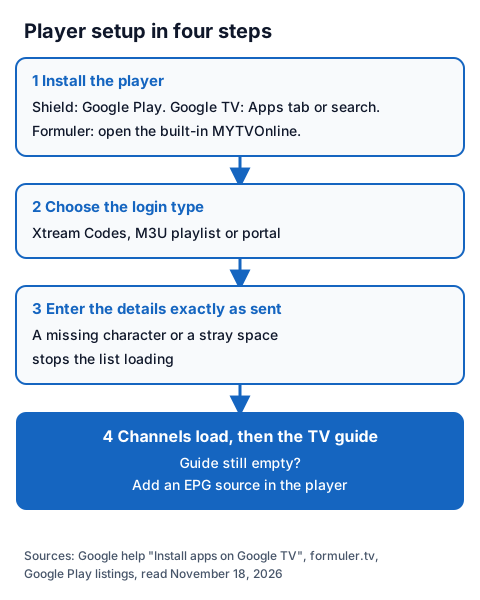
- Install the player. Search for it by name in Google Play (Shield) or from the Google TV home screen (Chromecast with Google TV, Google TV Streamer). On a Formuler box, open MYTVOnline.
- Pick the login type. Xtream Codes, M3U playlist or portal. Use the type your provider sent; our guide on how to enter an Xtream login explains each part of it.
- Enter the details exactly. A missing character or a stray space is the usual reason a list never loads.
- Let it load. Channels appear first; the TV guide can take longer. If the guide stays empty, our guide to adding an EPG source to an IPTV player shows where the guide address goes. If channels play with no sound, our checks for an IPTV box with no sound tell a silent channel apart from a box-wide audio setting.
Can you record IPTV on an Android box?
Yes, when the player has a recording feature and the box has room to store it. Recording one channel while you watch a different one also needs two streams at once, because the box pulls both channels from your provider at the same time.
| Player or box | Recording, as the developer describes it |
|---|---|
| TiviMate | "Record your favorite shows to watch later" (Google Play listing); the listing does not say which features need the paid upgrade |
| MYTVOnline3 on Formuler boxes | Record a programme while watching another, plus timeshift (Formuler's MYTVOnline3 page) |
| Formuler Z12 Ultra SE | Internal recording with built-in storage, no external drive required (Formuler's launch post) |
| GSE SMART IPTV PRO | No recording named on the Google Play listing |
Where the recording goes matters on a Shield. Nvidia's user guide says a microSD card or USB drive connects as "removable storage" that the Shield reads and writes directly, but apps and app data cannot be installed there unless you format it as "device storage" (Settings > Device Preferences > Storage), which formats and encrypts it. The Shield reads FAT32, exFAT, NTFS and HFS+ drives. Check the player's recording settings after you attach a drive. TIVRA, for one, lists recording to the device, a USB drive or a network drive.
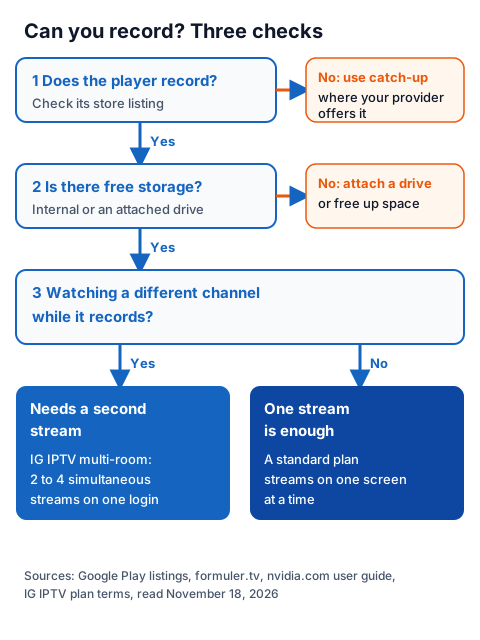
Catch-up, where your provider offers it, replays recent programmes without storage, but keeps no copy on the box.
Using an Android box player with an IG IPTV login
An IG IPTV login works in any of the players above that accept Xtream Codes or M3U. After payment, the login (server URL, username and password, or playlist and portal details) is sent on WhatsApp, and 24/7 WhatsApp support can help you enter it.
A standard plan streams on one screen at a time, so watching one channel while recording another needs the multi-room upgrade, which gives 2 to 4 simultaneous streams on one login.
Picture quality runs up to 4K where the channel broadcasts it. UK plans start from £15 a month, and the 24-hour free trial needs no card, so you can check your player, your box and the channels you care about before paying. The IG IPTV UK plans page lists every price.
Frequently Asked Questions
Does an Android box IPTV player come with channels?
No. TiviMate's listing says it is a media player only and provides no content, and GSE Smart IPTV's says it holds sample playlists only. You add a login from a provider.
Can I record IPTV on an Nvidia Shield?
Yes, with a player that records, such as TiviMate, whose listing names recording. Save to internal storage or an attached drive; the Shield TV Pro has two USB 3.0 ports and the Shield TV a microSD slot.
Do I need two connections to record?
You need two streams to watch one channel while recording a different one, because both run at once. On a one-screen plan, record while you are not watching anything else, or add the multi-room upgrade.
Is IPTV Smarters Pro on Google Play?
We could not confirm it on November 18, 2026: the Google Play address we used returned "not found" and the developer's site did not load. Several apps use the Smarters name, so check the publisher before installing.
Sources
- Google Play listings, UK store: "TiviMate IPTV Player" (Armobsoft FZE), "iMPlayer TV IPTV Player" (HzApps), "GSE SMART IPTV PRO" (droidvision) and "OttNav Companion" (SIA Scillarium Studio), read November 18, 2026.
- Google Play search for "iptv smarters pro", "ott navigator" and "implayer", UK store, read November 18, 2026.
- Apple App Store search for "iptv smarters pro", UK store, read November 18, 2026.
- nvidia.com SHIELD TV and SHIELD TV Pro product specs, and the SHIELD TV user guide (connecting storage), read November 18, 2026.
- Google help: "Chromecast and Google TV Streamer specifications", "Meet Chromecast with Google TV" and "Install apps on Google TV", read November 18, 2026.
- formuler.tv home page, MYTVOnline3 page and the post "Introducing the New Formuler Z12 Ultra SE & Z12 Pro", read November 18, 2026.
- IG IPTV plan prices and terms (igiptv.tv), read November 18, 2026.
Couldn't read: the IPTV Smarters developer site (the address did not resolve); the main Google Play listings for IPTV Smarters Pro and OTT Navigator (returned "not found"); tivimate.com's help content (the page shows no help text to our reader), so which TiviMate features need the paid upgrade is not described; whether Google Play is offered on Formuler's Z12 boxes.