IPTV Sports Channels: How to Check Them Yourself
IPTV sports channels appear in a provider's line-up as named groups in the channel list, with programme rows in the TV guide, and no list or advert tells you how they play on your screen. The only reliable check is your own: during a free 24-hour trial, open the channels you care about, compare the guide with the broadcaster's schedule, time the delay against a live score, look at motion and picture quality, and try a second screen if your household needs one.
This guide is the hub for sport on IG IPTV. The IG IPTV live sport page and the football page with UK plan prices cover the service itself; our plain-English guide to how IPTV works covers the basics. Facts about broadcasters, the law and streaming below come from pages we read on November 18, 2026. We do not promise any channel, league, event or fixture: you check those yourself during the trial.
How do sports channels appear in an IPTV line-up?
They appear as groups in the player's channel list, usually sorted by country and category, with one row per channel in the TV guide. Names, order and grouping come from the provider's playlist.
Three things sit behind every sports channel you scroll past:
- The playlist entry. A name, a logo and a stream address. It tells you a channel is listed, not that it plays.
- The guide row. Programme times come from a separate guide file (EPG). A sports channel with an empty or shifted row is a guide problem, not a stream problem; our guide to adding an EPG source to an IPTV player explains the fix.
- The stream itself. Only pressing play tells you whether the channel opens, how quickly, and at what picture quality.
That is why a channel count, ours included, cannot tell you whether the channel you want plays well on your TV when you want it.
What should you check during the free 24-hour trial?
Check six things, in this order: the channel is listed, the guide matches the broadcaster's schedule, the stream opens, the delay is acceptable to you, motion looks smooth, and picture quality holds up. Add a seventh, a second screen, if two people watch at once.
| Check | How to do it | What it tells you |
|---|---|---|
| 1. Listed | Search the channel list for each channel you watch | Whether the playlist includes it |
| 2. Guide | Compare the guide row with the broadcaster's own schedule | Whether programme times line up |
| 3. Opens | Press play and count how long the picture takes | Whether the stream answers at all |
| 4. Delay | Watch next to a live score app or radio commentary | How far behind live the stream runs |
| 5. Motion | Open the player's stream info during fast play | The frame rate (for example 50fps or 25fps) |
| 6. Picture | Watch 20 minutes during a busy evening | Whether quality holds when demand is high |
| 7. Second screen | Play on two devices at once | Whether your plan allows it (see below) |
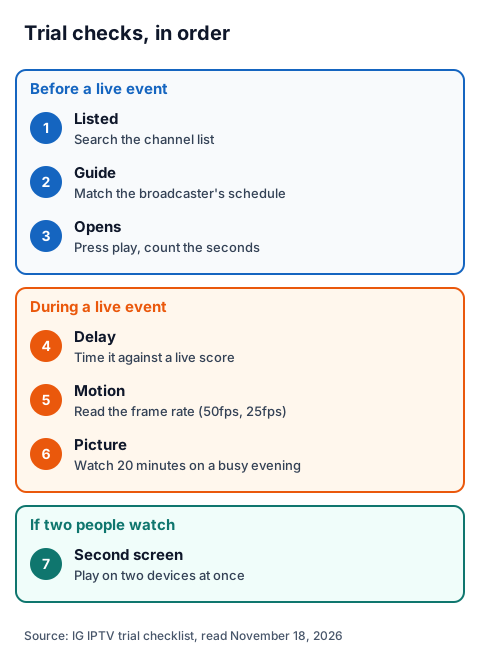
Do checks 1 to 3 before a live event and checks 4 to 6 while something live is on, not on a replay. Note any channel that fails, so you can send the list to support.
How far behind the broadcast is an IPTV stream?
It varies by channel, provider, player and connection, so the only number that matters is the one you measure. Internet streams are buffered before they play, which puts them behind a live broadcast.
To measure it, open a live score app or radio commentary next to the stream and note the time between a goal or wicket appearing there and on your TV. Do it twice, on two channels. A player with a smaller buffer may start sooner but stall more often; if you see stalls, our guide to stopping IPTV buffering lists the checks in order.
Does 50fps matter for IPTV sports channels?
It matters for fast motion. A stream labelled 50fps shows 50 frames every second, twice as many as a 25fps stream, so a ball crossing the screen moves in smaller steps. Many players show the frame rate in a stream-info overlay; open it during play.
The device matters too. Amazon's Fire TV developer documentation says frame rate conversion "may not provide optimal results" and recommends switching the display to the content's actual or closest frame rate. If your device has a match-frame-rate setting, compare the same channel with it on and off.
What picture quality and internet speed do you need?
Use a streaming benchmark as a floor. Netflix's help page recommends a stable 3 Mbps or higher for HD (720p), 5 Mbps for Full HD (1080p) and 15 Mbps for 4K. They are Netflix's figures, not an IPTV specification.
| Quality | Resolution | Netflix's recommended speed |
|---|---|---|
| HD | 720p | 3 Mbps or higher |
| Full HD | 1080p | 5 Mbps or higher |
| 4K (UHD) | 4K | 15 Mbps or higher |
Test speed on the TV device itself, not on your phone, and prefer Ethernet or 5 GHz Wi-Fi. IG IPTV streams up to 4K where the channel broadcasts it; check each channel's quality in the player's stream info.
Can you watch two matches in two rooms?
Yes, if your plan allows two streams at once. A standard IG IPTV plan plays on one screen at a time, though you can install the login on as many devices as you like. The multi-room upgrade for two to four screens gives 2 to 4 simultaneous streams on one login.
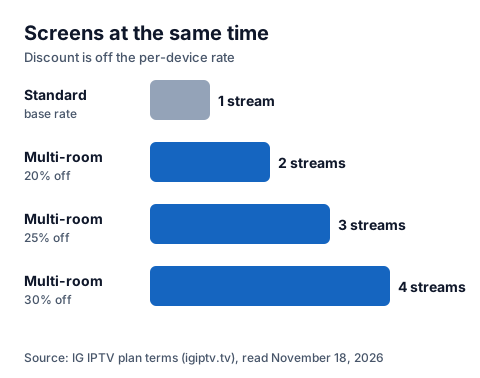
The per-device rate drops as you add screens: 20% off for 2, 25% for 3 and 30% for 4. Try both rooms during the trial, at the same time, before choosing.
What are the UK's legal pay-TV routes for sport?
Broadcasters sell sport directly, and a TV Licence is needed to watch any live TV. These facts come from the providers' own pages; TNT Sports' site refused our reader.
| Route | What the provider's page says | Commitment |
|---|---|---|
| Sky Sports | Headline price "from just £23/month"; 9 dedicated channels with 24/7 coverage; Sky Sports+ included | 24-month contract; needs a new 24-month Sky TV contract |
| Sky Sports F1 | Sold as a standalone channel to existing Sky TV customers | 31-day rolling contract |
| TV Licence (GOV.UK) | Needed to watch or record live TV on any channel or service and to use BBC iPlayer; costs £180 | Yearly licence |
Sky's page says new customers need a base Sky TV package first. GOV.UK says watching or recording live TV without a licence can bring a fine of up to £1,000; that applies to live TV watched through an IPTV player as well.
What is the 2026 UK enforcement context?
Enforcement in 2026 has targeted sellers of illegal streams. On its news page, the Federation Against Copyright Theft (FACT) reported on October 22, 2026 that a Clacton man was sentenced to two years in prison, suspended for two years, for selling illegally adapted streaming devices. Its September 22, 2026 summary of summer outcomes mentions around £1.4 million in illegal streaming revenue, more than £29,000 in pub penalties and a six-and-a-half-year sentence.
FACT also warned, in a BBC InDepth feature it summarised on October 20, 2026, that illegal sports streaming funds criminal activity and puts viewers' personal information at risk. IPTV technology is legal; what decides a service is whether the seller holds the rights to what it streams. Our page on whether IPTV is legal in the UK explains the law and the questions to ask any seller, us included.
What does IG IPTV offer sports viewers?
IG IPTV lists 55,000+ live channels from 50+ countries, sports channels among them, with picture quality up to 4K where the channel broadcasts it. We do not promise any particular channel or match: the free 24-hour trial needs no card, so you can run the checks above first.
| Term | UK price |
|---|---|
| Free trial | £0 for 24 hours, no card |
| 1 month | £15 |
| 3 months | £25 |
| 6 months | £35 |
| 12 months + 2 free | £55 |
Plans are prepaid with no contract and do not auto-renew. After payment, the login is sent on WhatsApp, where 24/7 support also helps with setup; read the UK refund policy before you buy. To start, request the free 24-hour trial.
Frequently Asked Questions
Which sports channels does an IPTV line-up include?
It depends on the provider's playlist, which can change, so no page can promise a channel. Search the channel list for each channel you watch during the free trial, then open it.
Why is my IPTV sports channel behind the live score?
Internet streams are buffered before they play, so they run behind a live broadcast. Measure the gap against a score app on two channels during the trial and decide whether it suits you.
What is 50fps on an IPTV channel?
It means the stream shows 50 frames per second, twice as many as a 25fps stream, which keeps fast motion smoother. Check it in the player's stream-info overlay.
Do I need a TV Licence to watch live sport on IPTV?
GOV.UK says you need a TV Licence to watch or record live TV on any channel or service. It costs £180, and watching live TV without one can mean a fine of up to £1,000.
Can two people watch different matches on one IG IPTV login?
Not on a standard plan, which plays on one screen at a time. The multi-room upgrade gives 2 to 4 simultaneous streams on one login.
Sources
- Sky, "Sky Sports Packages" page (sky.com/tv/sports), read November 18, 2026.
- GOV.UK, "TV Licence" page, read November 18, 2026.
- FACT (fact-uk.org.uk), news listing with the October 22, October 20 and September 22, 2026 items, read November 18, 2026.
- Netflix Help Center, "Netflix-recommended internet speeds", read November 18, 2026.
- Amazon Fire TV developer documentation, "APIs for HDMI Mode Switch", read November 18, 2026.
- IG IPTV plan prices and terms (igiptv.tv), read November 18, 2026.
Couldn't read: TNT Sports (tntsports.co.uk refused our reader), NOW's sports page (not found) and TV Licensing's own site (refused our reader), so none of them is described beyond the GOV.UK licence page. Kick-off delay is not given as a number because no source we read states one.