IPTV Buffering on a Firestick: What to Check, in Order
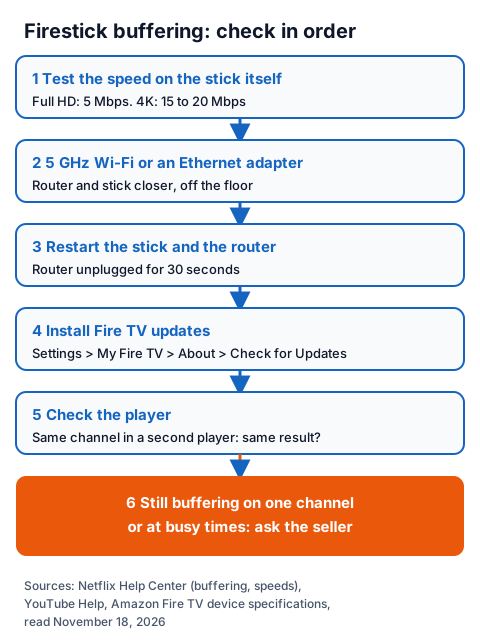
IPTV buffering on a Firestick starts in one of four places: the connection reaching the stick, the stick itself, the player app or the stream. Check them in that order. Test the speed on the Firestick, not on your phone; Netflix recommends 5 Mbps for Full HD and 15 Mbps for 4K. Then move the stick to 5 GHz Wi-Fi or an Ethernet adapter, restart it and the router, install Fire TV updates, and only then look at the player's settings or the stream.
This page is the Fire TV chapter of our step-by-step IPTV fixes, and the IG IPTV page for the Fire TV Stick covers plans and installing a player. The steps below come from Netflix's and YouTube's help pages, Amazon's Fire TV device specifications and the Smarters Pro developer's pages, all read on November 18, 2026.
What causes IPTV buffering on a Firestick?
Buffering means the stick receives video more slowly than it plays it, so playback pauses while it refills. Netflix's help puts it down to a weak or unstable internet connection or a device that needs an update. With IPTV, two more places can cause it: the player app and the stream itself.
| Where it starts | Typical sign | First check |
|---|---|---|
| Connection to the stick | Every app and channel stalls, worse in the evening or in another room | Speed test on the Firestick itself |
| The Firestick | Menus feel slow too; it has not restarted in weeks | Restart, then install updates |
| The player app | Other apps play fine; only the IPTV player stalls | Same channel in a second player |
| The stream | One channel stalls while others play; other players stall on it too | Tell the seller which channel and when |
How fast does the connection to a Firestick need to be?
For one stream, about 5 Mbps for Full HD and 15 to 20 Mbps for 4K, held steadily. Netflix recommends 3 Mbps for HD (720p), 5 Mbps for Full HD (1080p) and 15 Mbps for 4K. YouTube's system requirements page recommends a sustained 2.5 Mbps for 720p, 5 Mbps for 1080p and 20 Mbps for 4K.
| Picture quality | Netflix recommends | YouTube recommends (sustained) |
|---|---|---|
| HD 720p | 3 Mbps or higher | 2.5 Mbps |
| Full HD 1080p | 5 Mbps or higher | 5 Mbps |
| 4K Ultra HD | 15 Mbps or higher | 20 Mbps |
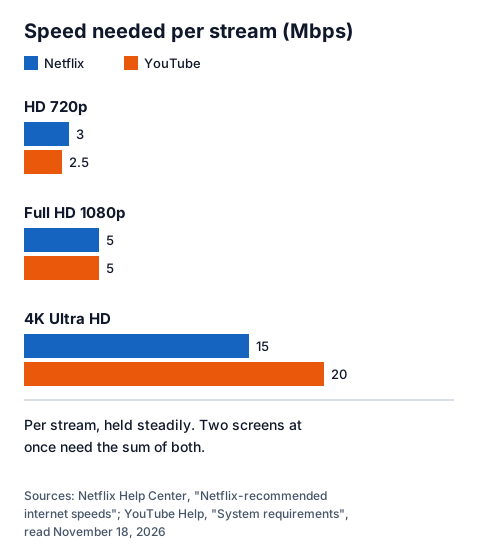
Those figures are per stream, held steadily. Two screens at once need the sum of both, plus whatever else is using the line.
Measure on the stick, not on a phone next to the router. If Netflix is installed on your Fire TV, its help page describes a built-in test: from the Netflix home screen, press Back, open Get Help, then Check your Network. Netflix adds that if the speed is slower than you expect, your broadband provider is the one to ask. Our guide to IPTV freezing and speed checks explains how to read the result.
Should a Firestick use Wi-Fi or an Ethernet adapter?
Use 5 GHz Wi-Fi with the router close by, or a wired Ethernet adapter if the signal is weak. Amazon's spec sheets list 5 GHz Wi-Fi on the sticks below and Ethernet through an adapter on the recent 4K models.
Netflix's tips for a better Wi-Fi signal apply to any stick: move the router and the device closer, in the same room if you can; keep the router away from other wireless devices and appliances; and keep it in an open space off the floor, such as on a desk or bookshelf.
| Model (Amazon's name) | Wi-Fi | Ethernet | Storage | Operating system |
|---|---|---|---|---|
| Fire TV Stick 4K, 3rd Gen (2026) | Wi-Fi 6, 2.4 and 5 GHz | Through an Ethernet adapter | 8 GB | Vega OS |
| Fire TV Stick 4K Plus (2025) | Wi-Fi 6, 2.4 and 5 GHz | 10/100 Mbps with an external dongle | 8 GB | Fire OS 8 |
| Fire TV Stick 4K Max, 2nd Gen (2023) | Wi-Fi 6E, 2.4, 5 and 6 GHz | 10/100 Mbps with an external dongle | 16 GB | Fire OS 8 |
| Fire TV Stick 4K, 2nd Gen (2023) | Wi-Fi 6, 2.4 and 5 GHz | 10/100 Mbps with an external dongle | 8 GB | Fire OS 8 |
| Fire TV Stick, 3rd Gen (2020) | 802.11ac, 2.4 and 5 GHz | 10/100 Mbps | 8 GB | Fire OS 7 |
A 10/100 adapter carries up to 100 Mbps, well above the 20 Mbps a 4K stream needs, and it takes Wi-Fi out of the picture. If buffering stops on a cable, the Wi-Fi was the cause; if it carries on, keep going down this page.
Amazon lists Vega OS for the 2026 Fire TV Stick 4K (3rd Gen), not Fire OS, so check that your IPTV player is offered for that model in Amazon's store before you rely on it.
How do you restart and update a Fire TV Stick?
Restart the stick and the router, then install any Fire TV update. Netflix's Fire TV steps are the most detailed we could read, and nothing in them is specific to Netflix.
- Restart the stick. Unplug it from power, leave it off for 15 seconds, then plug it back in. Netflix's buffering page also allows 3 minutes unplugged instead.
- Restart the router. Turn off the stick, unplug the modem and router for 30 seconds, plug them back in and wait about a minute before turning the stick on.
- Update the stick. Press Home, open Settings on the right, select My Fire TV, then About, then Check for Updates. Netflix notes you may need several updates to reach the latest version.
- Undo changed connection settings. If you changed the network settings on the stick, Netflix advises setting them back to the default.
Storage matters on 8 GB sticks. Amazon's help pages on freeing storage refused our reader, so we cannot give you their menu path; uninstalling apps you no longer use is a safe first step.
IPTV Smarters buffering: what can you change in the player?
Little that is documented: Tech Smarters' website and Google Play listings do not describe a buffer setting, so we cannot give a menu path for one. What you can do is rule the player in or out.
Smarters Pro is published by Tech Smarters, which says on smarterspro.com that it is "strictly a media player" and sells no subscriptions or content. Its Google Play listing for TV ("Smarters Pro", updated 3 Aug 2026) shows 5m+ downloads, and both its TV and mobile listings say the app supports M3U and JSON playlists. In the developer's install section, the FireTV Stick tab showed no steps when we read it, and the Amazon Appstore did not load for our reader, so we could not confirm how Smarters Pro is offered on Fire TV. Other publishers also use the Smarters name, so check the publisher before installing.
To tell whether IPTV Smarters Pro buffering comes from the app:
- Play the same channel in a second player at the same time of day. If it buffers there too, the app is not the cause.
- Update the player from the store you installed it from.
- Check the player's settings for a decoder or quality option. If your version shows one, change one setting at a time and test for a few minutes.
- Re-enter the login if the channel list loads slowly or only partly; a typing error in the server address can show up as stalls and errors.
Our overview of IPTV player apps lists other players you can use for that comparison. If the picture plays smoothly but the sound drops out or lags behind it, that is a separate fault; our guide to IPTV channel no sound and Smarters audio delay covers it.
When is the buffering on the seller's side?
When the line, the stick and two players all check out, but the same channels still stall, often at busy times such as a big live match. That is the stream, and only the seller can look at it. Note the channel, the time and your speed-test result before you get in touch. Test sports channels for stalls during the trial.
An IG IPTV login is sent on WhatsApp after payment, and 24/7 WhatsApp support can look at a channel that stalls. A standard plan streams on one screen at a time; the multi-room upgrade gives 2 to 4 simultaneous streams on one login, and each stream needs its own share of your speed. UK plans start from £15 a month, and the IG IPTV UK plans page lists every price. The 24-hour free trial with no card lets you run every check on this page on your own Firestick before you pay.
Frequently Asked Questions
Why does IPTV buffer on my Firestick but not on my phone?
Usually the connection. A phone near the router gets a stronger signal than a stick behind a TV. Run the speed test on the Firestick, move it to 5 GHz Wi-Fi or an Ethernet adapter, and compare.
Does IPTV Smarters Pro have a buffer size setting?
Tech Smarters' pages and Google Play listings that we read on November 18, 2026 do not document one. Check your version's settings; if there is none, compare the channel in a second player instead.
Will an Ethernet adapter fix IPTV buffering on a Firestick?
It removes Wi-Fi as a cause. Amazon lists 10/100 Mbps Ethernet through an adapter for recent 4K sticks, far above the 15 to 20 Mbps a 4K stream needs. It cannot help if the line itself is slow or the stream stalls at the source.
Can I try IG IPTV on my Firestick before paying?
Yes. The 24-hour free trial needs no card, so you can test your connection, your player and the channels you watch on the stick you own.
Sources
- Netflix Help Center: "TV show or movie loads slowly or keeps buffering", "Netflix freezes, stops responding, or gets stuck loading, but device isn't frozen" and "Netflix-recommended internet speeds", read November 18, 2026.
- YouTube Help: "System requirements and supported devices for YouTube", read November 18, 2026.
- Amazon Fire TV developer documentation: "Device Specifications: Fire TV Streaming Media Player", read November 18, 2026.
- Tech Smarters: smarterspro.com home page and install section, read November 18, 2026.
- Google Play listings, UK store: "Smarters Pro" and "Smarters Pro - Mobile" (Tech Smarters), read November 18, 2026.
- IG IPTV plan prices and terms (igiptv.tv), read November 18, 2026.
Couldn't read: Amazon's Fire TV customer help pages and the Amazon Appstore (refused our reader, so Fire TV restart and update steps follow Netflix's device instructions, and we could not confirm which Smarters app Amazon offers on Fire TV); any Smarters documentation of a buffer-size setting (none found on the developer's pages).