IPTV Channel No Sound: Fixes for One Channel, the Whole Box and Smarters Audio Delay
IPTV channel no sound, where one channel is silent while others play, usually comes down to the channel's audio format: Dolby Digital (AC3) or Dolby Digital Plus (E-AC3) that your player or box cannot decode, or passes on to a TV or soundbar that cannot either. Switch the player to software audio decoding, turn passthrough off, or change the box's Dolby Digital output setting. If every channel and every app is silent, the fault is the box, cable or TV, not the stream.
This page is part of our IPTV problem-solving guide. The settings below come from the device makers' and player developers' own pages as we read them on November 18, 2026; where a page did not load or did not cover a setting, we say so.
Is it one channel or the whole box?
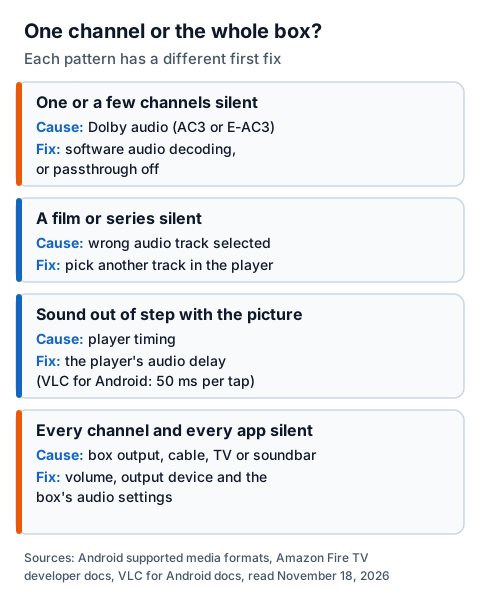
Start by finding where the silence is, because each pattern points to a different link in the chain. One silent channel points to its audio format; a silent box points to the box's output, the cable or the TV; sound that runs ahead of or behind the picture is a player timing setting.
| What you hear | Likely cause | First fix |
|---|---|---|
| One or a few channels silent | Dolby audio (AC3 or E-AC3) not decoded | Software audio decoding, or passthrough off |
| A film or series silent | An audio track you cannot hear is selected | Pick another track in the player |
| Sound out of step with the picture | Player timing | The player's audio delay setting |
| Every channel and every app silent | Box output, cable, TV or soundbar | Check volume, output device and the box's audio settings |
Quick test: open YouTube or another app on the same box. If it has sound, the box is fine and the problem sits in the IPTV player or the channel.
Why does one IPTV channel have no sound?
Most often because that channel carries Dolby audio and nothing in your setup decodes it. Some channels use AC3 or E-AC3 instead of the more common AAC, and not every Android box or player can decode them.
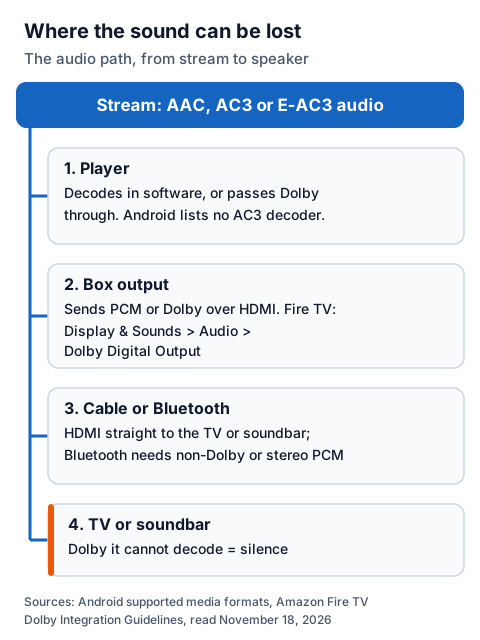
Android's developer page on supported media formats lists AAC, AMR, FLAC, MIDI, MP3, Opus, PCM/WAVE and Vorbis as the audio formats the platform supports; AC3 and E-AC3 are not on it. Dolby decoding on an Android box therefore comes from the box maker or from the player app, which is why one player can play a channel silently on a box where another plays it with sound.
Amazon's Fire TV developer guidelines say the same from the other side: apps that support Dolby audio "must also work on devices that do NOT support Dolby decoding", and if Dolby is not supported they must fall back to non-Dolby audio such as AAC. They also note that Android's standard MediaPlayer outputs only stereo PCM and cannot pass Dolby through.
Fix it by making one link in the chain do the decoding:
- In the player, switch audio decoding to software or turn audio passthrough off, so the player decodes the Dolby track itself.
- Or the reverse: if your soundbar or receiver decodes Dolby, turn passthrough on so the audio reaches it untouched.
- Try another decoder or player. VLC for Android documents a "Digital audio output (passthrough)" setting, which works only when its Audio output is set to AudioTrack.
IPTV box no sound on every channel: what to check
If every channel is silent, and other apps on the same box are too, the stream is not the problem. Check the box's own audio output, the cable route and what the TV or soundbar accepts.
Work through it in this order:
- Volume and mute on the box's remote, the TV and the soundbar.
- The output device. A box paired with Bluetooth headphones or a speaker may be sending sound there.
- The box's Dolby or surround setting. On a Fire TV, Amazon's developer guidelines give the route: Settings, then Display & Sounds, then Audio, then Dolby Digital Output. Try a stereo or PCM option if one is offered.
- The cable. Connect the box straight to the TV or soundbar HDMI input, then retest.
| Device | What its maker documents | What we could not check |
|---|---|---|
| Amazon Fire TV Stick | Dolby setting at Settings > Display & Sounds > Audio > Dolby Digital Output; the 2026 Fire TV Stick 4K (3rd Gen) and Fire TV Stick HD list HDMI audio pass-through for Dolby Digital and Dolby Digital Plus | Amazon's consumer help pages, which refused our reader |
| Android TV box | Android lists no AC3 or E-AC3 decoder among its supported formats; support depends on the box maker and the player | Google TV help pages for sound settings (the addresses we tried returned "not found") |
| NVIDIA Shield | Not checked | NVIDIA's audio support page returned "not found" |
Amazon's guidelines add one detail that explains silent Bluetooth audio: when a Fire TV plays through a Bluetooth headset, apps are advised to switch to non-Dolby audio, or to decode the Dolby track to stereo PCM. A player that does neither can be silent on headphones and fine through the TV. Our IPTV on Fire TV Stick page covers the player side, and the guide to IPTV on Android TV boxes and NVIDIA Shield helps if you are choosing a box.
How do you fix IPTV Smarters audio delay?
Look for an audio delay or audio sync option in the player's playback menu, and if Smarters has none on your device, switch its player engine or play the channel in a player that does. Sync is the player's job: Amazon's developer guidance tells apps to use the audio position as the main clock and match the video to it.
What we could confirm about Smarters is limited. The Google Play listing for Smarters Pro (Tech Smarters) says the latest version added "Integrated VLC Player as a built-in player along with multiple decoder support" and can switch between media players after repeated playback failures. Neither the listing nor the smarterspro.com site documents an audio delay control, and iptvsmarters.com did not resolve for us, so we cannot say whether your build has one.
VLC for Android does document it. During playback, open Options and choose Audio delay, then use the arrow buttons to move the audio 50 milliseconds per tap, or RESET to return to zero. If you do not know the offset, tap SOUND HEARD when you hear a sound and SOUND SPOTTED when you see what made it, and VLC sets the delay for you.
If a channel is out of step in every player, the delay is in the stream itself; report it to your provider with the channel name.
Film or series silent? Change the audio track
A silent film, when live channels play, usually means the player picked a track you cannot hear. Films often carry several: languages, commentary, stereo and surround versions of the same soundtrack.
Open the audio track menu during playback and pick another. VLC for Android puts it behind the icon at the bottom-left of the screen, where you can also disable audio by mistake; check it is not set to Disable. A stereo or AAC track is the safest choice on TV speakers. If every track is silent, apply the Dolby fixes above.
One test: the player or the stream?
Play the same channel in a second player on the same device. Sound there means the audio reached your box intact and the first player's settings are the fix; silence in every player means the channel has lost its audio at source.
For IG IPTV, send the channel name, your device and your player to 24/7 WhatsApp support. The login works in any player that accepts Xtream Codes or M3U, so you can test two players with the same details. Not a customer? The 24-hour trial login needs no card, so you can check the channels you watch most through your own box, TV and soundbar first. Our overview of IPTV players to try on each device lists alternatives.
Frequently Asked Questions
Why does only one IPTV channel have no sound?
Usually that channel carries Dolby Digital (AC3) or Dolby Digital Plus (E-AC3) audio that your player or box does not decode. Switch the player to software decoding or turn passthrough off.
Why is my IPTV box silent on every channel?
If other apps are silent too, check volume, mute, Bluetooth outputs, the box's Dolby or surround setting and the HDMI cable. The stream is not the cause when every app is silent.
Does IPTV Smarters have an audio delay setting?
We could not confirm it: the Smarters Pro listing and website do not document one. VLC for Android documents an audio delay control in 50-millisecond steps.
Should passthrough be on or off?
Off when the TV speakers or a basic soundbar cannot decode Dolby, so the player decodes it. On when a soundbar or receiver decodes Dolby itself.
Can headphones cause silence on a Fire TV?
They can. Amazon advises apps to switch to non-Dolby audio over Bluetooth; a player that keeps sending Dolby may be silent there.
Sources
- Android Developers, "Supported media formats", read November 18, 2026.
- Amazon Fire TV developer docs: "Dolby Integration Guidelines", "AV Synchronization in Android Applications" and "Fire TV Streaming Media Player Specifications", read November 18, 2026.
- VLC for Android documentation (docs.videolan.me): video player (audio track, audio delay) and Audio settings, read November 18, 2026.
- Google Play UK listing "Smarters Pro" (Tech Smarters) and the smarterspro.com site, read November 18, 2026.
- IG IPTV trial and support terms (igiptv.tv), read November 18, 2026.
Couldn't read: Amazon's consumer Fire TV help pages (refused our reader or returned "page not found"), Google TV and Android TV help pages for sound settings (returned "not found"), NVIDIA's SHIELD audio support page (returned "not found"), iptvsmarters.com (did not resolve) and whmcssmarters.com (refused our reader).