IPTV Box Troubleshooting: Find the Fix From the Symptom
IPTV box troubleshooting starts from the symptom you can see. Buffering, a black screen, a silent channel, a login error, an expired account and an empty guide each have their own short list of causes, so name the symptom first, then check whether it hits one channel or all of them, and one device or every device. Those two answers tell you whether the fault is the stream, your account, your network or the box itself, before you restart anything.
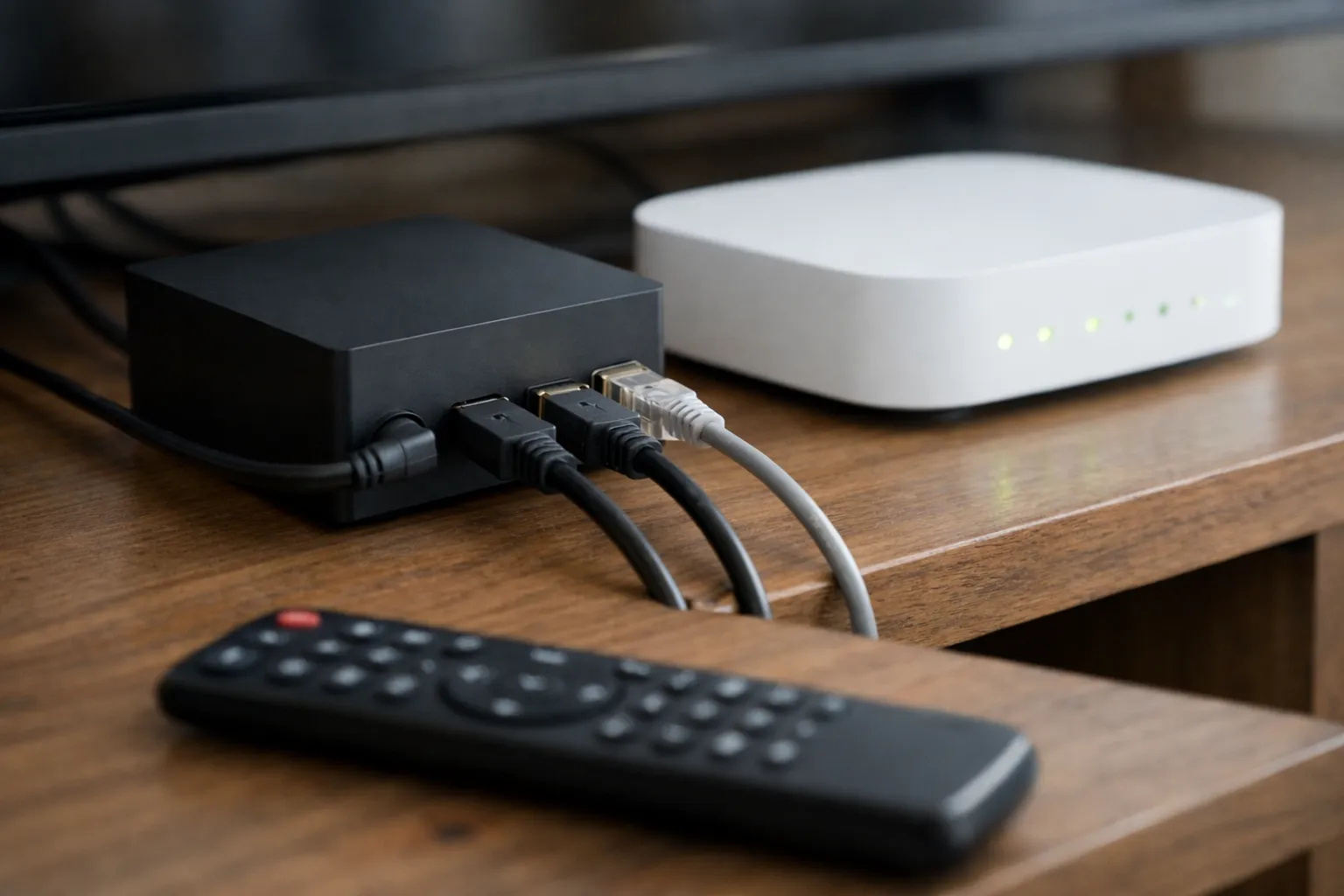
This page is the troubleshooting hub of our guide to choosing and using an IPTV service, for Android boxes, streaming sticks and smart-TV apps alike. Restart and connection steps quoted below come from Netflix's help pages for TV devices, read on November 18, 2026.
Which symptom are you seeing?
Find your symptom, try the first fix, then open the guide in the last column if it persists.
| Symptom | Most likely cause | First fix | Full guide |
|---|---|---|---|
| Buffering or freezing | Wi-Fi signal or speed on the box | Speed test on the box; try Ethernet or 5 GHz | Buffering checks in order |
| Black screen, sound plays | HDMI chain or decoder | Plug the box straight into the TV | See "no picture" below |
| Picture but no sound | Channel audio format or passthrough | Switch the player to software audio | Fixing a silent channel |
| Login or authorisation error | Typo, wrong server URL or port | Retype the login exactly | Entering an Xtream Codes login |
| "Account expired" message | The end date on the server has passed | Check the expiry date | What to do when an account expires |
| Guide empty or wrong times | Missing guide source or time offset | Refresh the guide in the player | Adding an EPG source |
| Stopped after adding a VPN | The VPN route, not the box | Turn the VPN off and retest | What a VPN does and does not do |
| App crashes or freezes | Cached data or full storage | Clear the app's cache, free storage | See "app crashes" below |
| Some channels fail, others play | Those streams, not your setup | Note which channels fail | Send the list to support |
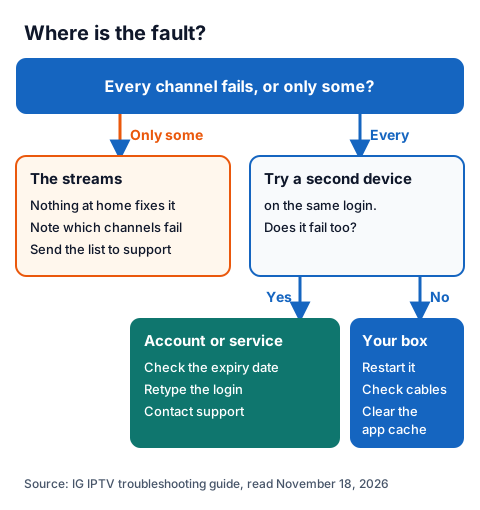
Is it your box, your network or the service?
Two questions settle most cases. If only some channels fail, the fault is in those streams. If every channel fails, try a second device on the same login: if it fails too, look at the account or service; if it works, the fault is your box.
Two more tests narrow it further:
- A second player. Same box, same login, another player. If only one works, the problem is the player's settings.
- Mobile data. Share your phone's connection with the box. If it works there but not on home broadband, the problem is your router or line; if it fails on both, it is the account or service.
In what order should you restart things?
Restart the box first, then the network, then the box again. Netflix's help page gives this order for TV devices: turn the device off, unplug the modem and router from power, wait 30 seconds, plug them back in, wait 1 minute, then turn the device on and try again.
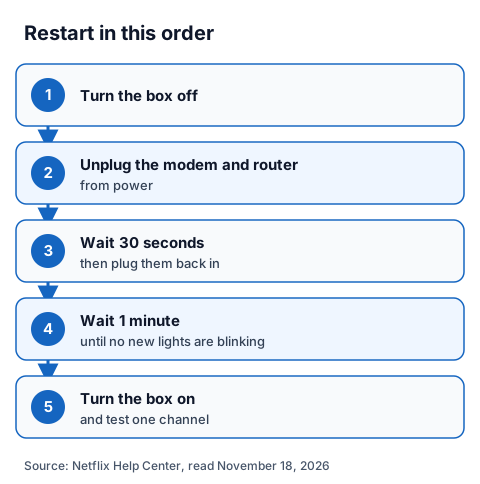
Netflix adds two details. For a device on its own, unplug it, press its power button once and wait 1 minute, or leave it unplugged for 3 minutes. For the router, wait until no new indicator lights are blinking.
Why does the IPTV box show no picture?
If you hear sound but see black, the fault is usually the HDMI chain or the decoder. Netflix's "black screen with sound" page says the cause is usually the device or a video cable, and lists the checks:
- Reverse the ends of the HDMI cable, then try a different HDMI port on the TV.
- Bypass any receiver or sound system by connecting the box directly to the TV.
- Try a new HDMI cable, or the box on another TV.
Netflix also explains HDCP, a copy-protection handshake between device and TV over HDMI, which a receiver in the middle can upset. If the cables are fine, switch the player between hardware and software decoding, and if only one channel is black while others play, that stream is the fault.
Why is there no sound?
If one channel is silent while others play, the usual cause is the channel's audio format, Dolby Digital (AC3) or Dolby Digital Plus (E-AC3), which your box or TV cannot decode. Switch the player to software audio decoding or turn passthrough off. If every channel and app is silent, check the box, cable and TV instead. Our guide to fixing a channel with no sound covers each player's settings and the audio delay fix.
Why does the box keep buffering?
Usually because the connection reaching the box is weaker than the stream needs. Test speed on the box itself, not on your phone, and compare it with a streaming benchmark: Netflix recommends a stable 3 Mbps for HD, 5 Mbps for Full HD and 15 Mbps for 4K.
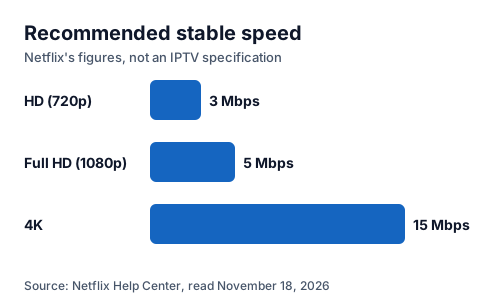
Those are Netflix's figures, not an IPTV specification. If the box is near the limit, use Ethernet or 5 GHz Wi-Fi, or move the router closer: Netflix suggests the same room, in the open and off the floor. The step-by-step buffering guide for Firestick and boxes works through every check in order.
Why won't the login work?
Most login errors are a typing problem. Usernames and passwords are case-sensitive, and the server URL must include the port if your provider gave one. Retype rather than paste, and check the box's date and time are set to automatic.
Two other causes look like typos:
- The account has expired. The end date lives on the provider's server, so reinstalling changes nothing. Our page on checking an IPTV expiry date shows how.
- The login is already playing elsewhere. A standard IG IPTV plan plays on one screen at a time, though the login can be added to more than one device. The multi-room plan for 2 to 4 screens allows simultaneous streams.
Why is the TV guide missing?
The channel list and the guide are two separate files, so working channels with an empty guide point at the guide source, not your account. Refresh the guide in the player's settings, check a guide source is attached, and use the time-shift setting if programmes sit at the wrong hour. Our guide to loading an EPG source in each player gives the steps player by player.
Does a VPN fix an IPTV box?
No. A VPN is a privacy tool; it does not fix buffering, login errors, a black screen or a missing guide, and it can add a fault of its own. Netflix's troubleshooting page lists VPN and proxy settings among the custom connection settings to set back to default when a TV device will not connect. Our page on whether you need a VPN for IPTV explains what a VPN does and does not change.
What do you do when the app keeps crashing?
Clear the player's cache, then free storage, then update or reinstall it. Clearing app data also clears the login, so have it to hand.
An IPTV box reset to factory settings is the last step, not the first. Netflix warns that restoring a device to its original settings may remove apps, data and settings, so have your Wi-Fi name and password and your login ready before you start. Our guides for Android TV boxes and NVIDIA Shield, Samsung and LG smart TVs and the IG IPTV Fire TV Stick setup show where each setting lives.
What should you send support?
Send five things in one message: the box and the player app, the exact error wording or a screenshot, which channels fail and which work, whether a second device fails too, and what you have already tried.
IG IPTV support runs 24/7 on WhatsApp, where screenshots are easy to send; the UK contact page lists the ways to reach it. If you are testing before you buy, the free 24-hour trial with no card lets you run these checks on your own box first.
Frequently Asked Questions
Why is my IPTV box not working at all?
Check power, the HDMI input and the network, then restart the box and router in order. If every channel fails on two devices, check the expiry date and contact support.
How do I reset an IPTV box?
Restart it first by cutting the power. A factory reset is a last step: it may remove apps, data and settings, so have your Wi-Fi password and IPTV login ready before you start.
What are the most common IPTV box problems?
Buffering, a black screen, a silent channel, login errors, an expired account and an empty guide. The symptom table at the top of this page links the fix for each.
Should I use a VPN to fix my IPTV box?
No. A VPN does not fix buffering, login errors or a missing guide. Turn it off while you troubleshoot so you can see the real fault.
Sources
- Netflix Help Center: "Netflix-recommended internet speeds", "Black screen with sound", "Black screen with no sound", "Netflix freezes, stops responding, or gets stuck loading, but device isn't frozen" and "What is HDCP?", read November 18, 2026.
- IG IPTV plan terms and support details (igiptv.tv), read November 18, 2026.
Couldn't read: Amazon's Fire TV help pages (refused our reader) and the Google TV and Roku help centres (the restart and storage pages we tried did not load or were not found), so device menus are described in the linked device guides rather than here.