Can IPTV Work on Roku? The Answer From Roku's Own Pages
Can IPTV work on Roku? Yes, but only through the routes Roku allows. A Roku device installs apps from Roku's Streaming Store, and a search for "iptv" in the UK store returned 24 apps, several describing themselves as players for M3U or Xtream Codes playlists. Roku's help pages describe three more ways in: screen mirroring from an Android phone or Windows PC, AirPlay from an iPhone or iPad on compatible models, and casting from apps that have a matching Roku app.
This answer belongs to our guide to IPTV on every screen you own. Everything about Roku below comes from Roku's own support pages, developer documentation and Streaming Store as we read them on November 18, 2026; we did not test any of the apps named.
Which route works on your Roku?
It depends on what you watch from. If you want the Roku remote to do everything, the only route is a player app from the Streaming Store. If the player runs on your phone or computer, you send the picture to the Roku with mirroring, AirPlay or casting.
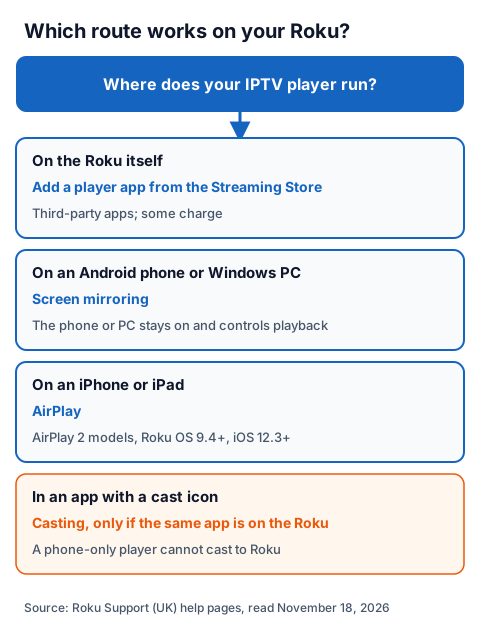
| Route | What it needs, per Roku's pages | The catch |
|---|---|---|
| Player app from the Streaming Store | Search, then Add app; some apps charge | Third-party apps; we could not verify how each handles a login |
| Screen mirroring | A compatible Android or Windows device | The phone or PC stays on and controls playback |
| AirPlay | AirPlay 2 Roku model, Roku OS 9.4 or higher, iOS 12.3 or later | Only on the listed models |
| Casting | The same app on your phone and on the Roku | A phone-only IPTV player cannot cast to Roku |
Does the Roku Streaming Store have IPTV player apps?
Yes. On November 18, 2026, a search for "iptv" in the UK Streaming Store listed 24 apps. Several describe themselves in their store text as media players for M3U playlists or Xtream Codes logins that supply no channels of their own; one says it is "a pure media player for XC, M3U Playlists".
Roku's help page "How to add apps to your Roku streaming device" gives the steps: press Home, select Store (or Streaming Store), find the app and select Add app. Roku notes that some apps require a paid subscription or a one-time charge, and that an app you add appears on every Roku device on your account.
Many carry the Smarters name under different publishers, so before paying, read the developer name and the store text. Stremium is one app found there, though what we could confirm about the Stremium app is limited to a Roku listing that says a cable or satellite subscription is required.
Can you mirror IPTV from an Android phone or Windows PC to Roku?
Yes, on most current Roku devices. Roku's page "How to screen mirror from your phone, tablet, or computer to your Roku streaming device" says you enable mirroring on the Android or Windows device, request a connection, then allow it on the TV with the Roku remote.
- Android (Samsung example): pull down the status bar, tap Smart View and select your Roku. Roku says devices on Android 10.0 or later generally support mirroring, except Google-branded devices such as Pixel.
- Windows 11: press Win + K, select "Connect to a wireless display" and pick your Roku.
- On the TV: choose Allow, Always allow, Block or Always block.
Roku lists exceptions: the Roku Express model 3700 and Express+ model 3710 do not support mirroring, and the Express+ 3910 supports it only on the HDMI output. You find your model under Settings > System > About. During mirroring the phone must stay on and controls playback, so the IPTV player runs on the phone and the Roku only shows its screen.
Can you AirPlay IPTV from an iPhone to Roku?
Yes, on Roku devices with AirPlay 2. Roku's AirPlay page lists Roku TV models, the Streaming Stick 4K (3820), Express 4K (3940), Streaming Stick+ (3810), Streambar (9102) and Premiere (4620, 3920), running Roku OS 9.4 or higher, with an iPhone or iPad on iOS 12.3 or later.
Put both on the same Wi-Fi, start the channel in your iPhone player, tap the AirPlay icon and select the Roku. If the Roku does not appear, Roku says to check Settings > Apple AirPlay and HomeKit and set AirPlay to On. Our guide on how to play IPTV on iPhone covers the player side.
How is casting different from screen mirroring on Roku?
Casting sends one video from an app; mirroring copies your whole screen. Roku's page "How do I cast apps from my phone to my TV?" says casting only works when the supported app is installed on both the phone and the Roku. Few IPTV players exist on both, so for most people mirroring or AirPlay is the phone route.
| Casting | Screen mirroring | |
|---|---|---|
| What you can send | Only from apps that support casting | Any app on the device |
| What the TV shows | Only the video | The whole screen, menus included |
| Phone after playback starts | Free to use or switch off | Must stay on |
| Supported devices | Most mobile devices | Compatible Android and Windows devices |
Can Roku Media Player play an M3U playlist?
Only from a USB drive. Roku's help page on Roku Media Player says it supports .m3u, .m3u8 and .pls playlists on a USB drive, and that playlist entries can point to a URL beginning with http://. Roku describes the app as a way to play your own personal video, music and photo files, and the page does not mention a TV guide for live channels. Not every Roku has a USB port.
We could not verify whether a live IPTV stream plays from such a playlist, so treat this route as a test rather than a setup.
What does Roku say about non-certified channels?
Roku's developer documentation calls them beta apps: test apps that skip certification and are shared by access code. The rules are strict, and they explain why a "private channel code" for IPTV can stop working.
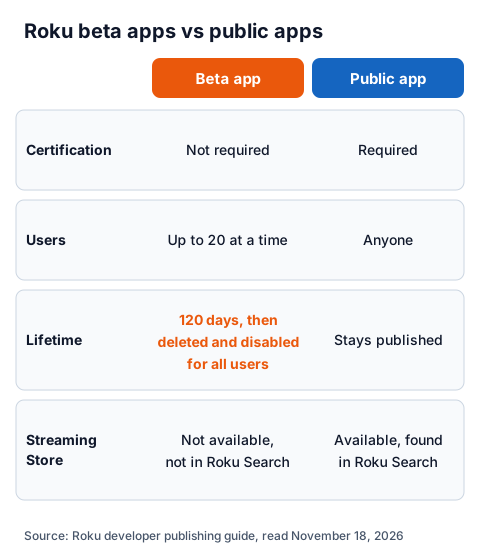
Per Roku's "Publishing" guide, a beta app can exist for only 120 days after it is created, after which it is deleted and disabled for every user who installed it; it allows up to 20 test users at a time and cannot be published to the Streaming Store. Public apps, by contrast, must pass certification, can be installed by anyone and stay published in the Streaming Store, where Roku Search finds them. Sideloading, which Roku's developer setup page defines as installing apps outside the Streaming Store, needs developer mode and a developer account, and only one app can be sideloaded at a time. Both are developer tools.
When is a Fire TV Stick or Google TV device simpler?
When you want a full IPTV player on the remote with a TV guide. These devices install players directly: TiviMate's Google Play listing, for example, says it is designed for Android TV, supports M3U, Xtream Codes and Stalker Portal, and offers a TV guide, catch-up, recording and multiview.
Our step-by-step guides cover IPTV on a Fire TV Stick and IPTV on a Chromecast with Google TV. You can keep the Roku on another HDMI input for its own apps.
Using an IG IPTV login on Roku
An IG IPTV login is an M3U playlist or an Xtream Codes login, so it works wherever your player accepts one: a Streaming Store player app, or a phone player mirrored or AirPlayed to the Roku. After payment, the login is sent on WhatsApp, and 24/7 WhatsApp support can help you enter it.
A standard plan streams on one screen at a time. UK plans start from £15 a month, and the 24-hour free trial with no card lets you check your Roku route, your player and the channels you want before paying. Every price is listed on IG IPTV's page for UK viewers.
Frequently Asked Questions
Does Roku support IPTV?
Roku has no built-in IPTV player, but the Streaming Store lists third-party apps that describe themselves as M3U or Xtream players, and Roku supports screen mirroring, AirPlay and casting from other devices.
How do you watch IPTV on Roku without an app?
Mirror your Android phone or Windows PC to the Roku, or AirPlay from an iPhone to a compatible Roku model. The player runs on the phone or computer and the Roku shows the picture.
Can you sideload an IPTV app on Roku?
Only in developer mode, which Roku documents for developers testing their own apps; one sideloaded app at a time. We do not link sideloaded apps.
Is it legal to use IPTV with a Roku?
The Roku and the player app are legal; what decides it is whether the service behind your login holds the rights to what it streams. Our page on whether IPTV is legal explains how to check.
Why does my Roku not show up for screen mirroring?
Check the model: Roku says the Express 3700 and Express+ 3710 do not support mirroring. Then check that your Android device supports it and that you allowed the request on the TV.
Sources
- Roku Support (UK): "How to add apps to your Roku streaming device", "What is Roku's Streaming Store and how do I access it to add apps?", "How to screen mirror from your phone, tablet, or computer to your Roku streaming device", "How do I cast apps from my phone to my TV?", "How to use AirPlay and HomeKit with your Roku streaming device" and "How do I use Roku Media Player to play my videos, music and photos?", read November 18, 2026.
- Roku developer documentation: "Developer setup" (developer mode and sideloading) and the channel publishing guide (beta apps and public apps), read November 18, 2026.
- Roku Streaming Store, UK, search for "iptv", read November 18, 2026.
- Google Play listing, UK store: "TiviMate IPTV Player", read November 18, 2026.
- IG IPTV plan prices and terms (igiptv.tv), read November 18, 2026.
Couldn't read: whether any Streaming Store player accepts an M3U or Xtream login and plays it reliably (we did not install them); the developer and price of each store app (shown only on each app's detail page); whether a live stream plays from an M3U playlist in Roku Media Player; a current Roku support page specifically about non-certified channels (none found in Roku's UK help).