Mac OS IPTV Player: What Each App Accepts and Costs
A Mac OS IPTV player is an app that plays the M3U link or Xtream Codes login your IPTV provider sends you; none of these apps come with channels. On the UK Mac App Store, GSE SMART IPTV PRO costs £5.99 and has a free Lite version, while Lume and IPTV Streamer Max are free to download. IPTV Smarters Pro offers a macOS download on its developer's site, and VLC plays an M3U link for free. Install one, add your login, then wait for the TV guide.

This page is part of our guide to IPTV on every screen you own. Every app detail below comes from Apple's Mac App Store data and the developers' own pages as we read them on November 18, 2026; we describe what each one says it does, not how it performed.
Which Mac OS IPTV players can you install, and what do they accept?
Five players cover most needs on a Mac: three from the Mac App Store, one from its developer's site, and VLC. They differ mainly in the login they take and in what they cost. Other Mac players exist beyond these five, such as YES IPTV Player, whose name is also used by a seller site.
| App (publisher) | Where you get it | Price shown | What it accepts, per the listing |
|---|---|---|---|
| GSE SMART IPTV PRO (droidvision) | Mac App Store | £5.99; GSE SMART IPTV LITE is free | M3U playlists, Xtream Codes API, XMLTV guide |
| Lume (Philipp Bischoff) | Mac App Store | Free for 1 playlist; Lume Pro $0.99 a month or $9.99 lifetime on the developer's site | Xtream Codes, M3U, Stalker portal |
| IPTV Streamer Max (HOLD-APPS - FZCO) | Mac App Store | Free | M3U playlists, TV guide |
| IPTV Smarters Pro | Developer's site, getiptvsmarters.com (macOS version 1.2, 72 MB) | Not stated on the pages we read | M3U playlists and "API-based login" |
| VLC (VideoLAN) | videolan.org (version 3.0.24, 95 MB) | Free and open source | A stream or playlist URL, such as an M3U link |
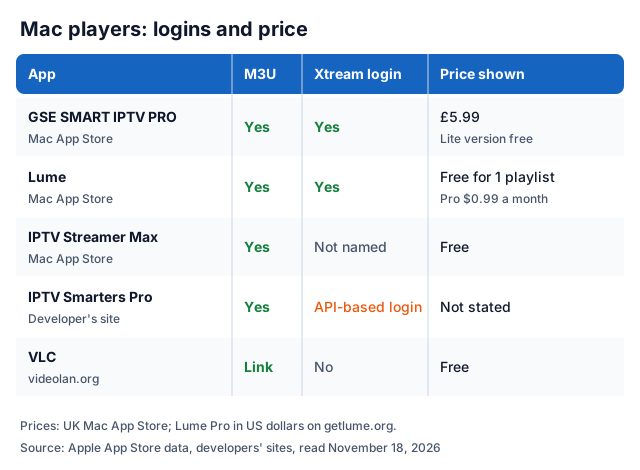
In practice: if your provider sent a server URL, username and password (Xtream Codes), pick GSE SMART IPTV PRO or Lume, which name it in their listings. If you only have an M3U link, all five can open it. Our roundup of IPTV player apps covers players for other devices.
A few details from the listings help you choose:
- GSE SMART IPTV PRO lists recording live TV, an EPG timeline, parental control, subtitle support and 31 interface languages, and says it is optimised for Apple Silicon. It needs macOS 10.12 or later. The listing's latest version, 4.4, is dated May 13, 2022.
- Lume lists Mac alongside iPhone, iPad and Apple TV. The free tier holds 1 playlist and 1 profile; the developer says Pro adds unlimited playlists, multiple profiles and offline downloads. Its prices are in US dollars, so the UK App Store charge may differ.
- IPTV Streamer Max says it supports HD and 4K on Mac, iPhone, iPad and Apple TV, with a TV guide and parental control by PIN code.
- IPTV Smarters Pro comes from its developer's download page. We found no Mac App Store player from that developer; the Mac apps there using the Smarters name come from other publishers. The developer says the app "is not distributed through any other website".
How do you set up an IPTV player on a Mac?
Install the app, add your login, then let the channels and the guide load. The steps are the same in every player; only the menu names differ.
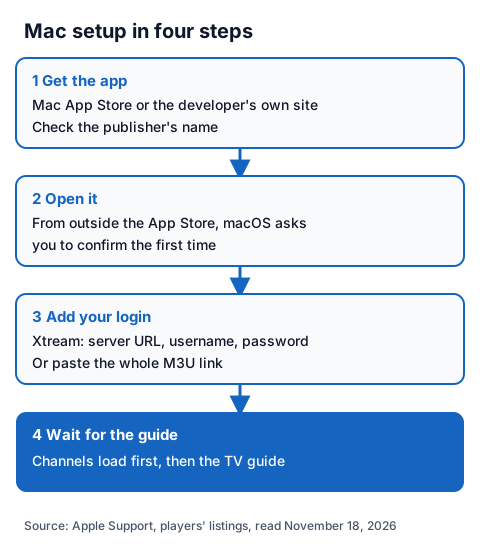
- Get the app. Search the Mac App Store by name and check the publisher, because several players share similar names. For IPTV Smarters Pro, use the download page on getiptvsmarters.com.
- Open it. Apple's support page on opening apps safely says that the first time you open an app from an identified developer downloaded outside the App Store, your Mac asks if you are sure. If macOS says the developer cannot be verified, Apple's advice is to check the App Store for an updated version or an alternative app.
- Add your login. For Xtream Codes, enter the server URL, username and password exactly as sent. For an M3U playlist, paste the whole link. Our page on typing in an Xtream login explains each field.
- Wait for the guide. Live channels appear first and the TV guide follows. If the guide stays empty, our page on adding an EPG source covers the fix.
How do you play an M3U link in VLC on a Mac?
Open VLC, choose File, then Open Network, paste your M3U link and confirm. VLC's macOS menu guide lists Open Network under the File menu, and its documentation says the network dialog takes the stream's address.
VideoLAN's download page lists VLC 3.0.24 for macOS as a 95 MB universal download that runs on Macs with Intel processors or Apple Silicon chips, and says it requires Mac OS X 10.7.5 or later. It is free and open source.
VLC suits a quick check that a link works. It has no Xtream Codes login screen, so ask your provider for the M3U version of your login. If playback stutters, VLC's wiki suggests ticking "Show more options" in the network dialog and raising the Caching value, the time in milliseconds VLC holds data before it starts playing. Our IPTV troubleshooting guide covers problems that come from the stream itself.
What does GSE SMART IPTV offer on a Mac?
GSE SMART IPTV PRO costs £5.99 on the UK Mac App Store, and the free GSE SMART IPTV LITE is, in the developer's words, its trial version. The Lite listing says both are the same except that the free version cannot export playlists.
Both listings name the same core features:
- Local and remote M3U playlists, and Xtream Codes API logins
- EPG in XMLTV format, with xml, zip and gz files allowed
- Recording live TV and an EPG timeline
- Parental control
- Automatic reconnection of live streams
The developer's own site, gsetechnology.co.uk, lists versions for iOS, Apple TV, Android and Mac OS X. Both Mac listings show version dates of May 13, 2022, so check the App Store page for anything newer before you pay.
Is a Mac App Store player safer than a download?
The Mac App Store is the route Apple calls the safest. Apple's support page says it reviews each App Store app before accepting it and signs it so it cannot be tampered with, and that outside the store macOS checks the developer's signature and, from macOS Catalina, requires notarisation.
Several players borrow well-known names. A Mac App Store search for "smarters" returned apps from at least five different publishers, none of them the developer behind getiptvsmarters.com. Check the publisher before installing, never use a download link from a forum, and never paste a free playlist found online into any player.
Which IPTV player works on a Windows PC?
Two of the same apps run on Windows. The IPTV Smarters Pro download page lists a Windows version of 125 MB, and VideoLAN says VLC 3.0.24 runs on every version of Windows from XP SP3 to Windows 11.
In VLC on Windows, VLC's documentation says to click Media, select Open Network Stream, enter the network URL and click Play. The IPTV Smarters Pro developer's Windows blog post tells you to download it from the developer's own page, install it and import a compatible M3U playlist. For a fuller desktop setup with add-ons, our guide to adding an IPTV playlist to Kodi walks through it.
Using an IG IPTV login on a Mac
An IG IPTV login works in any Mac player that accepts Xtream Codes or M3U. After payment, the login (server URL, username and password, or playlist and portal details) is sent on WhatsApp, and 24/7 WhatsApp support can help you enter it.
A standard plan streams on one screen at a time; the multi-room upgrade gives 2 to 4 simultaneous streams on one login. Picture quality goes up to 4K where the channel broadcasts it. UK plans start from £15 a month, and the 24-hour free trial with no card lets you check your Mac player and the channels you want first. The IG IPTV UK plans page lists every price.
Frequently Asked Questions
Is there a free Mac OS IPTV player?
Yes. VLC is free, IPTV Streamer Max is free on the Mac App Store, Lume is free for 1 playlist and 1 profile, and GSE SMART IPTV LITE is the free version of the £5.99 PRO app.
Does VLC play Xtream Codes logins on a Mac?
Not as a login. VLC opens a network address, so you paste the M3U link from your provider. For a username and password, use a player that lists Xtream Codes, such as GSE SMART IPTV PRO or Lume.
Does IPTV Smarters Pro work on macOS?
Its developer lists macOS among supported device families and offers a macOS download, version 1.2, on getiptvsmarters.com.
Do these Mac players include channels?
No. Lume, GSE SMART IPTV and IPTV Smarters Pro each say they provide no channels or playlists; you add your own login, and the provider's rights decide what you may lawfully watch. Our page on telling legal IPTV from illegal explains how to check.
Can I send IPTV from my Mac to the TV?
Some players list it. Lume names AirPlay, and its Pro tier adds Chromecast on iPhone and iPad. Our guide to IPTV on Chromecast explains casting.
Sources
- Apple App Store data, UK store, for "GSE SMART IPTV PRO" and "GSE SMART IPTV LITE" (droidvision), "Lume: IPTV Player, Xtream, M3U" (Philipp Bischoff) and "IPTV Streamer Max" (HOLD-APPS - FZCO), plus Mac App Store searches for "iptv" and "smarters", read through Apple's search and lookup service November 18, 2026.
- getiptvsmarters.com home, features and download pages, and its blog posts on macOS (October 30, 2026) and Windows (November 3, 2026), read November 18, 2026.
- getlume.org home and pricing, read November 18, 2026.
- gsetechnology.co.uk home page, read November 18, 2026.
- VideoLAN: "VLC for Mac OS X" and "VLC for Windows" download pages, VLC user documentation "Playing a network stream", and the VideoLAN wiki pages "macOS" and "Documentation:Open Media", read November 18, 2026.
- Apple Support: "Open apps safely on your Mac", read November 18, 2026.
- IG IPTV plan prices and terms (igiptv.tv), read November 18, 2026.
Couldn't read: the Apple App Store web pages (we used Apple's search and lookup data instead); www.iptvsmarters.com (the domain did not resolve); IPTV Smarters Pro's price, and whether its "API-based login" is labelled Xtream Codes in the Mac app; the UK price of Lume Pro (the developer shows US dollars).