IPTV on TV: Four Ways to Watch, Plus Phones and PCs
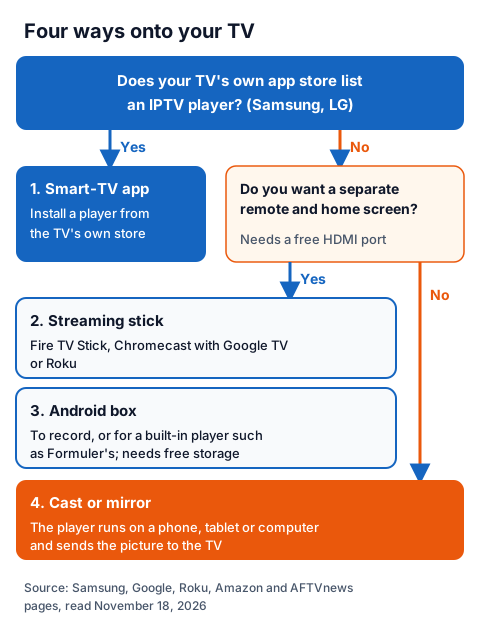
IPTV on TV works in four ways: install a player app on the smart TV itself, plug in a streaming stick such as a Fire TV Stick, connect an Android TV box, or cast or mirror from a phone, tablet or computer. Each route needs the same two things: a player app and the login your IPTV provider sends. Which one suits you depends on your TV's own app store, whether you want a separate remote, and whether you want to record.
This hub sits under our plain-words guide to how IPTV works and links a step-by-step page for every device below. Each device detail comes from the maker's help pages, the app stores and the developers' sites as read on November 18, 2026. The player apps themselves are compared in our guide to UK player apps by device, login and price.
How to watch IPTV on TV: which of the four ways fits?
Start with your TV's own app store. If it lists an IPTV player, install it there; if not, add a streaming stick or an Android box to a free HDMI port, or send the picture from a phone. The table sums up each route.
| Route | Where the player comes from | Good to know | Step-by-step guide |
|---|---|---|---|
| Smart-TV app | The TV's own store: Tizen on Samsung, webOS on LG | Several players link your playlist through the developer's website and charge their own fee after a test period | Samsung and LG player apps |
| Fire TV Stick | Amazon Appstore, or a Downloader code from the developer's own site | Fire TV models running Amazon's Vega OS cannot use Downloader | Downloader codes, used safely |
| Chromecast with Google TV | Google Play, from the Apps tab or search | Older Chromecasts have no app store and take a cast instead | Chromecast, model by model |
| Roku | Roku's Streaming Store | A search for "iptv" in the UK store returned 24 apps | What Roku allows |
| Android TV box | Google Play, or a built-in player on Formuler boxes | Recording needs a player that records, free storage and, for a different channel, a second stream | Android box players and recording |
| Linux box (BuzzTV L1) | BuzzTV's own Linux app only | No app store and no PVR recording, per BuzzTV's chart | The BuzzTV L1, spec by spec |
| Cast or mirror | A player on your phone, tablet or computer | Phone and TV must share the same Wi-Fi | See the section below |
Can you install IPTV on a Samsung or LG smart TV?
Yes, if the TV's own store lists a player. Samsung TVs use Tizen and LG TVs use webOS, and players such as Smart IPTV, SmartOne IPTV and Set IPTV are offered on both, according to their developers' sites.
These apps work differently from phone apps. Most show the TV's MAC address, and you upload your playlist against it on the developer's website; the developer then charges its own fee after a free test period, separate from your IPTV subscription. Our Samsung and LG smart TV guide compares the apps, and our IG IPTV page for Samsung smart TVs covers the plans for that screen. If your TV's store has no player, or it is an older model, a streaming stick is usually the simpler route.
Which streaming stick works for IPTV on a TV?
Any stick with an app store that lists IPTV players: a Fire TV Stick, a Chromecast with Google TV or a Roku. Each installs the player from its own store and gives you a remote and a home screen, so the TV's own software no longer matters.
Fire TV Stick. Players are listed in the Amazon Appstore; some developers instead publish a Downloader code on their own site. AFTVnews, which makes Downloader, lists the Fire TV models that run Amazon's Linux-based Vega OS, which cannot sideload or run Downloader at all. Our IG IPTV page for the Fire TV Stick covers setup and plans for that device.
Chromecast with Google TV. Google's help says to install apps from the Apps tab or by search, as on any Android TV device. The older Chromecast and Chromecast Ultra have no app store and only receive a cast.
Roku. Apps come from Roku's Streaming Store, where a search for "iptv" in the UK store returned 24 apps, several describing themselves as M3U or Xtream Codes players. Roku's help also describes mirroring, AirPlay and casting as other ways in.
When is an Android TV box the better choice?
When you want to record, or a built-in player. An Nvidia Shield or other Android TV box installs players from Google Play, and Formuler boxes come with their own MYTVOnline player; TiviMate's Google Play listing names recording, and Formuler says MYTVOnline3 records one programme while you watch another.
Recording needs three things: a player that records, free storage on the box, and, to record a different channel from the one you watch, a second simultaneous stream. Our Android box player guide covers storage and recording settings. Not every box runs Android: the BuzzTV L1 runs a customised Debian Linux with no app store, built to play one IPTV service through BuzzTV's own app.
How do you cast or mirror IPTV from a phone to a TV?
Run the player on your phone, tablet or computer and send the picture to the TV, with both on the same Wi-Fi. There are three ways, and which one works depends on the receiving device.
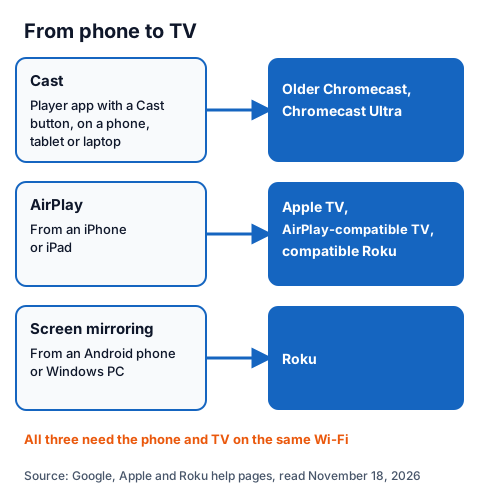
Casting needs a player with a Cast button, so check for it before you rely on this route; our Chromecast guide lists what to check if the button does not appear. AirPlay works from the player on an iPhone or iPad, as described in Apple's help. Mirroring shows your whole phone screen, so notifications appear on the TV too.
Can you watch IPTV on phones, tablets and computers?
Yes, with the same login. Phones, tablets and computers install a player from their own store and play on their own screen, or send the picture to a TV as above.
- iPhone and iPad: install a player from the App Store, choose M3U or Xtream Codes and type the login; our step-by-step guide for iPhone and iPad covers AirPlay too.
- Android phones and tablets: players install from Google Play, as on Android TV.
- Windows and Mac: on the UK Mac App Store, GSE SMART IPTV PRO costs £5.99, and VLC plays an M3U link for free; our Windows and Mac player guide compares the desktop apps.
Multi device IPTV: how does one login work on several screens?
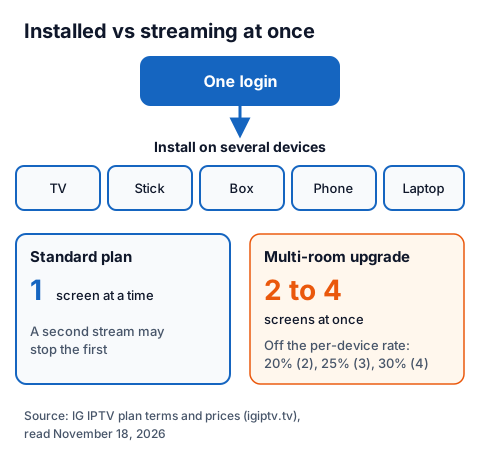
One login installs on as many devices as you like, but a standard plan plays on one screen at a time. To watch on two to four screens at once, you need a multi-room plan.
| How you watch | Screens playing at once | Plan |
|---|---|---|
| One person, or everyone watching the same thing | 1 | Standard plan |
| Two rooms watching different things | 2 | Multi-room, 20% off the per-device rate |
| Three rooms | 3 | Multi-room, 25% off |
| Four rooms | 4 | Multi-room, 30% off |
Count the people who watch different things at the same time, not the devices you own. On a standard plan, a second stream may stop the first. Our multi-room plans page prices 2, 3 or 4 streams on one login. If one screen stutters while another plays, our checklist for stopping IPTV buffering covers the home-network side, and our box troubleshooting guide covers the rest.
Using an IG IPTV login on your TV
An IG IPTV login works on every route above, in any player that accepts Xtream Codes, M3U or a portal. After payment, the login (server URL, username and password, or playlist and portal details) is sent on WhatsApp, and 24/7 WhatsApp support can help you enter it on each device.
Picture quality runs up to 4K where the channel broadcasts it. UK plans start from £15 a month with no contract, and the 24-hour free trial with no card lets you check your TV, your player and the channels you want before paying. IPTV technology is legal, and what decides a stream's legality is whether the seller holds the rights; our guide to whether IPTV is legal in the UK explains how to check.
Frequently Asked Questions
How do I watch IPTV on a TV that is not a smart TV?
Plug a streaming stick or an Android TV box into a free HDMI port, install a player from its store and enter your login. A Fire TV Stick, Chromecast with Google TV or Roku all install apps from their own stores.
Do I need a different app on each device?
Not always. Some players, such as MaxPlayer, list Android TV, Fire TV, Samsung and LG TVs and Apple devices, but no player runs everywhere. The login stays the same on every device; only the app may change.
Can two people watch on different TVs at once?
Only with a plan that allows two or more simultaneous streams. A standard plan plays on one screen at a time; the multi-room upgrade gives 2 to 4.
Does a new TV or stick need a new subscription?
No. The subscription is your login, not the hardware, so you install a player on the new device and enter the same details.
Sources
- Google help: "Install apps on Google TV" and "Chromecast and Google TV Streamer specifications", read November 18, 2026.
- Roku Support (UK): adding apps, screen mirroring, casting and AirPlay pages, and a Roku Streaming Store (UK) search for "iptv", read November 18, 2026.
- Apple Support (UK): "Use AirPlay to stream video or mirror the screen of your iPhone or iPad", and Mac App Store data for "GSE SMART IPTV PRO", read November 18, 2026.
- AFTVnews: "These are the Fire TVs that don't support Sideloading or Downloader due to Vega OS replacing Fire OS", read November 18, 2026.
- Samsung UK "Smart TV" (One UI Tizen) page, and the Smart IPTV, SmartOne IPTV and Set IPTV developer sites, read November 18, 2026.
- Google Play listings "TiviMate IPTV Player" and "MaxPlayer: IPTV M3U Player", UK store; formuler.tv MYTVOnline3 page; nvidia.com SHIELD TV pages; BuzzTV L1 Linux Player page and comparison chart; VideoLAN VLC download pages, read November 18, 2026.
- IG IPTV plan prices and terms (igiptv.tv), read November 18, 2026.
Couldn't read: the Samsung and LG app store listings (no readable web listing, so each player's availability is described from its developer's site); the Amazon Appstore search (did not load for our reader); whether every Roku Streaming Store player accepts an M3U or Xtream login (we did not install them).