9Xtream IPTV: What the Player Is and How to Set It Up
9Xtream IPTV is a player app, not a TV service: it plays an Xtream Codes login or an M3U playlist that you already have from a provider, and it ships with no channels. Its App Store listing, published by ZEEALPHA TECH (SMC-PRIVATE) LIMITED with 9xtream.net as the seller website, covers iPhone and Apple TV and says those versions need no licence purchase. The "9xtream code" people search for is usually either that Xtream Codes login or a Downloader code for a Fire TV install.
This guide is one entry in our comparison of IPTV player apps, where 9Xtream sits beside better-known players. Below: which 9Xtream listings point to the developer, what the code means, how to add a login, and what we could not check.
What is 9Xtream IPTV?
9Xtream is a video player for IPTV logins. It organises the live channels, films and series that your provider's login unlocks into menus with a TV guide, but the app itself contains nothing to watch.
The App Store listing says so in plain words: "9Xtream does not provide any media or content; users must add their own playlists or streaming URLs with proper permission." It also says the app is "intended for users who already have a Playlist and have permission to consume the content in the playlist", and that the developer has no affiliation with any playlist provider.
What the listing names as features:
- Xtream Codes API logins and M3U playlists
- Several playlists, themes and settings
- An EPG TV guide and parental control
- Live TV, films, series and catch-up, where the provider offers them
- Interface languages including English, Arabic, Portuguese, French and German
That makes 9Xtream the same kind of app as XCIPTV or IPTV Smarters: an empty front end that is only as useful as the login you put into it.
Which 9Xtream app is the real one?
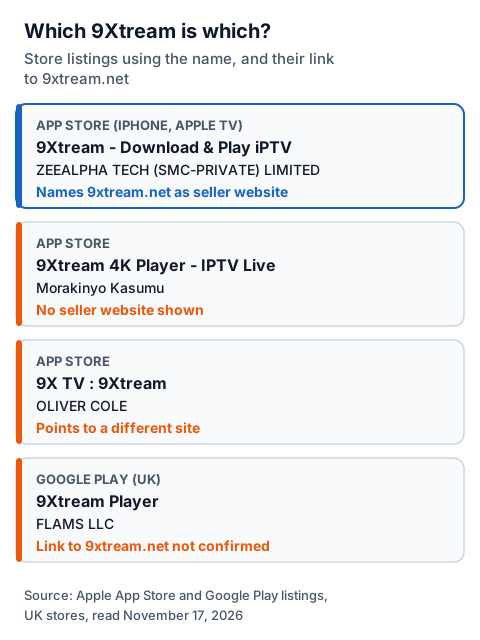
Only one listing we read links back to 9xtream.net: "9Xtream - Download & Play iPTV" on the App Store, published by ZEEALPHA TECH (SMC-PRIVATE) LIMITED. Other apps in the stores use the 9Xtream name under different publishers, so check the publisher before you install anything.
| Where | Listing name | Publisher | Links to 9xtream.net? |
|---|---|---|---|
| App Store (iPhone, Apple TV) | 9Xtream - Download & Play iPTV | ZEEALPHA TECH (SMC-PRIVATE) LIMITED | Yes, as the seller website |
| App Store | 9Xtream 4K Player - IPTV Live | Morakinyo Kasumu | No seller website shown |
| App Store | 9X TV : 9Xtream | OLIVER COLE | No; it points to a different site |
| Google Play (UK) | 9Xtream Player | FLAMS LLC | Not that we could confirm |
The developer-linked App Store version was at 7.1.0, last updated on September 1, 2025, when we read the listing on November 17, 2026. The Google Play listing we found under the name, "9Xtream Player" by FLAMS LLC, was updated on November 3, 2026; its page does not mention 9xtream.net, so we cannot say whether it comes from the same developer.
For Fire TV, the address firetv.9xtream.net returned an app file directly rather than a web page when we fetched it. We could not load Amazon's Appstore search, so we cannot confirm whether 9Xtream is listed there. The developer's main site, 9xtream.net, showed a browser check that blocked our reader, so its install pages and prices are not described here.
What is the 9xtream code?
The "9xtream code", often searched as "9xtream code iptv", means one of two things. Most often it is your Xtream Codes login from your provider: a server URL, a username and a password. Sometimes it means a short Downloader code that Fire TV owners type to fetch the app.
The Xtream Codes login. This is what your IPTV provider sends you after you pay or start a trial. 9Xtream asks for the same three values as any Xtream Codes player, and our guide to the three Xtream login fields explains where each one comes from and the usual typing mistakes.
A Downloader code. Downloader is a free Fire TV app that fetches a file from a short code or address. Because we could not read 9xtream.net today, we do not publish a code for it. Codes copied from lists on other sites can point anywhere; take one only from the developer's own site, and check that the app you end up with names the same publisher.
How do you add your login to 9Xtream?
You choose Xtream Codes or M3U, enter the details exactly as your provider sent them, and wait for the channel list to load. Xtream Codes is usually the better choice, because it brings in films, series and the TV guide with the channels.
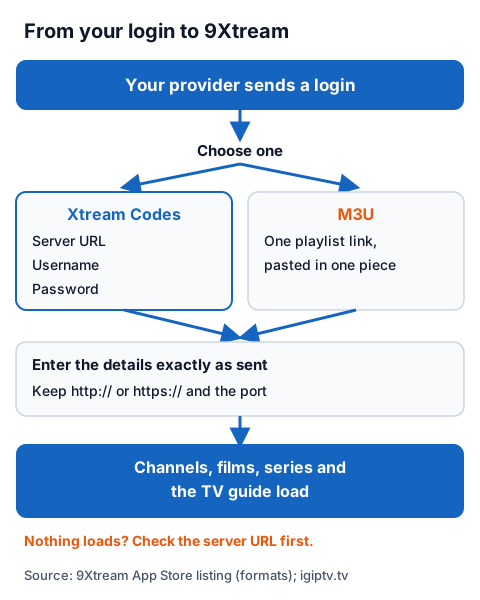
- Open 9Xtream and choose to add a playlist.
- Pick Xtream Codes if you have a server URL, username and password, or M3U if you have a single playlist link.
- For Xtream Codes, type the server URL with its
http://orhttps://and the port number if there is one, then the username and password. - For M3U, paste the whole link in one piece.
- Save, and give the app time to load the channel list and the TV guide.
Menu names change between versions, so follow the words on your screen rather than a fixed path. If the list never loads, check each character of the server URL first; a missing port or a stray space is the usual cause. Our IG IPTV page for the Fire TV Stick covers the device side, and the setup guide for every device includes Apple TV.
How much does 9Xtream cost?
On iPhone and Apple TV, the App Store listing says 9Xtream is free and that the developer does not require users to buy an app licence "by any means" for the iOS and Apple TV versions. We could not read the developer's prices for Android or Fire TV.
That sentence on the App Store listing only covers iOS and Apple TV, which suggests the other versions may work differently. If the app asks you to pay on Android or Fire TV, read the price on screen, pay only through the app or the developer's own site, and keep the receipt. The app's price is separate from what your IPTV provider charges, which our breakdown of UK IPTV prices by plan length sets out.
Is 9Xtream legal and safe to use?
A player app is legal software; what you load into it decides the legal question. IPTV technology is legal, and a stream is lawful only when the seller holds the rights to what it streams. The 9Xtream listing puts that responsibility on the user.
Our guide to IPTV and the law explains how to tell a seller with rights from one without them. For safety, the steps that matter most are simple:
- Install from the App Store, or for Fire TV from the developer's own address, never from an APK mirror.
- Check the publisher name, because several apps share the 9Xtream name.
- Never paste a free playlist or M3U link found on a forum; you do not know who runs it or what it carries.
Using 9Xtream with an IG IPTV login
An IG IPTV login is sent on WhatsApp after payment, as a server URL, username and password, or as playlist details. Those are the two formats the 9Xtream listing names, so you can try the app with a free trial login before you pay.
The free IG IPTV trial needs no card. Use it to check, on your own device and inside 9Xtream, that the channels you care about play. If they do, the IG IPTV UK prices start at £15 a month, with 3, 6 and 12-month plans at £25, £35 and £55, and the 12-month plan includes 2 free months. Picture quality goes up to 4K where the channel broadcasts it.
A standard plan streams on one screen at a time, so if 9Xtream shows an error while another device is watching, see IG IPTV's multi-room plans for 2 to 4 screens.
Frequently Asked Questions
Is 9Xtream IPTV free?
On iPhone and Apple TV, yes: the App Store listing says those versions need no licence purchase. We could not read the developer's prices for Android or Fire TV, so check the price shown in the app before paying.
Does 9Xtream come with channels?
No. The App Store listing says 9Xtream does not provide any media or content. You add a login or playlist from a provider, and the provider's rights decide what you can lawfully watch.
Is 9Xtream on the Amazon Appstore?
We could not confirm it. Amazon's Appstore search did not load for us, and the developer's Fire TV address returned an app file rather than a store page.
What is a 9xtream code?
Usually your Xtream Codes login: a server URL, username and password from your provider. It can also mean a Downloader code for a Fire TV install; take that only from the developer's own site.
Which 9Xtream app should I download?
The App Store listing that names 9xtream.net as its seller website is published by ZEEALPHA TECH (SMC-PRIVATE) LIMITED. Other apps use the 9Xtream name under different publishers, so check the publisher before you install.
Sources
- Apple App Store listing "9Xtream - Download & Play iPTV" (ZEEALPHA TECH (SMC-PRIVATE) LIMITED), UK store, read November 17, 2026.
- Apple App Store listings "9Xtream 4K Player - IPTV Live" and "9X TV : 9Xtream", UK store, read November 17, 2026.
- Google Play listing "9Xtream Player" (FLAMS LLC), UK store, read November 17, 2026.
- firetv.9xtream.net, fetched November 17, 2026 (returned an app file, not a page).
- IG IPTV plan prices and terms (igiptv.tv), read November 17, 2026.
Couldn't read: 9xtream.net (a browser check blocked our reader, so its install steps, codes and Android or Fire TV prices are not described); Amazon Appstore search (did not load).