UHF IPTV Player on Firestick: Is There a Fire TV Version?
There is no UHF IPTV player for Firestick from its developer. Short Wavelength Applications SL, which makes UHF, names iPhone, iPad, Apple TV and Mac on getuhf.com, and the app is on Apple's App Store. We found no UHF listing from that developer on Google Play, and no Fire TV download on its site. On a Fire TV Stick, install another player from the Amazon Appstore and enter the same M3U or Xtream login you would use in UHF.
This page is part of our guide to IPTV player apps. Everything below comes from the developer's site, the App Store and Google Play as we read them on November 18, 2026: where UHF runs, why a "UHF for Firestick" download is a warning sign, and how to get the same login onto a Fire TV.
Is there a UHF IPTV player for Firestick?
No, not from the developer. getuhf.com describes UHF as designed for iPhone, iPad, Apple TV and Mac, and its download buttons lead to Apple's App Store. None of the pages we read there, including the blog index, mentions Amazon Fire TV, Android or Google TV.
| Platform | What we found on November 18, 2026 |
|---|---|
| iPhone and iPad | Listed on getuhf.com; App Store (UK) version 2.7.0, free, iOS 16.0 or later |
| Apple TV | Listed on getuhf.com; the developer's blog has a guide to the tvOS remote |
| Mac | Listed on getuhf.com |
| Amazon Fire TV | Not listed by the developer |
| Android and Google TV | No listing from Short Wavelength Applications SL in a Google Play (UK) search; Google Play's developer page for that name returned "not found" |
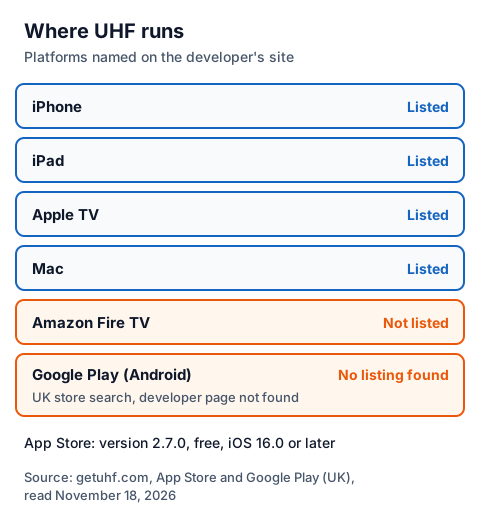
We could not open the Amazon Appstore search, which did not load for our reader, so we cannot rule out a listing there from someone else. Since the developer itself names only Apple devices, treat any Fire TV app called "UHF" as a different product until its publisher says otherwise.
Why avoid a "UHF APK for Firestick" download?
Because it would not come from the developer. Short Wavelength Applications SL distributes UHF through the App Store only, so any Android file carrying the name was built or repackaged by someone else, and you cannot tell what it does with the logins you type into it.
The developer's blog also warns about websites selling "UHF IPTV" subscriptions. It calls them scams and says UHF is a media player that does not provide, host or sell any content. The site footer says the same: users are responsible for having the legal right to whatever they add. We do not link APK mirrors or sideloading sites; every player named on this page installs from a device's own store.
Can you cast UHF from an iPhone to a Fire TV?
We could not confirm it. UHF's App Store listing names AirPlay and Chromecast as its two ways to send a stream to a TV. Whether your Fire TV model accepts either depends on Amazon, and we could not read Amazon's help pages on it today, so we do not suggest casting as a route.
If you already own an Apple TV or a Chromecast, those are the receivers UHF names. Our page on getting IPTV onto a Chromecast explains how casting works from a phone app.
How do you set up UHF on an Apple device?
Install UHF from the App Store, open it and add your playlist. The App Store listing names five source types: M3U8, Xtream, Plex, Jellyfin and Emby. For an IPTV service you will use one of the first two.
- Install UHF. Search the App Store for "UHF - Love your IPTV Player" and check the publisher reads Short Wavelength Applications SL.
- Add your playlist. Choose Xtream and enter the server URL, username and password, or choose M3U8 and paste the playlist link.
- Wait for the guide. UHF's listing describes a TV guide, catch-up where your provider offers it, and search across all your playlists.
- Open it on your other Apple devices. Sync between devices is part of the optional Pro plan.
What the free tier and Pro tier include, according to the developer's site and the App Store listing:
| Tier | What the developer lists |
|---|---|
| Free | All core playback features: search, TV guide, catch-up, picture-in-picture, downloads, AirPlay and Chromecast, Trakt, favourites, PIN lock on categories |
| Pro (optional) | Cross-device sync, no ads or watermarks, unlimited TV guide navigation, Family Sharing, reminders |
The developer's site shows Pro prices in US dollars with a monthly and an annual option; we could not read a clear UK price, so check it in the App Store before you subscribe. The developer's support page says it does not answer emails about content problems such as guides not loading or a playlist failing; those go to your IPTV provider.
What can you use on a Fire TV Stick instead?
Any player whose developer distributes it through the Amazon Appstore and accepts an M3U link or Xtream login. The steps are the same whichever player you choose; only the menu names change.
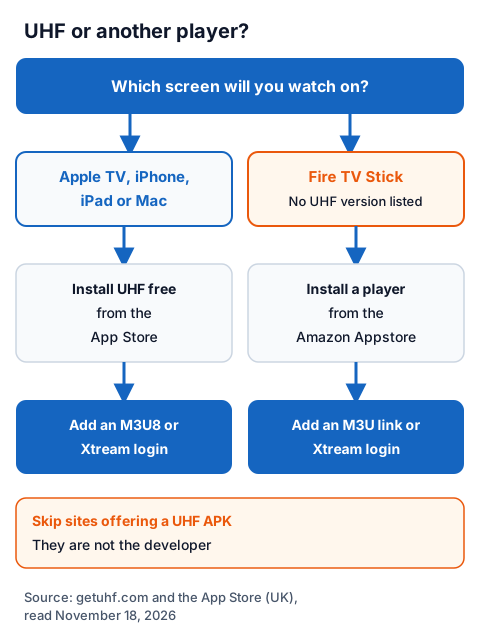
One example we could check today is MaxPlayer. Its Fire TV page on maxplayer.tv gives four steps: open the Amazon Appstore on your Fire TV, search for "MaxPlayer", select Get or Download, then open the app and register. It lists a Fire TV Stick of the 2nd generation or newer, or a Fire TV Cube, and it needs a MaxPlayer subscription after the trial; our MaxPlayer guide covers its prices.
Whatever you install, the login part works like UHF's:
- Choose the login type your provider sent: Xtream (server URL, username, password) or M3U (one playlist link).
- Type each value exactly, including
http://and any port number in the server URL. - Let the channel list and TV guide load, then try a few channels.
Our step-by-step guide to entering an Xtream login shows where each value goes, and the IG IPTV Fire TV Stick page sets up a player on the device itself. If you also use an Android TV box, our guide to IPTV players for Android TV boxes compares more apps.
Using an IG IPTV login in UHF or on a Fire TV
An IG IPTV login works in UHF and in Fire TV players that accept Xtream or M3U. After payment, the login (server URL, username and password, or playlist details) is sent on WhatsApp, and 24/7 WhatsApp support can help you enter it.
Start with the 24-hour trial login, which needs no card, and check in your own player that the channels you care about play on your screen. The UK plan prices start at £15 a month, with 3, 6 and 12-month plans at £25, £35 and £55; the 12-month plan includes 2 free months. A standard plan streams on one screen at a time, and the multi-room upgrade gives 2 to 4 streams on one login. Picture quality runs up to 4K where the channel broadcasts it.
Frequently Asked Questions
Can I install UHF on a Fire TV Stick?
Not from the developer. Short Wavelength Applications SL lists iPhone, iPad, Apple TV and Mac only, and distributes UHF through Apple's App Store. On a Fire TV Stick, use another player from the Amazon Appstore with the same login.
Is UHF free?
The App Store listing shows UHF as free, and the developer says all core playback features are in the free tier. An optional Pro plan adds cross-device sync, no ads, unlimited guide navigation, Family Sharing and reminders.
Does UHF come with channels?
No. The developer says UHF is a media player that does not provide, host or distribute content, and its blog warns about sites selling "UHF IPTV" subscriptions. You add a login from a provider, and that provider's rights decide what you can lawfully watch; our page on whether IPTV is legal explains how to check.
Which logins does UHF accept?
The App Store listing names M3U8, Xtream, Plex, Jellyfin and Emby. An IPTV service usually sends either an Xtream login or an M3U link.
Is there a UHF app on Google Play?
We found none from Short Wavelength Applications SL in a Google Play (UK) search on November 18, 2026, and Google Play's developer page for that name returned "not found".
Sources
- getuhf.com home page, support page, blog index and legal page, read November 18, 2026.
- Apple App Store data for "UHF - Love your IPTV Player" (Short Wavelength Applications SL), UK store, read through Apple's lookup service November 18, 2026.
- Google Play (UK) search for "UHF Love your IPTV" and developer page for "Short Wavelength Applications SL", read November 18, 2026.
- maxplayer.tv Amazon Fire TV page, read November 18, 2026.
- IG IPTV plan prices and terms (igiptv.tv), read November 18, 2026.
Couldn't read: the Amazon Appstore search (did not load for our reader); Amazon's Fire TV help pages on AirPlay and casting; the answers in getuhf.com's FAQ (they load only in a browser); a UK price for UHF Pro (the developer's site shows US dollars only).