Smart Xtream IPTV Player: Which App It Is and How to Log In
A Smart Xtream IPTV player is not one app: several players on Google Play use "Smart" and "Xtream" in their names, from different publishers. In the UK store on November 18, 2026, two were called "Smart IPTV Xtream Player" (Blitz Interactive and HFR Tech LLC) and one "Smart Xtream AI: IPTV Player" (ByBora Apps). Apple's UK App Store had no app with that exact name. All of them are empty players: you log in with the server URL, username and password your provider sends.

This guide belongs to our overview of IPTV player apps. Below: which listing is which, what each one says it accepts, how to type an Xtream login on a smart TV or streaming device without mistakes, and what we could not verify. Every app detail comes from its store listing or developer page as we read it today. If logins and playlists are new to you, start with IPTV explained in plain words.
Which app is the "Smart Xtream IPTV Player"?
There is no single one. Three Google Play (UK) listings come closest to the name, and each has a different publisher, price model and list of accepted logins. Check the publisher line on the listing before you install, because the name alone does not tell them apart.
| Google Play (UK) listing | Publisher shown | Downloads | Logins named | Price shown | Last updated |
|---|---|---|---|---|---|
| Smart IPTV Xtream Player | Blitz Interactive | 100k+ | Xtream, M3U, M3U8, direct links, local files | Contains ads; in-app purchases | 14 October 2026 |
| Smart IPTV Xtream Player | HFR Tech LLC | 10k+ | M3U and Xtream (short description) | Not stated in the description | 16 July 2025 |
| Smart Xtream AI: IPTV Player | ByBora Apps | 10k+ | Xtream only (username and password) | 7-day free trial, then a membership; in-app purchases | 24 October 2026 |
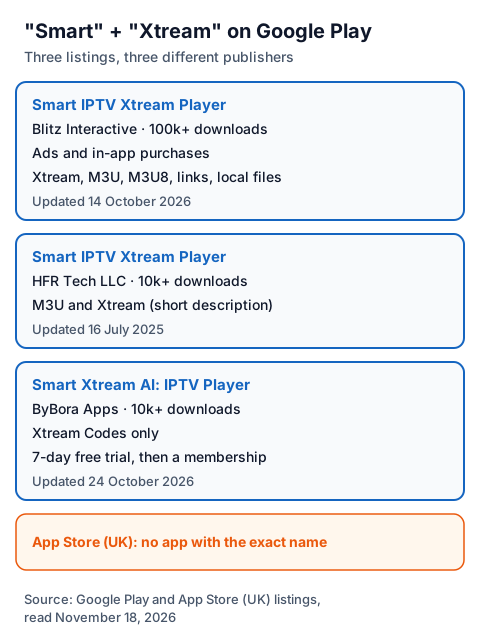
All three are rated PEGI 3 on Google Play. Apple's UK App Store search for "smart xtream iptv player" returned players with similar words, such as "IPTV Smart Player - Live TV" and "IPTV - Xtream Player", but none with the exact name.
What does each listing say about itself?
Each listing says the app provides no channels. Beyond that, they differ in what they accept and how they charge.
Smart IPTV Xtream Player (Blitz Interactive). The listing names Xtream Codes logins for live TV, films and series, M3U and M3U8 links or files, direct links and local files, plus parental control, custom playlists and favourites. Its notes say the app "does not provide any IPTV content" and that users add their own playlists. The store labels it "Contains ads", while its description lists ad-free streaming; we could not check which applies to the version you get.
Smart IPTV Xtream Player (HFR Tech LLC). The full description is short and names no login types; its short description reads "M3U & Xtream". It was last updated in July 2025, the oldest of the three.
Smart Xtream AI: IPTV Player (ByBora Apps). The listing describes a player for phones, tablets and Android TV that takes an Xtream Codes login only (username and password), with a TV guide, reminders, catch-up where the provider offers it, subtitle and audio track choice, and 4K and HDR playback when the device supports it. It says passwords are stored encrypted on the device and that adult categories are hidden by default. After a 7-day free trial, the listing says a monthly, yearly or lifetime membership is needed, tied to your Google account. It also says the app "does NOT provide or sell any channels".
We did not install these apps, so we cannot say how they behave beyond what their listings state. Our guide to IPTV players for Android TV boxes covers more players on the same devices.
What is in an Xtream login?
Three values: a server URL, a username and a password. The player uses them to fetch your live channels, films, series and TV guide from the provider's server, so you never paste a long playlist link.
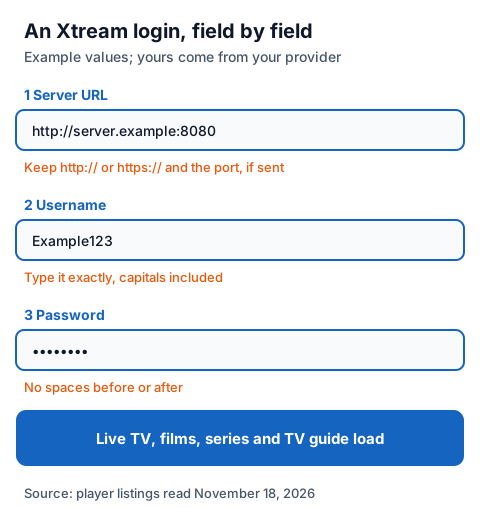
A server URL usually looks like http://server.example:8080: the protocol, an address and sometimes a port number after the colon. Keep all of it, and keep https:// if that is what you were sent. Type the username exactly, capitals included (Example123 is not the same as example123), and check that no space slipped in before or after the password. Some players also accept the same account as an M3U link; if you have one, the player will ask for a single URL instead of three fields.
How do you enter an Xtream login on a smart TV or streaming device?
Install a player from your device's own store, choose the Xtream (sometimes "Xtream Codes API") login option, and type the three values. The store depends on the device.
| Device | Where players come from | Example read today |
|---|---|---|
| Android TV, Google TV, Android box | Google Play | Smart Xtream AI's listing names Android TV and TV boxes |
| Amazon Fire TV Stick, Fire TV Cube | Amazon Appstore | MaxPlayer's Fire TV page: Fire TV Stick 2nd generation or newer, or Fire TV Cube |
| Samsung smart TV | Samsung's app store | MaxPlayer's Samsung page: Tizen TVs from 2017 or newer |
| LG smart TV | LG Content Store | MaxPlayer's LG page: webOS 4.0 or higher |
| Apple TV | App Store | UHF's App Store listing names Xtream logins |
The steps are the same on each:
- Install the player from the store above and open it.
- Pick the Xtream option on the add-playlist or login screen.
- Type the server URL, username and password exactly as sent. On a TV, the on-screen keyboard makes typos easy, so check each field before you confirm.
- Wait for the channels and guide to load, then try a few channels in different categories.
Samsung and LG TVs have their own app stores and limits; our guide to IPTV on Samsung and LG smart TVs covers which players are offered there. For a Fire TV, see the IG IPTV Fire TV Stick setup page. If you are weighing up a specific player, our pages on MaxPlayer and the UHF player on Apple devices and Fire TV describe them from their developers' pages.
Why does an Xtream login fail?
Most failures come from the values typed, not from the app. Work through these checks before you contact your provider:
| What you see | What to check |
|---|---|
| Login refused straight away | Username and password typed exactly, capitals included, no spaces |
| Cannot reach the server | Server URL complete: http:// or https://, address and port number if one was sent |
| Channels load but the guide is empty | Give it time, then see our guide to adding an EPG source |
| Worked before, now refused | The account may have ended or another screen may be using it |
Our IPTV problem-solving guide goes through playback problems once you are logged in.
Is a Smart Xtream IPTV player legal?
A player is legal software; what you load into it decides the legal question. IPTV technology is legal, and a stream is lawful only when the seller holds the rights to what it streams. The ByBora listing asks users to watch only content they are legally authorised to watch, and the Blitz listing says the app is compatible with legal IPTV services only. Our page on whether IPTV is legal explains how to check a seller. Install players only from your device's store, and never paste a free playlist found on a forum.
Using an IG IPTV login in a Smart Xtream player
An IG IPTV login is sent on WhatsApp after payment, as a server URL, username and password, or as playlist details, so it fits any player above that accepts Xtream or M3U. 24/7 WhatsApp support can help you type it in.
Test it first with the 24-hour free trial, which needs no card, in the player you plan to keep. The UK plan prices start at £15 a month, with 3, 6 and 12-month plans at £25, £35 and £55; the 12-month plan includes 2 free months. A standard plan streams on one screen at a time, and the multi-room upgrade gives 2 to 4 streams on one login.
Frequently Asked Questions
Is Smart Xtream IPTV Player free?
It depends on the listing. Blitz Interactive's "Smart IPTV Xtream Player" is labelled "Contains ads" with in-app purchases. ByBora Apps' "Smart Xtream AI" gives 7 days free, then needs a monthly, yearly or lifetime membership.
Does a Smart Xtream IPTV player come with channels?
No. The listings we read say the apps provide no IPTV content. You add a login from a provider, and that provider's rights decide what you can lawfully watch.
Is Smart Xtream IPTV Player on the iPhone or Apple TV?
Apple's UK App Store had no app with that exact name on November 18, 2026. Other players there accept Xtream logins, such as UHF, whose listing names Xtream.
What do I need to log in with Xtream?
A server URL, a username and a password from your IPTV provider. Type them exactly, including http:// or https:// and any port number in the server URL.
Can I use one Xtream login on my TV and phone?
You can install it on several devices, but a standard IG IPTV plan streams on one screen at a time. Watching on two at once needs the multi-room upgrade.
Sources
- Google Play (UK) search for "smart xtream iptv player", read November 18, 2026.
- Google Play (UK) listings: "Smart IPTV Xtream Player" (Blitz Interactive), "Smart IPTV Xtream Player" (HFR Tech LLC) and "Smart Xtream AI: IPTV Player" (ByBora Apps), read November 18, 2026.
- Apple App Store (UK) search for "smart xtream iptv player" and data for "UHF - Love your IPTV Player", read through Apple's search and lookup services November 18, 2026.
- maxplayer.tv platform pages for Amazon Fire TV, Samsung Tizen and LG webOS, read November 18, 2026.
- IG IPTV plan prices and terms (igiptv.tv), read November 18, 2026.
Couldn't read: the Amazon Appstore, Samsung and LG stores (not readable from a browser, so we do not know whether any app named "Smart Xtream" is listed there); in-app prices for the three Google Play listings (not shown on the listing pages); the apps' behaviour on a real device (we did not install them).