iMPlayer: What the IPTV Player Is, What It Costs and How to Set It Up
iMPlayer is a media player app for IPTV playlists you already have, published by the developer HzApps. Its UK App Store listing, iMPlayer IPTV Player, runs on iPhone, iPad, Apple TV, Mac and Apple Vision, is free to install and shows one in-app purchase, a Premium Subscription at £24.99. Two Google Play listings, iMPlayer TV IPTV Player and a separate mobile app, each show 500k+ downloads. The App Store describes support for m3u files, catch-up, films and series, and a full TV guide.
This guide is part of our comparison of IPTV player apps. Below: what the iMPlayer IPTV app does, which listing to install on which device, what it costs, how to set it up, and what we could not check.
What is iMPlayer?
iMPlayer is a front end for an IPTV source: you add a playlist from your provider, and the app sorts its live channels, films and series into menus with a TV guide. The listings describe a player for "your personal media sources", not a TV service.
The App Store description says the app is "designed to support m3u files and certain compatible platforms" and lists:
- Catch-up support, for programmes your source keeps available
- Films and series on demand (VOD)
- A full EPG (electronic programme guide)
- A customisable interface
The latest App Store release notes, for version 2.20.4, add casting to Chromecast from iPhone and iPad, picture-in-picture while you browse the app, playlist re-ordering, a video decoder setting, Simkl integration and a sign-in for your iMPlayer account by QR code on Apple TV or in the browser on iPhone and iPad. The app is offered in English and 28 other languages.
None of the three listings we read says in so many words that iMPlayer includes no channels, but none sells any either: every description is about playing sources you add. Treat it the same way as XCIPTV or IPTV Smarters: an empty player that is only as useful, and as lawful, as the playlist you put in it.
Which iMPlayer app should you install?
Install the listing that matches your device. On Apple devices that is iMPlayer IPTV Player on the App Store; on Android there are two Google Play listings, one named for TV and one for mobile. All three point to the same developer.
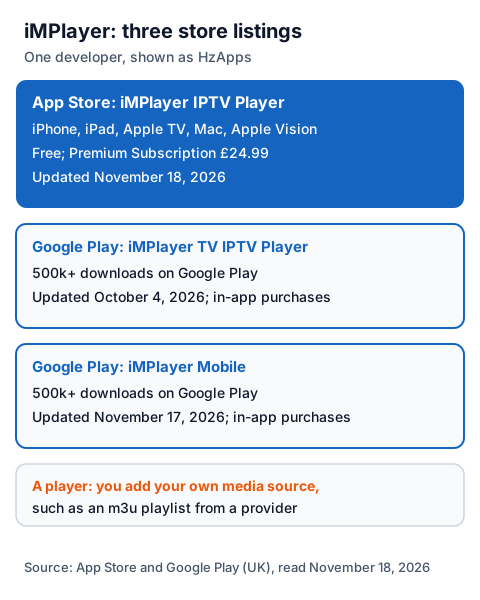
| UK store listing | Devices | Price shown | Last update shown |
|---|---|---|---|
| iMPlayer IPTV Player (App Store) | iPhone, iPad, Apple TV, Mac, Apple Vision | Free; Premium Subscription £24.99 | November 18, 2026 (version 2.20.4) |
| iMPlayer TV IPTV Player (Google Play) | Android | Free; in-app purchases | October 4, 2026 |
| iMPlayer Mobile (Google Play) | Android | Free; in-app purchases | November 17, 2026 |
The App Store app is published under the company name Horizon Applications LLC, with HzApps named as the developer; both Google Play listings show HzApps and link to implayer.tv. The App Store version was first released on January 7, 2025. We could not load the Amazon Appstore, so we cannot confirm whether iMPlayer is listed there for Fire TV; check the store on your own device, and never install a copy from a mirror site.
How much does iMPlayer cost?
All three listings are free to install and show in-app purchases. The UK App Store names one: a Premium Subscription at £24.99. The listing does not show the billing period or which features Premium unlocks, and the Google Play pages do not show prices at all.
| Where | Install | Paid option shown |
|---|---|---|
| App Store (UK) | Free | Premium Subscription, £24.99; period not shown |
| Google Play, TV listing | Free | In-app purchases; prices not shown |
| Google Play, mobile listing | Free | In-app purchases; prices not shown |
The developer's site, implayer.tv, refused our reader, so we could not see a price list, a trial or the terms behind the subscription. Read the purchase screen inside the app, note whether it renews, and pay only through the store. The app fee pays for the player only; your IPTV provider charges separately, and our monthly IPTV price breakdown adds the two together.
What do you need before you set up iMPlayer?
You need the app from your device's store and a playlist from an IPTV provider; the App Store listing names m3u files. Apple TV needs tvOS 18.0 or later and iPhone needs iOS 18.0 or later; a Mac needs macOS 26.0 and an M1 chip or later.
| Apple device | Requirement on the UK App Store |
|---|---|
| iPhone | iOS 18.0 or later |
| iPad | iPadOS 18.0 or later |
| Apple TV | tvOS 18.0 or later |
| Mac | macOS 26.0 or later, Apple M1 chip or later |
| Apple Vision | visionOS 2.0 or later |
The Google Play pages we read do not list a minimum Android version in their text. Our IPTV setup guide for each device, iPhone and iPad guide and Android TV box guide cover the device side.
How do you set up iMPlayer?
Install the app from your device's store, sign in if you use an iMPlayer account, add your m3u playlist, and wait for the channels and TV guide to load. The steps below follow the App Store listing and release notes.
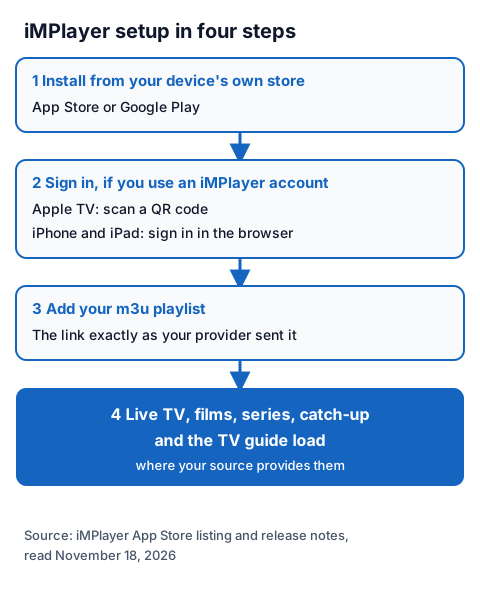
- Install iMPlayer from the App Store or Google Play, and check that the developer shown is HzApps.
- Open the app. If you use an iMPlayer account, the release notes say Apple TV signs in by QR code and iPhone or iPad through the browser.
- Add your playlist: paste the m3u link exactly as your provider sent it, in one piece.
- Wait while live channels, films, series and the TV guide load. Catch-up appears only where your source provides it.
Menu names change between versions, so follow the words on your screen. If the list never loads, check the link for a missing character or a stray space first. Our EPG explainer helps when the guide stays empty, and our page on entering a server URL, username and password helps if your provider sends a server URL, username and password instead of a link.
Is iMPlayer legal and safe to use?
A player app is legal software; what you load into it decides the legal question. IPTV technology is legal, and a stream is lawful only when the seller holds the rights to what it streams. iMPlayer's listings sell an app, not channels.
Our guide to whether IPTV is legal in the UK explains how to tell a seller with rights from one without them. Install iMPlayer only from the App Store or Google Play, check the developer name, and never paste a free playlist or M3U link found on a forum or video page.
Using iMPlayer with an IG IPTV login
An IG IPTV login is sent on WhatsApp after payment, as a server URL, username and password, or as playlist details. iMPlayer's App Store listing names m3u files, so ask for the playlist details and paste that link into the app.
Try the pairing first with our 24-hour trial, which needs no card: load the trial playlist into iMPlayer on your own TV or phone and check that the channels you care about play. If they do, the UK subscription prices start at £15 a month, with 3, 6 and 12-month plans at £25, £35 and £55, and the 12-month plan includes 2 free months. Picture quality goes up to 4K where the channel broadcasts it.
A standard plan streams on one screen at a time, even if iMPlayer is installed on several devices; our page on IG IPTV multi-room plans explains the upgrade. For other Apple players, see Flex IPTV and Snappier IPTV.
Frequently Asked Questions
Is iMPlayer free?
All three listings are free to install. The UK App Store shows a Premium Subscription at £24.99 as an in-app purchase, without the billing period; the Google Play listings show in-app purchases without prices.
Does iMPlayer come with channels?
No listing we read sells channels. The App Store describes a media player for m3u files and compatible platforms, so you add a playlist from a provider, and the provider's rights decide what you can lawfully watch.
Is iMPlayer IPTV on Android?
Yes. Google Play has two listings from HzApps, iMPlayer TV IPTV Player and a mobile version, each with 500k+ downloads.
Which Apple TV does iMPlayer need?
The UK App Store lists tvOS 18.0 or later for Apple TV. iPhone needs iOS 18.0 or later.
Who makes iMPlayer?
The App Store lists Horizon Applications LLC as the provider with HzApps as the developer, and both Google Play listings show HzApps with the website implayer.tv.
Sources
- Apple App Store listing "iMPlayer IPTV Player" (Horizon Applications LLC, HzApps), UK store: description, compatibility, in-app purchases and version 2.20.4 release notes, read November 18, 2026, plus Apple's lookup data the same day.
- Google Play listings "iMPlayer TV IPTV Player" and the iMPlayer mobile app (HzApps), UK store, read November 18, 2026.
- Google Play search for "implayer", UK store, read November 18, 2026.
- IG IPTV plan prices and terms (igiptv.tv), read November 18, 2026.
Couldn't read: implayer.tv (it refused our reader, so the developer's own prices, trial, terms and install pages are not described); Amazon Appstore search (did not load, so a Fire TV listing is unconfirmed); the billing period and features of the £24.99 Premium Subscription (not shown on the App Store page).