IPTV Downloader Codes for Firestick: How to Use One Safely
IPTV downloader codes for Firestick are numbers from the AFTVnews URL shortener: type one into the free Downloader app and it opens the web address behind it, usually an app's installation file. A code carries no approval from Amazon or anyone else, so only use one that a player's developer publishes on its own website, and check where it leads before you type it. Fire TV models that run Amazon's newer Vega OS cannot use Downloader or install outside apps at all.
This page is part of our guide to watching IPTV on every device. Setting up a stick from scratch? The Fire TV Stick plans and setup page covers the whole process; this page covers the codes.
What is a Downloader code?
A Downloader code is a short number that stands in for a long web address. The AFTVnews URL Shortener turns any address into "a short numeric code, like 12345", plus a matching short link such as aftv.news/12345, according to the shortener's own home page. You type the number into Downloader instead of spelling out a full address with a remote.
Downloader itself is an app made by AFTVnews.com. Its Amazon UK listing, read on November 17, 2026, shows it free to download, first available on Amazon.co.uk on November 11, 2016, at version 2.0.4, and needing Android 5.1 or later. The same app is on Google Play for Android TV, Google TV, phones and tablets, where the listing marks it "Contains ads" and "In-app purchases".
The listing says it downloads files such as app installation files (APKs) from a web address, a website or a short code, then opens, installs or deletes them. Its documentation adds that "APK Auto-Install" is switched on by default, so an app file starts installing as soon as it has downloaded.
A code does not vet the file, Amazon does not issue it, and it says nothing about who made the app.
Do Downloader codes expire or change?
Codes are not deleted for age, but they can be switched off, and the file they lead to can change. The shortener's FAQ, read today, says codes "may be disabled in response to copyright complaints, other abuse, or violations of our terms", and that no address has yet been deleted for age or low use, though that "may change in the future".
| What the shortener's FAQ says | What it means for you |
|---|---|
| Codes may be disabled after copyright complaints or abuse | A code in an old list may simply stop working |
| The destination of a code cannot be edited | The code always opens the same address, but whoever runs that address can replace the file there |
| One long address gets one code, not several | If a developer moves its download, it needs a new code |
| Submitted addresses are not private, and codes use only numbers | Anyone can create a code, and anyone can type random numbers to find addresses |
So a code is only as trustworthy as whoever submitted the address, which is why this page does not publish a code list, apart from one code a developer publishes itself, covered below.
Which Fire TVs can still use Downloader?
Only Fire TVs running Fire OS can. AFTVnews reported on October 5, 2026 that Amazon's Linux-based Vega OS "does not support sideloading" or the Downloader app, and that Amazon does not say on its product pages which models run it.
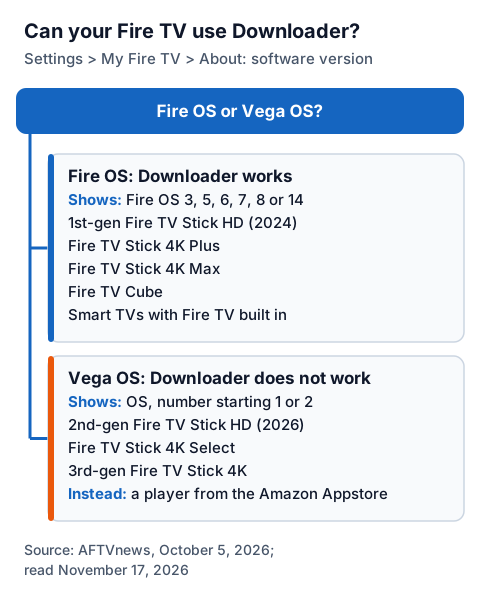
| Runs Fire OS: Downloader works | Runs Vega OS: Downloader does not work |
|---|---|
| 1st-gen Fire TV Stick HD (2024, Wi-Fi 5) | 2nd-gen Fire TV Stick HD (2026, Wi-Fi 6) |
| Fire TV Stick 4K Plus | Fire TV Stick 4K Select |
| Fire TV Stick 4K Max | 3rd-gen Fire TV Stick 4K |
| Fire TV Cube and smart TVs with Fire TV built in | (no others listed) |
To check the one you own, open Settings > My Fire TV > About (Device & Software > About on a Fire TV smart TV) and read the software version. AFTVnews says a Vega OS device lists it as "OS" with a number starting 1 or 2, while a Fire OS device shows "Fire OS" followed by 3, 5, 6, 7, 8 or 14. If yours runs Vega OS, no code will help: use a player from the Amazon Appstore on that device instead.
How do you install Downloader and allow it to install apps?
Install Downloader from the Amazon Appstore, reveal Developer Options, then give Downloader permission to install apps. The permission is per app, so you are only opening the door for Downloader.
- On the Fire TV home screen, search for Downloader and choose the app by AFTVnews.com. Select Get or Download.
- Open Settings > My Fire TV > About. If you see no Developer Options menu, select the first item, your device's name, about 7 times. Amazon's developer documentation describes the same 7 clicks, and AFTVnews says the message "No need, you are already a developer" confirms it.
- Press Back, open Developer Options, choose Install unknown apps (called Apps from Unknown Sources on some versions) and turn it on for Downloader.
- Open Downloader and allow it to access files when it asks.
If Downloader sits on "Connecting..." forever, its documentation suggests using the stick's wall adapter, not a USB port on the TV.
How do you use a code, and check it first?
Check where a code leads before typing it on the TV. Open go.aftvnews.com/ followed by the code in any browser: the shortener shows "Redirecting in 6 seconds to:" with the full address, and lets you pause the redirect to read it.
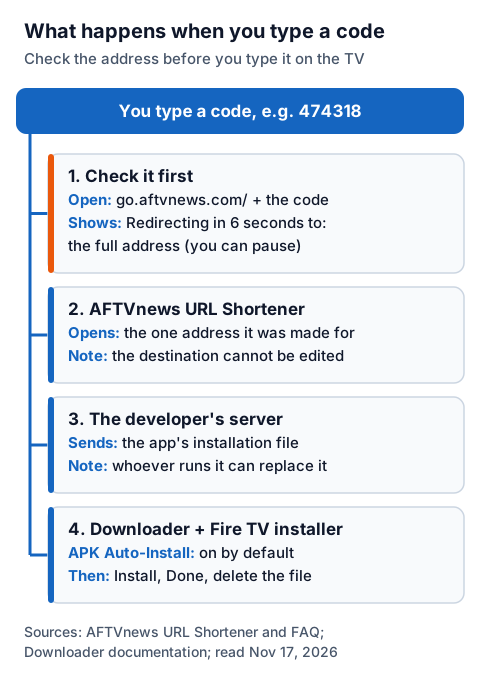
- In a phone or computer browser, open go.aftvnews.com/ plus the code and read the address it shows.
- Make sure the address is on the app developer's own website, the same domain you found the code on. If it points somewhere else, stop.
- On the Fire TV, open Downloader, select the address box on the Home screen, type the code and select Go.
- When the download finishes, the installer opens. Choose Install, then Done.
- Back in Downloader, delete the installation file from Files to free up storage. The app stays installed.
Which player apps publish their own Downloader code?
Some player developers print a code on their own download page. On November 17, 2026 we found one: Televizo's website shows the code 474318, and the shortener page for that code led to files.televizo.net, the developer's own domain. The developer describes Televizo as "a video player only" that "does not provide any content". On November 18, 2026 waveo.tv also listed a code for its TV build, and our page on installing Waveo IPTV through Downloader gives the steps.
We could not confirm a developer-published code for other well-known players today. TiviMate's website loaded without readable content, and the IPTV Smarters website did not respond. We are not repeating codes for them from third-party lists, for the reasons above.
Two simpler rules cover most cases. If a player is in the Amazon Appstore, install it there and skip the code entirely; it then updates through Amazon's store. A site offering "unlocked" copies of paid players is not the developer. Our comparison of IPTV players by device covers where each player is published.
What should you never install with a code?
Never install apps that stream films, series or live channels without the rights to them. Many "free movies" apps passed around as codes fall in this group: the app is free because nobody is paying the rights holders.
The technology is not the issue. IPTV is a legal way to deliver TV, and what decides whether a service is lawful is whether its seller holds the rights to what it streams; our guide to whether IPTV is legal in the UK explains the difference. If you want free TV, choose apps from broadcasters and services that carry their content legally, such as those in our list of free live TV apps.
The same goes for free playlists and M3U links shared online: no player developer publishes them, and we do not link them.
Where IG IPTV fits on a Fire TV Stick
IG IPTV is a subscription, not an app, so there is no IG IPTV code to type. After payment, the login (a server address, username and password, or playlist details) is sent on WhatsApp, and you enter it in a player you have installed.
Your login can be installed on as many devices as you like, with one stream at a time on a standard plan. Picture quality is up to 4K where the channel broadcasts it. The IPTV for Fire Stick page explains what you need, UK plans start from £15 a month, and the IPTV free trial needs no card, so you can check your player and the channels you care about on your own stick before paying.
Frequently Asked Questions
Are Downloader codes safe?
A code is only a pointer to a web address. It is as safe as the file at that address. Check the address at go.aftvnews.com before typing the code, and only continue if it is on the app developer's own website.
Why does my Downloader code not work?
The shortener's FAQ says codes can be disabled after copyright complaints or abuse. The file behind a code can also be removed by whoever hosts it. Get a current code or download link from the developer's own website.
Can I use Downloader on a Fire TV Stick 4K Select?
No. AFTVnews reports that the Fire TV Stick 4K Select runs Vega OS, which does not support the Downloader app or installing apps from outside the Amazon Appstore.
Sources
- Downloader app home and documentation, AFTVnews, read November 17, 2026
- AFTVnews URL Shortener home page and FAQ, read November 17, 2026
- Downloader, Amazon.co.uk Appstore listing, read November 17, 2026
- Downloader by AFTVnews, Google Play, read November 17, 2026
- Connect to Fire TV through ADB (Developer Options steps), Amazon Developer documentation, read November 17, 2026
- How to reveal Developer Options on a Fire TV, AFTVnews, read November 17, 2026
- These are the Fire TVs that don't support sideloading or Downloader due to Vega OS, AFTVnews, read November 17, 2026
- Televizo, developer website, and the shortener page for code 474318, read November 17, 2026
Couldn't read: tivimate.com (loaded without readable content); iptvsmarters.com (did not respond); Amazon's own Fire TV product pages for an operating-system label (AFTVnews reports Amazon does not show one).