Waveo IPTV: What the Player Is and How to Set It Up
Waveo IPTV is a free player app for Android TV, Google TV, Fire TV and Android phones that plays an M3U playlist or Xtream Codes login you already have; it ships with no channels. Its developer's site, waveo.tv, titles it "Waveo (Wave IPTV)", so it is the player many people knew under the older name. A one-time Premium code unlocks extra features on up to 5 devices. The TV version installs from the developer's own download, not from an app store.
This guide is one entry in our comparison of IPTV player apps. Below: what Waveo does, what is free and what Premium adds, which devices it runs on, how to install it and import a login, and what we could not check.
What is Waveo?
Waveo is a video player for your own IPTV login. It organises the live channels, TV guide, catch-up, films and series that your provider's login unlocks, with profiles for each person in the house. The app itself contains nothing to watch.
The developer says so in several places. The waveo.tv FAQ says Waveo is "a private video player" and that the apps "only read your sources and never embed content"; the getting-started guide says the app "does not sell subscriptions, channels, or playlists". Its pages ask users to bring their own legal M3U links or Xtream logins from authorised sources.
What the developer's site and documentation name as features:
- Profiles, each with its own playlists, favourites and history
- A TV guide, with catch-up and restart where your source supports them
- Renaming, reordering or hiding channel groups
- Search across live TV, films and series
- Audio tracks, subtitles, and playback up to 4K when your source provides it
- A Sports Centre that lists matches and points to the channels in your own playlists that show them; it adds no channels
- Recording from the live player, where the provider, playlist, channel and device allow it
- 13 interface languages, among them English, French, German, Italian and Dutch
That makes Waveo the same kind of app as TiviMate or OTT Navigator: a front end that is only as useful as the login you load into it.
Is Waveo the same app as Wave IPTV?
Yes, by the developer's own naming. The waveo.tv home page carries the title "Waveo (Wave IPTV)", the developer's GitHub project for the TV app is still named WAVE-IPTV, and the documentation still speaks of "WAVE Premium" and the "My Wave" account area. Downloads and updates now come out under the Waveo name.
The practical point: if you used Wave IPTV before, take new versions only from waveo.tv or the GitHub releases page that the site links to. The documentation warns that "a modified APK or one obtained from a third-party website may compromise your data and credentials."
What is free in Waveo, and what does Premium add?
The app itself is free to install and use for core playback and navigation, according to the developer's GitHub page. Premium is a one-time payment, with no subscription, for a 12-character code that works on up to 5 devices.
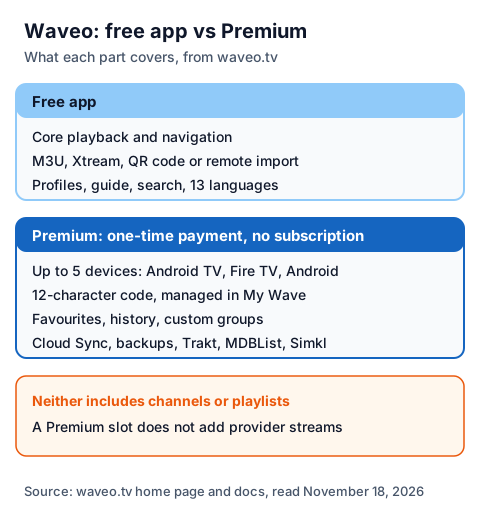
| Item | What waveo.tv says |
|---|---|
| Payment | One-time payment, no subscription |
| Devices | Up to 5: Android TV, Fire TV or Android; extra slots can be bought |
| Code | 12 characters, managed in My Wave on waveo.tv |
| Premium unlocks | My Wave TV and VOD areas, favourites, history, custom groups, advanced player settings, OpenSubtitles, Trakt, MDBList, Simkl, Cloud Sync, backups and restore |
| Not included | Any channel, playlist, film library, guide data or catch-up |
| Price | Shown at checkout; we could not read it |
We could not see the Premium price. The waveo.tv pricing panel fills in the amount with a script when the page loads, and that part did not load in our reader, so we do not quote a figure. The documentation also mentions an "eligible active trial" for some Premium features without saying how long it lasts. Check the price on the payment page before you pay, as the developer's own guide advises.
The developer also notes that a Premium slot "lets one device use Waveo" and "does not increase the number of simultaneous streams allowed by your provider." Our explainer on what IPTV costs puts a player fee and a provider plan together.
Which devices does Waveo run on?
Waveo supports Android TV and Google TV devices with Android 8.0 or newer, Fire TV through a build you install yourself, and Android phones and tablets with Android 9 or newer, according to the waveo.tv FAQ. Chromecast with Google TV is listed as fully supported.
| Device | Route named by the developer | Requirement listed |
|---|---|---|
| Android TV, Google TV | Download from waveo.tv through the Downloader app | Android 8.0 or later |
| Fire TV Stick, Fire TV Cube | Fire TV download from waveo.tv | Not stated beyond Fire TV |
| Android phones and tablets | Mobile app download from waveo.tv | Android 9 or later; Chromecast and picture-in-picture |
| iPhone, Apple TV, Samsung, LG | None listed | No version named |
A Google Play UK search for "waveo" showed no Waveo listing, and Apple's UK App Store showed none either, although the documentation mentions Google Play orders and devices "using Google Play". On November 18, 2026 the latest TV release on the developer's GitHub page was version 2.3.1, published November 16. For Apple devices, see our IPTV guide for all devices instead.
How do you install Waveo and import a login?
You install the free Downloader app, enter the code that waveo.tv publishes, install Waveo, and then import your provider's login. The developer's getting-started guide gives these steps.
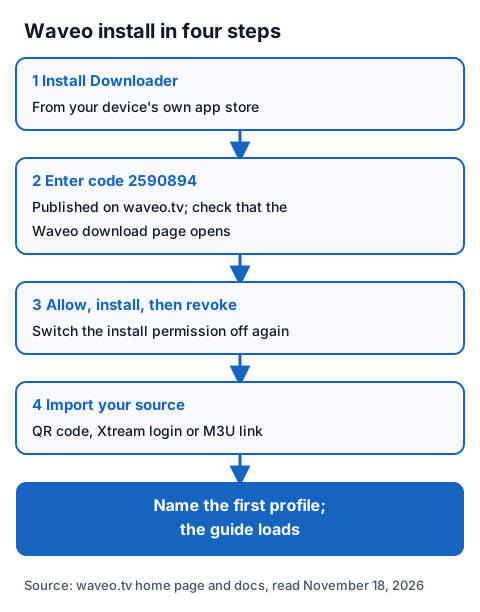
- Install the Downloader app from your device's own app store.
- On waveo.tv, choose Get Waveo and note the Downloader code for the TV version: 2590894 on November 18, 2026. Enter it in Downloader and check that the Waveo download page opens.
- Allow Downloader to install the file when Android asks, install Waveo, then switch that permission off again, as the developer advises.
- Open Waveo and pick an import method: a QR code that you scan with your phone, Xtream login details, or an M3U link. You can also send a playlist from your account at waveo.tv using the device ID shown in the app.
- Name the first profile, and wait for the channels and guide to load.
Take the code only from waveo.tv on the day you install; codes copied from lists on other sites can point anywhere. Our guide to Downloader codes on a Firestick explains the checks, and our page on entering an Xtream login on a TV shows where each value comes from. If a login is rejected, the developer suggests checking spaces, letter case, the http or https prefix, the port, the expiry date and your provider's connection limit.
Is Waveo legal and safe to use?
A player app is legal software; what you load into it decides the legal question. IPTV technology is legal, and a stream is lawful only when the seller holds the rights to what it streams. Waveo's pages tell users to add only legal sources from authorised providers.
Our guide to the legality of IPTV explains how to tell a seller with rights from one without them. For safety, install Waveo only from waveo.tv or the GitHub page it links to, never share your login or Premium code in a screenshot, as the developer warns, and never paste a free playlist or M3U link found on a forum.
Using Waveo with an IG IPTV login
An IG IPTV login is sent on WhatsApp after payment, as a server URL, username and password, or as playlist details. Those match Waveo's Xtream and M3U import options, so you can load it in the free app and check it during our free day-long trial, which needs no card.
Use the trial to check, inside Waveo on your own TV, that the channels you care about play. If they do, the UK plan lengths and prices start at £15 a month, with 3, 6 and 12-month plans at £25, £35 and £55, and the 12-month plan includes 2 free months. Picture quality goes up to 4K where the channel broadcasts it.
Waveo's 5 Premium devices and an IPTV plan's streams are different limits. A standard IG IPTV plan streams on one screen at a time, and the IG IPTV multi-room option adds 2 to 4 streams on one login.
Frequently Asked Questions
Is Waveo IPTV free?
The app is free to install and use for core playback, according to the developer. Waveo Premium is a one-time payment, with no subscription, for a code that covers up to 5 devices; we could not read its price.
Does Waveo come with channels?
No. The developer says Waveo does not sell subscriptions, channels or playlists. You import an M3U link or Xtream login from a provider, and the provider's rights decide what you can lawfully watch.
Is Waveo the new name of Wave IPTV?
Yes. The developer's site is titled "Waveo (Wave IPTV)", and its GitHub project for the TV app is still called WAVE-IPTV.
Does Waveo work on a Firestick?
Yes, according to the developer, through a Fire TV build downloaded from waveo.tv with the Downloader app. We found no Waveo listing in Google Play or the App Store, and could not search Amazon's Appstore.
What is the Waveo Downloader code?
On November 18, 2026, waveo.tv listed 2590894 for the TV version. Read the code from waveo.tv yourself on the day you install.
Sources
- waveo.tv home page (English), including the FAQ, downloads and Premium panel, read November 18, 2026.
- waveo.tv documentation: getting started, importing a playlist, Premium and backups, Premium codes and slots, read November 18, 2026.
- waveo.tv privacy policy, read November 18, 2026.
- The developer's GitHub page for the TV app and its releases page (version 2.3.1, November 16, 2026), read November 18, 2026.
- Google Play search for "waveo", UK store, read November 18, 2026.
- Apple App Store search data for "waveo", UK store, read through Apple's search service November 18, 2026.
- IG IPTV plan prices and terms (igiptv.tv), read November 18, 2026.
Couldn't read: the Waveo Premium price (filled in by a script at checkout that did not load for us); the length of any Premium trial; Amazon's UK Appstore; we did not install the Waveo builds ourselves.