IPTV on Samsung and LG Smart TV: Player Apps, Stores and Setup
To watch IPTV on Samsung and LG smart TV models, install a player app from the TV's own app store (Tizen on Samsung, webOS on LG), then add the login your IPTV provider gives you. The player shows no channels of its own. Several players offered on both platforms, such as Smart IPTV, SmartOne IPTV and Set IPTV, link your playlist to the TV through the developer's website, and charge their own fee after a free test period. That fee is separate from your IPTV subscription.
This guide is part of our IPTV guide for every device. It covers the two TV platforms side by side; if you only have a Samsung, the Samsung smart TV IPTV page covers that set alone. Everything below about third-party apps comes from their developers' pages and Samsung's own site, read on November 17, 2026.
How do Samsung and LG smart TVs play IPTV?
Both brands run their own operating system and their own app store, so IPTV works through an app installed from that store, not through Google Play. Samsung TVs run Tizen, which Samsung describes as "a Linux-based operating system (OS) that powers all Samsung Smart TVs". LG TVs run webOS, and LG's UK site calls its app store the LG Content Store. So a Tizen IPTV player comes from Samsung's store, and a webOS one from LG's.
| Samsung | LG | |
|---|---|---|
| Operating system | Tizen (One UI Tizen on recent models) | webOS (Netcast on older models) |
| App store | Samsung's app store, reached through Search on the Home screen | LG Content Store |
| What decides if a player runs | The TV's Tizen version | The TV's webOS version |
The practical point is that the same player can exist on both stores but in different versions, and an old TV may only get an older version or none at all. Check your TV's software version before you pick a player. On a Samsung, Samsung's own instructions are Settings > All Settings > Support > Software Update, where you can also turn on automatic updates.
Samsung adds that TVs released from 2023 onwards receive free One UI Tizen upgrades for up to 7 years from launch, though availability "may vary by model and region". We could not read a matching LG page today.
Which IPTV player apps work on Samsung and LG TVs?
Several players publish versions for both platforms. The table lists what each developer's own website said today; we could not read the Samsung or LG store listings on the web, so search the store on your TV to confirm the app is offered for your model and country.
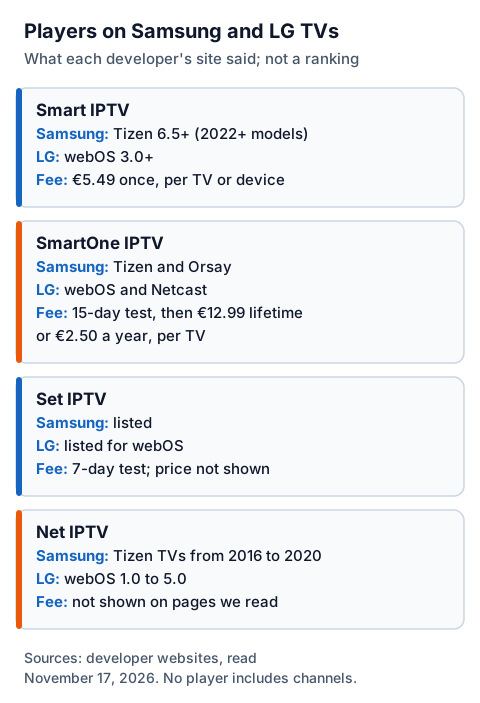
| Player | Samsung (Tizen) | LG (webOS) | Test period and fee, per the developer |
|---|---|---|---|
| Smart IPTV | Version 3.1.3 for Tizen 6.5+ TVs (2022+ models) | Version 3.1.3 for webOS 3.0+ TVs | One-time fee of €5.49 per TV or device |
| SmartOne IPTV | Tizen and older Orsay TVs | webOS and older Netcast TVs | 15 days to test, then €12.99 lifetime or €2.50 a year per TV |
| Set IPTV | Listed for Samsung | Listed for LG webOS | Free for a 7-day test period; fee not shown on the page we read |
| Net IPTV | Samsung Tizen TVs from 2016 to 2020 | LG webOS 1.0 to 5.0 | Fee not shown on the pages we read |
Every one of these developers says the same thing in its own words: the app is a player and includes no channels. SmartOne's activation page, for example, says "NO CHANNELS/STREAMS are provided with activation, you have to add your own playlist." The table is in no particular order and is not a ranking.
Some well-known players were not checkable today: the IPTV Smarters website did not respond, and the Flix IPTV website refused our request. If you want one of those, search for it in your TV's store and read its listing there.
How do you set up IPTV on a Samsung or LG TV?
Install the player from the TV's store, note the ID the app shows, add your playlist through the developer's website (or log in inside the app if it supports that), then test it before paying the developer anything.
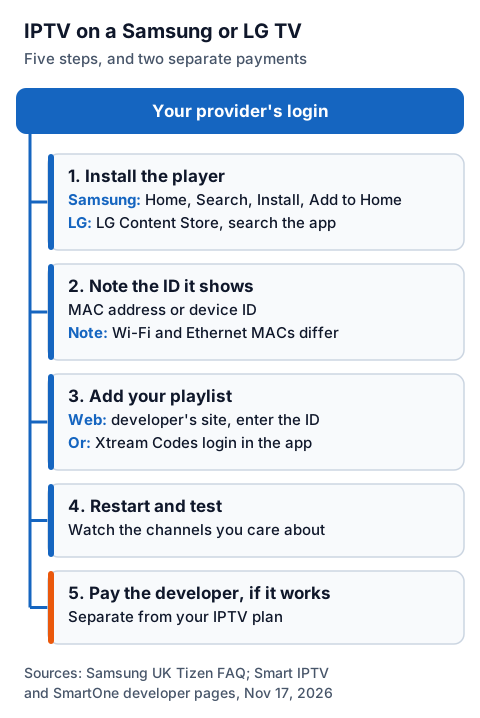
- Install the player. On a Samsung, Samsung's instructions are: press Home, select Search on the left, type the app name, select Install, then Add to Home. On an LG, open the LG Content Store and search for the app.
- Open it and note the ID. Many TV players show a MAC address or device ID on the first screen. Smart IPTV's FAQ notes that each TV has two MAC addresses, one for Wi-Fi and one for Ethernet, and that since its version 3.0.0 on LG webOS the app shows a device ID instead.
- Add your playlist. On players that work this way, go to the developer's website on a phone or computer, enter that ID and paste the playlist link from your provider. Some players also accept an Xtream Codes login inside the app; our guide to Smart Xtream player apps on a TV explains the three details you need.
- Restart the app and test. Watch a few channels you care about, including any in 4K. If a 4K channel looks no sharper than HD, our guide to what IPTV UHD needs: resolution, HDR and a capable TV shows which part of the chain to check.
- Pay the developer only if it works. SmartOne asks you to confirm "I have tested the application" before paying, and Smart IPTV tells readers not to pay if they have no channels to use.
For a walk-through of one player's screens, see our Smart IPTV setup guide.
Why does a TV player charge its own fee?
Because you are paying two different parties. The player's developer charges for the software, often once per TV, and your IPTV provider charges for the service the player connects to. Paying one never covers the other.
That is why the developers above are blunt about it. Smart IPTV's activation page says no channels are provided with the payment and that paying "won't solve" a playlist that does not work. Set IPTV's page warns that payment will not be refunded if you buy the app without a working list. Test first, pay second.
Smart IPTV and SmartOne both price their fee per TV or device, so a new TV can mean a new fee. Read the developer's terms before paying if you plan to replace the set.
What if your TV has no compatible player?
Plug a streaming device into the TV's HDMI port and install the player there. Older sets are the usual case: Net IPTV lists Samsung TVs from 2016 to 2020 only, while the current Smart IPTV version needs Tizen 6.5 or later, which the developer ties to 2022 and newer models.
A Fire TV Stick or an Android TV box gives you the wider choice of players in the Amazon Appstore or Google Play, and the TV simply shows what the device sends. Our IG IPTV Fire TV Stick page and Android TV box guide cover both routes.
If a player installs but some channels play sound with no picture, the TV's decoder may not support that stream's format; Smart IPTV's FAQ points out that every TV make and model supports different formats. Our IPTV fault-finding guide works through the no-picture fixes.
Using IG IPTV on a Samsung or LG TV
IG IPTV is the service, not the player: after payment, your login (a server address, username and password, or playlist details) is sent on WhatsApp, and you add it to the player on your TV. The player's own fee, if it has one, is paid to its developer.
Your login can go on as many devices as you like, with one stream at a time on a standard plan; the multi-room upgrade gives 2 to 4 streams at once. Picture quality is up to 4K where the channel broadcasts it, and UK plans start from £15 a month. Before paying anyone, use the free day-long trial, which needs no card, to check that your TV's player and the channels you care about work together.
Frequently Asked Questions
Can you get IPTV on a Samsung smart TV?
Yes. Install a player app from Samsung's app store, then add the login from your IPTV provider. Samsung's own steps are Home, Search, type the app name, Install, Add to Home.
Is there a free IPTV player for LG TV?
Several players offer a free test period on LG webOS: SmartOne IPTV gives 15 days and Set IPTV 7 days, according to their websites. After that, both charge a fee to keep using them.
Why does my TV player show a MAC address?
Players such as Smart IPTV use the TV's MAC address or a device ID to link the playlist you upload on their website to your TV. Each TV has separate Wi-Fi and Ethernet MAC addresses, so switching connection can change the one shown.
Do I pay the player and the IPTV provider separately?
Yes. The player's developer charges for the app, and your IPTV provider charges for the service. Neither payment includes the other.
What if my Samsung or LG TV is too old for the app?
Connect a Fire TV Stick or an Android TV box to the TV's HDMI port and install a player there instead.
Sources
- Smart TV and One UI Tizen FAQ, Samsung UK, read November 17, 2026
- LG UK website navigation (LG Content Store TV), read November 17, 2026
- Smart IPTV activation, news and FAQ, developer website, read November 17, 2026
- SmartOne IPTV home and activation pages, developer website, read November 17, 2026
- Set IPTV home page, developer website, read November 17, 2026
- Net IPTV home and FAQ pages, developer website, read November 17, 2026
Couldn't read: the Samsung and LG app store listings themselves (no readable web listing; LG's Content Store page renders only in a browser script); iptvsmarters.com (did not respond); flixiptv.eu (refused the request); duplexplay.com and iboplayer.com (pages loaded almost empty); siptv.app home page (timed out).