IPTV Account Expired: How to Check the Expiry Date and What to Do Next
An IPTV account expired message means the provider's server has passed the end date stored against your username and now refuses that login. The date lives on the server, so reinstalling the player or restarting the router changes nothing. Check the date first: some players show it on an account information screen, and an Xtream Codes login can be checked from a browser. If the date has passed, buy a new period; if it has not, the fault is something else.
This page belongs to our guide to what IPTV costs and how plans work. The player details below come from developers' own pages and store listings as we read them on November 18, 2026; where a developer documents nothing, we say so.
What does a player show when an IPTV account expires?
It depends on the player: some show a status and an expiry date on an account screen, some show an error naming the expired account, and others only report a failed login. In every case the server, not the app, made the decision.
| Player | What its developer documents | Where we read it |
|---|---|---|
| IPTVnator (open source, desktop and web) | An "Account Information" window with Status, Created, Expires, Active Connections and Trial Account | The project's code and docs on GitHub |
| IP Television (iPhone, iPad, Apple TV) | Version 8.0.10 notes: "Clear error messages: credentials, expired account, invalid address" | App Store UK listing |
| King Stream Player (iPhone, iPad) | Version 1.8 notes: expiration date detection now handles "different date formats and field names" | App Store UK listing |
| IPTV Smarters / Smarters Pro | Nothing about an expiry screen | We could not verify it (see below) |
| TiviMate | Nothing about an expiry screen | Google Play UK listing |
IPTVnator's compatibility notes explain why players disagree. A server can mark an account "Active" while its end date has already passed, so IPTVnator treats a past date as expired even when the status says active. An end date of 0, a negative number or no date at all is treated as no expiry. The same notes say real panels "differ even when they advertise Xtream Codes compatibility", which is why IPTVnator tries three different account requests in turn.
We could not confirm where IPTV Smarters shows the expiry date. The developer site iptvsmarters.com did not resolve for us, and the Smarters Pro site and its Google Play listing (Tech Smarters) describe playlists and playback, not an account screen. If your Smarters build has an account or user-info option in its settings, look there; we cannot say it exists in yours.
How to check IPTV expiry date: three routes
There are three reliable routes: the player's account screen, an account check typed into a web browser for Xtream Codes logins, and asking your provider. Try them in that order.
- The player's account screen. Look in settings or the playlist's menu for something like account, user info or account information. In IPTVnator the field is labelled Expires.
- A browser check (Xtream Codes only). Players ask the server for account details at your server address followed by
/player_api.php?username=YOUR_USERNAME&password=YOUR_PASSWORD. Typed into a browser, many servers return the same details as text, including a status and anexp_datevalue. Our guide to the three parts of an Xtream Codes login shows where each part goes. - Ask the provider. Send your username and ask for the end date as the server holds it.
The exp_date value is usually a long number, not a date. IPTVnator's code reads it as Unix time: the number of seconds since 1 January 1970, UTC. A ten-digit number such as 1798761600 converts to 1 January 2027, 00:00 UTC; paste yours into any Unix time converter to read it. Keep that browser address private, because your password is in it.
An M3U playlist link cannot show a date by itself; it is a list of channel addresses. If the link carries username= and password= in it, you can use those in the browser check above. If not, ask the provider.
Is it really expired, or something else?
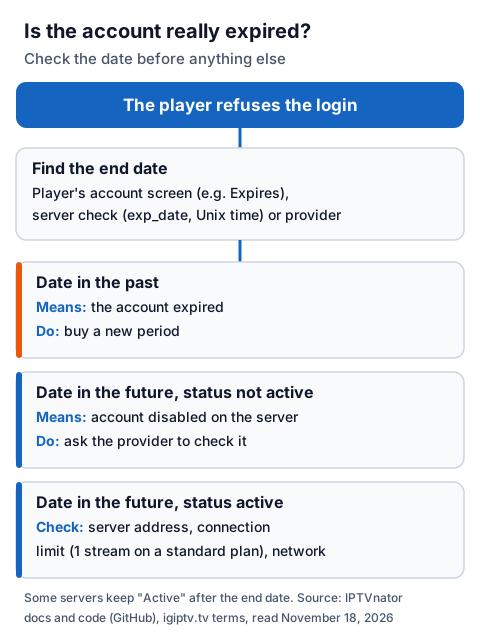
An expired account fails on every device and its end date is in the past. If the date is still in the future, or only one device fails, look at the other causes in the table first.
| What you see | Likely cause | What to do |
|---|---|---|
| Login refused everywhere, end date in the past | Account expired | Buy a new period |
| Status not active, end date in the future | Account disabled or blocked on the server | Ask the provider to check the line |
| Error before the login is checked | Wrong or changed server address | Re-enter the address; ask if it changed |
| Works on one device, fails on the next | Connection limit reached | Stop playback on the other device |
| Other apps fail on the same device | Network fault | Restart the router and test again |
The connection limit is the easiest to mistake for expiry. An IG IPTV login can be added to more than one device, but a standard plan plays one stream at a time, so a second screen can fail while the first is watching. The multi-room plans allow 2 to 4 streams on one login. For faults that are not about the account at all, work through the step-by-step IPTV fixes symptom by symptom.
If you have just paid and the player still refuses the login, close the player fully, reopen it and log in again so it asks the server afresh. If it still fails, send your username to support.
What to do after your IPTV account has expired
Nothing on your device can extend the date, so the next step is a new period on the server. With IG IPTV that means choosing a plan length and paying; plans are prepaid for a fixed period and do not auto-renew, so an account simply stops at its end date.
To buy, use the IG IPTV subscription page: pick a length, pay by Visa, Mastercard, Google Pay or Apple Pay, and the login is sent on WhatsApp after payment. Before paying, ask 24/7 WhatsApp support two things and keep the answers: whether your current username carries on, and whether days left on an unexpired account are added to the new period.
The longer the plan, the less each month of access costs. UK plans start from £15 a month, and the 12-month plan includes 2 free months, so £55 buys 14 months of access.
| Plan | Price | Months of access | Cost per month of access |
|---|---|---|---|
| 1 month | £15 | 1 | £15.00 |
| 3 months | £25 | 3 | £8.33 |
| 6 months | £35 | 6 | £5.83 |
| 12 months + 2 free | £55 | 14 | £3.93 |
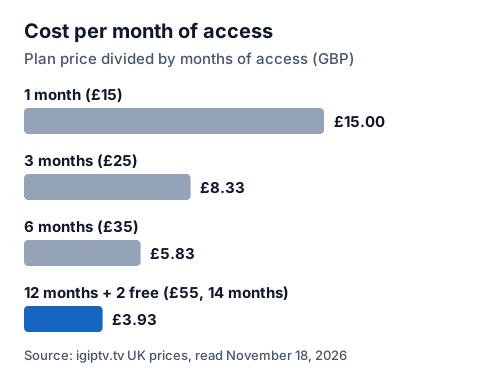
A short plan costs more per month but less up front; the 12-month plan with 2 free months costs least per month if you already know you will keep watching. The UK pricing page lists every length side by side, and the UK refund policy sets out what happens if a problem cannot be fixed. Not sure you want to pay again yet? The free 24-hour test needs no card; it ends 24 hours after it starts, and players then report it the same way as any other ended account.
How to avoid the next expiry catching you out
Write the end date down the day you pay, and set a phone reminder a few days before it. Players that show an Expires field make this easy to recheck; for the others, the browser check takes a minute.
Pay for the next period before the day of anything you do not want to miss: with IG IPTV, renewing early adds the new months on to your current end date, so no days are lost. If you only need a short bridge, the 1-month plan at £15 covers it without a longer commitment. Our page on IPTV without a contract explains why nothing renews on its own.
Frequently Asked Questions
What does "account expired" mean in an IPTV player?
The provider's server has passed the end date stored for your username and refuses the login. The player is only reporting the server's answer, so reinstalling it does not help.
How do I check my IPTV expiry date?
Look for an account or user-info screen in the player, such as IPTVnator's Expires field. With an Xtream Codes login, the server's account check shows an exp_date value in Unix time. Otherwise, ask your provider.
Why does my player say active but nothing loads?
IPTVnator's developers note that some servers keep the status "Active" after the end date has passed. Check the date itself, then the server address and the connection limit.
Does the IG IPTV free trial expire the same way?
Yes. The 24-hour free trial ends 24 hours after it starts, and the trial login then stops working like any ended account. The trial needs no card, so nothing is charged when it ends.
Can I keep the same login when I pay for a new period?
Ask before paying. With IG IPTV, message 24/7 WhatsApp support with your username and they can tell you whether it carries on.
Sources
- IPTVnator (4gray, GitHub): README, docs/architecture/xtream-portal-compatibility.md (Account Status), libs/shared/interfaces/src/lib/xtream-portal.utils.ts and the English interface strings for Account Information, read November 18, 2026.
- Apple App Store UK listings: "IP Television: IPTV Player" (version 8.0.10 release notes) and "King Stream Player" (version 1.8 release notes), read November 18, 2026.
- Google Play UK listings: "Smarters Pro" (Tech Smarters) and "TiviMate IPTV Player" (Armobsoft FZE), read November 18, 2026.
- Smarters Pro developer site (smarterspro.com), read November 18, 2026.
- IG IPTV plan prices, payment methods and terms (igiptv.tv), read November 18, 2026.
Couldn't read: iptvsmarters.com (did not resolve), whmcssmarters.com (refused our reader) and the IPTV Smarters Pro Google Play address we tried (returned "not found"), so we could not verify where IPTV Smarters shows an expiry date.