4K IPTV Stream: What You Need to Watch Live in 4K
A 4K IPTV stream only reaches your screen in 4K when every link in the chain can carry 3840 x 2160 video: a steady connection of roughly 15 to 25 Mbps per stream (Netflix advises 15 Mbps for 4K, BBC iPlayer 24 Mbit/s for full Ultra HD), a device that decodes H.265 in hardware, an HDMI port and cable that pass 4K with HDCP 2.2, and a 4K TV. The channel must also broadcast in 4K; an HD channel stays HD whatever your equipment.
This guide belongs to our breakdown of what IPTV really costs, plan by plan, because 4K is where a slow line or an HD-only device quietly wastes the money you spend on a plan.
What does a 4K IPTV stream need?
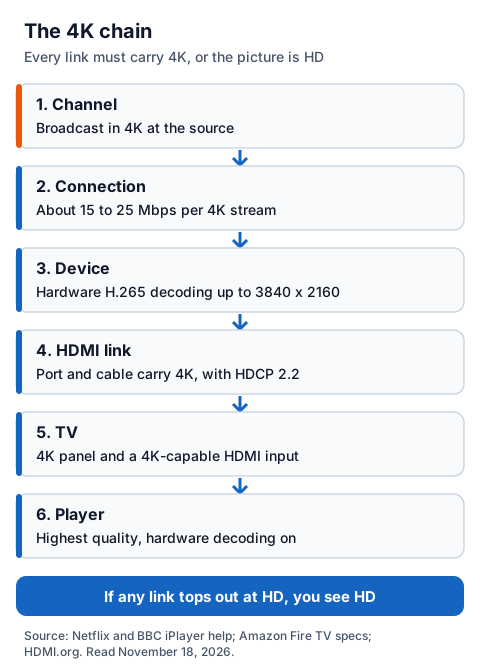
A 4K IPTV stream needs six things at once: a 4K source channel, enough bandwidth, a device that can decode it, an HDMI link that carries 4K, a 4K TV, and a player set to the highest quality. If any one of them tops out at HD, the picture you see is HD.
| Link | What it needs for 4K | Who controls it |
|---|---|---|
| Channel | Broadcast in 4K at the source | The broadcaster and the seller |
| Connection | About 15 to 25 Mbps for each 4K stream, steady rather than in bursts | You and your broadband provider |
| Device | Hardware H.265 (HEVC) decoding up to 3840 x 2160 | You |
| HDMI link | A port and cable that carry 4K, with HDCP 2.2 | You |
| TV | A 4K panel and a 4K-capable HDMI input | You |
| Player | Quality set to the highest option, hardware decoding on | You |
Five of the six links sit in your home, so you can check them before you pay, and a 24-hour free trial with no card lets you check the sixth on your own TV.
How much bandwidth does a 4K stream use?
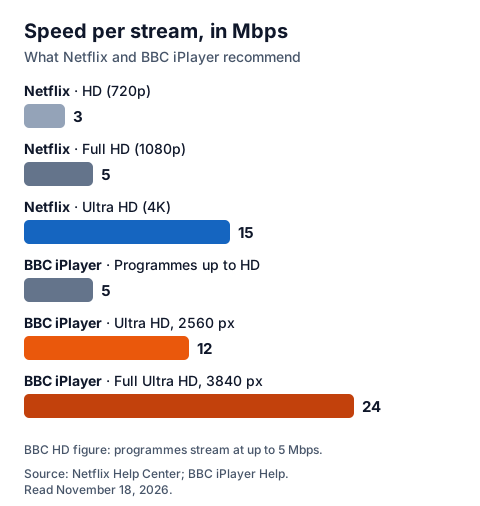
A 4K stream needs about 15 Mbps by Netflix's guidance and 24 Mbit/s by the BBC's for full Ultra HD, compared with 5 Mbps or less for HD. Those figures are per stream, and they assume the speed holds steady, not that it peaks there once in a speed test.
| Source | Quality | Recommended speed |
|---|---|---|
| Netflix | HD (720p) | 3 Mbps or higher |
| Netflix | Full HD (1080p) | 5 Mbps or higher |
| Netflix | Ultra HD (4K) | 15 Mbps or higher |
| BBC iPlayer | Programmes up to HD | Stream at up to 5 Mbps |
| BBC iPlayer | Ultra HD, 2560 pixels wide | 12 Mbit/s |
| BBC iPlayer | Full Ultra HD, 3840 pixels wide | 24 Mbit/s |
The BBC's help page adds a useful warning: if your connection is not fast or stable enough at that moment, the Ultra HD stream will not play smoothly. For live 4K, plan around the higher BBC figure.
If one 4K stream needs 15 Mbps, two at once need about 30 Mbps, plus whatever else runs on the line. Data adds up too: Netflix puts 4K at up to 7 GB per hour per device, against up to 3 GB for HD, which matters on a capped or mobile connection. Our guide to IPTV freezing and speed checks covers testing your line.
Which devices and HDMI ports can show 4K?
A device shows 4K only if it decodes H.265 in hardware at 3840 x 2160 and outputs it over an HDMI link that carries 4K with HDCP 2.2. Many sticks top out at 1080p, so check the exact model.
Amazon's Fire TV specifications show how much models differ:
| Fire TV model (Amazon's specs) | Video | 4K stream? |
|---|---|---|
| Fire TV Stick 4K Max (1st Gen, 2021) | H.265 hardware decoding up to 3840 x 2160 at 60 fps; HDCP 2.2 | Yes |
| Fire TV Stick 4K (3rd Gen, 2026) | H.265 hardware decoding up to 3840 x 2160 at 60 fps; runs Vega OS | Yes, if your player is available for it |
| Fire TV Stick (3rd Gen, 2020) | Streams in 1080p at 60 fps | No, HD only |
| Fire TV Stick (2nd Gen) | Maximum 1080p at 30 fps | No, HD only |
Amazon lists the 2026 stick's operating system as Vega OS, so before buying one for IPTV, check that your player app is offered for that model in Amazon's store. Our guide to IPTV on every device covers other platforms, and the IG IPTV Fire TV Stick page covers plans and installing a player.
HDMI.org's page for the HDMI 1.4b specification lists 4K at 3840 x 2160 only at 24, 25 and 30 Hz, so a TV input or soundbar built to that version cannot pass 4K at 50 or 60 frames per second. HDMI.org's certification programme for 4K cables tests them for the full 18Gbps bandwidth and features such as 4K at 60 Hz and HDR. Use the TV input its manual marks for 4K, and if a soundbar or receiver sits in between, check its HDMI ports list HDCP 2.2 too, or plug the device straight into the TV.
How is a 4K IPTV live channel different from on-demand 4K?
A 4K IPTV live channel streams as it happens, so the player cannot store much ahead, and only selected programmes and events are produced in 4K at all. On-demand 4K films are encoded in advance, and the player can load well ahead of what you watch.
BBC iPlayer's Ultra HD help page shows how selective live 4K is: it lists a set of programmes plus previous live events shown in Ultra HD, not whole channels running in 4K around the clock. An IPTV seller can only pass on what the broadcaster sends.
That is why IG IPTV words it carefully: picture quality is up to 4K where the channel broadcasts it. Which channels and events carry a 4K feed is for the seller to tell you and for you to check, not for anyone to promise in advance. For what a UHD picture needs at home, see our guide to IPTV UHD: resolution, HDR and the devices that play it.
How can you tell if you are really watching 4K?
You are watching 4K only when the stream, the device output and the TV all report 3840 x 2160. A 4K TV upscales an HD signal, which can look sharp enough to fool you.
- The player. If it shows stream information, look for 3840 x 2160; 1920 x 1080 means the stream is HD.
- The device. In the device's display settings, check the output resolution is set to 4K (2160p) and not 1080p.
- The TV. Your TV may show the incoming signal's resolution in its info or input menu; the manual says where.
- The quality setting. Pick the highest option rather than "auto", with hardware decoding on.
If the TV reports 1080p while the device is set to 4K, the HDMI port, cable or a box in between is the weak link. If only the stream reports 1080p, the channel is HD at source. If a 4K channel plays sound with no picture, the device cannot decode it; the sound-but-no-picture checks in our IPTV troubleshooting hub cover the decoder fix.
What does IG IPTV offer for 4K streams?
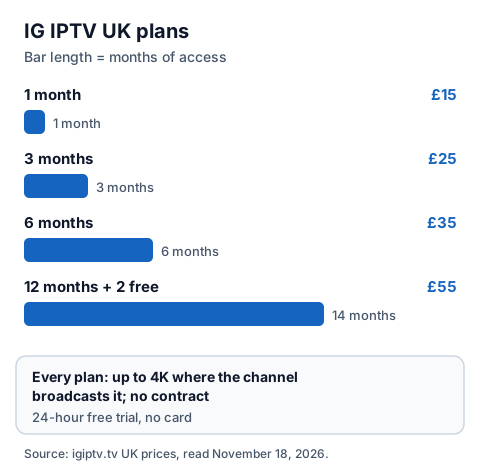
IG IPTV delivers picture quality up to 4K where the channel broadcasts it, on UK plans from £15 a month with no contract. A 24-hour free trial needs no card, so you can check the 4K channels you care about on your own TV before you pay. For live sport, our page on checking sports channels for delay and smooth 50fps motion adds the tests a picture check misses.
| UK plan | Price | Months of access |
|---|---|---|
| Free trial | £0, no card | 24 hours |
| 1 month | £15 | 1 |
| 3 months | £25 | 3 |
| 6 months | £35 | 6 |
| 12 months + 2 free | £55 | 14 |
A standard plan streams on one screen at a time; the multi-room upgrade gives 2 to 4 simultaneous streams on one login, and your connection then needs speed for each. Plans are prepaid for a fixed period, and the first purchase carries a 7-day money-back guarantee when a service problem you report cannot be fixed; the UK refund policy sets out the terms. See the IG IPTV UK plans and prices to order, or the multi-room options for more than one screen.
Frequently Asked Questions
What speed do I need for a 4K IPTV stream?
Netflix recommends 15 Mbps or higher for 4K, and BBC iPlayer asks for 24 Mbit/s for full Ultra HD at 3840 pixels wide. For live 4K, aim for the higher figure and make sure it holds steady at the times you watch. Each extra 4K stream at the same time needs the same again.
Do I need HDMI 2.0 for 4K IPTV?
You need an HDMI link that carries 4K at the frame rate of the stream. HDMI.org's HDMI 1.4b page lists 3840 x 2160 only at up to 30 Hz, so for 4K at 50 or 60 frames per second use a newer port and a cable rated for 4K at 60 Hz, with HDCP 2.2 on every device in the path.
Can a Fire TV Stick play a 4K IPTV stream?
The 4K models can. Amazon's specifications list hardware H.265 decoding up to 3840 x 2160 at 60 fps on the Fire TV Stick 4K Max (1st Gen) and the Fire TV Stick 4K (3rd Gen), while the Fire TV Stick (3rd Gen) streams in 1080p. Check your player is available for your model.
Does every IG IPTV channel play in 4K?
No. Picture quality is up to 4K where the channel broadcasts it, and many channels are broadcast in HD. Use the 24-hour free trial to check the ones you watch.
Sources
- Netflix Help Center, "Netflix-recommended internet speeds", read November 18, 2026.
- Netflix Help Center, data used per hour by video quality, read November 18, 2026.
- BBC iPlayer Help, "Can I watch programmes in Ultra HD on my connected TV?", read November 18, 2026.
- BBC iPlayer Help, "What programmes can I watch in Ultra HD?", read November 18, 2026.
- BBC iPlayer Help, "How can I check if my internet connection is fast enough for BBC iPlayer?", read November 18, 2026.
- Amazon Developer, Fire TV streaming media player device specifications, read November 18, 2026.
- HDMI.org, HDMI 1.4b specification page and its 4K cable certification programme page, read November 18, 2026.
- IG IPTV plan prices and terms (igiptv.tv), read November 18, 2026.
Couldn't read: Ofcom's broadband speed guidance (ofcom.org.uk refused our reader, so no Ofcom figures are quoted); Amazon's customer help pages on 4K and HDCP (refused our reader); Google's Google TV 4K help page (the address no longer exists).