How to Test an IPTV Free Trial in 24 Hours
Here is how to test an IPTV free trial: use it the way you will use the service after paying: on your own TV and broadband, on the channels you actually watch, at the times you usually watch them. Prepare the night before so the 24 hours go on watching. Check the TV guide, catch-up and on-demand films, try every device in the house, and write down anything that fails, with the channel and time, so support can look at it before the trial ends.
This guide is the testing half of our 24-hour IG IPTV free trial: that page explains how to get a login, and this one explains how to test IPTV once you have it, so the decision you make at the end rests on what you saw at home rather than on a sales page.
What should you prepare before the trial starts?
Prepare three things before you ask for a trial login: the player app installed on every device you plan to use, a short list of the channels you watch most, and a start time that puts your usual evening viewing inside the 24 hours.
The trial clock runs from the moment the login arrives, so do the slow parts first. Install a player such as IPTV Smarters Pro or TiviMate first; our comparison of player apps by device helps you pick one, and the IG IPTV Fire TV Stick page covers the install.
| Prepare | Why it matters |
|---|---|
| Player app on every device | The login goes in as soon as it arrives |
| A list of 10 to 15 channels you watch | You test your own viewing, not a random sample |
| A start time in the early evening | Your usual viewing hours fall inside the window |
| A note on paper or your phone | Faults are recorded with the channel and time |
If a match or programme you follow airs during the window, add it to the list, but do not assume any channel is included until you find it in the channel list yourself.
What is a good 24-hour test plan?
A good plan follows your own week in miniature: start in the early evening, watch your usual channels at your usual hours, try the other devices and the guide the same night, and use the next morning for catch-up and on-demand checks.
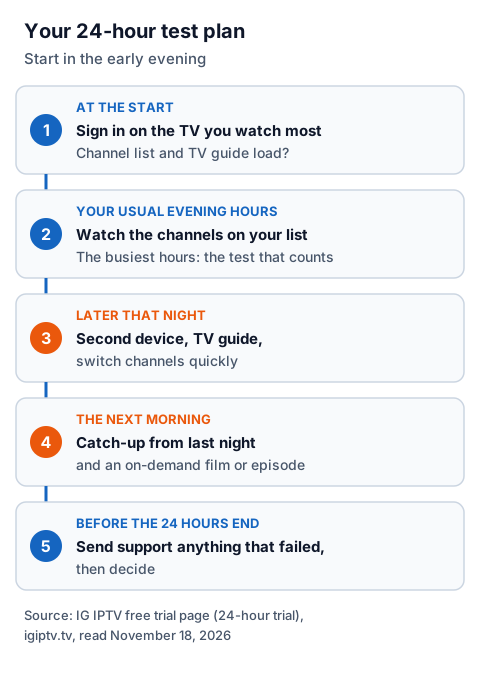
- At the start. Sign in on the TV you watch most and confirm the channel list and TV guide load.
- Your usual evening hours. Watch the channels on your list for real, not for ten seconds each. Evenings are when any IPTV service is under the most load, so this is the test that counts.
- Later that night. Try a second device, open the guide, and switch channels quickly to see how fast each one starts.
- The next morning. Try catch-up on a programme from the night before where the channel offers it, and play a film or episode from the on-demand library.
- Before the 24 hours end. Read your notes and send support anything that failed.
What should you test on your own TV?
What to test during an IPTV trial comes down to six things on your own TV: your channels, your viewing times, your devices, the TV guide, catch-up and on-demand playback. Each one has a clear sign of a pass and a clear sign of a problem.
| Test | How to test it | Pass sign | Problem sign |
|---|---|---|---|
| Your channels | Find every channel on your list and watch each for a few minutes | All are there and play steadily | Missing channels, black screens, constant spinning |
| Your viewing times | Watch through your usual evening hours | The picture holds when the service is busiest | Pauses that appear only in the evening |
| Your devices | Sign in on each TV, stick or phone you will use | Each one loads the list and plays | One device fails where others play |
| TV guide | Open the guide for your channels | Now and next match what is on screen, in UK time | Blank guide or programmes an hour out |
| Catch-up | Replay a programme from earlier on a channel that offers it | The right programme starts from the beginning | No catch-up icon, or the wrong segment plays |
| On-demand | Play a film and a series episode | Both start and you can skip forward | Titles listed but not playing |
Catch-up uses the guide's start and end times to find the programme, so a wrong guide usually means wrong catch-up too. Our guide to IPTV EPG and catch-up explains how the two work together.
If you have a 4K TV, play a 4K stream as well. Picture quality on IG IPTV goes up to 4K where the channel broadcasts it, so check which channels carry 4K rather than expecting it everywhere, and check your broadband with the speed checks in our IPTV freezing guide first.
What should you write down during the trial?
Write down the channel, the time, the device and the app for anything that goes wrong, plus what you saw: a black screen, a spinning wheel, sound with no picture or an error message. Those four details turn a vague complaint into something support can check.
A note like "channel name, 8.40pm, Fire TV Stick, TiviMate, picture froze twice" is far more useful than "it buffered". It also shows whether problems share a pattern: one channel, one device, or only evenings.
| Write down | Example | What it tells you |
|---|---|---|
| Channel | The channel name as shown in the app | Whether one stream or many are affected |
| Time | The clock time it happened | Whether it only happens at busy hours |
| Device and app | Fire TV Stick, TiviMate | Whether one device is the weak link |
| What you saw | Froze, black screen, error text | Which layer to look at first |
When should you ask support during a trial?
Ask support as soon as something fails twice in the same way, not at the end of the trial. Reported early, a fault can be fixed while you still have time to retest.
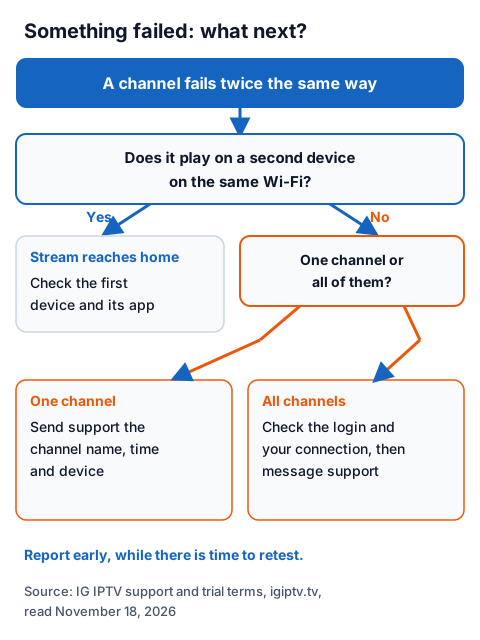
Before you message, play the same channel on a second device on the same Wi-Fi. If it plays there, the stream is reaching your home and the first device or its app is the problem; our IPTV troubleshooting hub and IPTV buffering checklist cover the fixes at home. If it fails on both, send support the channel, the time and the device from your notes.
IG IPTV support runs 24/7 on WhatsApp, in the same chat the trial login arrives in, so you do not need a separate account or email to report a fault.
How do you test IPTV on more than one device?
Sign in on each device one at a time first, then try two at once only if your plan will include more than one screen. A standard IG IPTV plan streams on one screen at a time; the multi-room upgrade gives two to four simultaneous streams on one login.
If a second device shows an error or a black screen while the first is playing, the connection limit may be the reason rather than a fault. Ask support whether your trial login allows a second stream at once before you count it as a failure. The multi-room plans page explains the limit and lists the options.
What does the IG IPTV free trial include?
The IG IPTV trial lasts 24 hours, costs £0 and needs no credit card. It gives access to 55,000+ live channels and 180,000+ films and series on demand, with picture quality up to 4K where the channel broadcasts it and a TV guide on supported channels.
The login arrives on WhatsApp as a server URL, username and password, which go into a player app on your device. Because no card is taken, nothing is charged when the 24 hours end; you choose whether to buy a plan. Afterwards, players show an expired-account message.
| After the trial | UK price |
|---|---|
| 1 month | £15 |
| 3 months | £25 |
| 6 months | £35 |
| 12 months + 2 free | £55 |
Plans are prepaid for a fixed period with no contract and do not auto-renew; the UK pricing page shows the multi-device prices. Your first purchase also carries a 7-day money-back guarantee if a service problem you report within 7 days of payment cannot be fixed. What to look for in that kind of guarantee, from any seller, is in our guide to IPTV refund policies.
What should make you stop testing a service?
Stop and look elsewhere if a "free" trial asks for card details, if the seller gives no business name or postal address, or if you are pushed to pay before the trial has finished.
Citizens Advice lists similar warning signs in its scam guidance: no postal address, being asked to transfer money quickly, an unusual payment method such as vouchers or a money-transfer service, and nothing agreed in writing. It also suggests checking a company's details on GOV.UK and reading reviews on other websites rather than relying on the seller's own. IPTV as a technology is legal in the UK; whether a service is lawful depends on the seller holding the rights to what it streams, as our guide to whether IPTV is legal explains.
Frequently Asked Questions
Is 24 hours enough to test an IPTV service?
Yes, if you prepare the night before and start in the early evening, so your usual viewing hours and a next-morning catch-up check both fall inside the window.
Should I test IPTV on Wi-Fi or a cable?
Test on the connection you will really use. If the picture pauses on Wi-Fi, try the same channel with the device plugged into the router by Ethernet: if it then plays steadily, the Wi-Fi is the weak link, not the service.
What if a channel I want is missing during the trial?
Note the channel name and ask support before the trial ends. Do not buy a plan expecting a channel to be added later; judge the service on what you found in the list.
Does the IG IPTV trial charge my card afterwards?
No. The trial needs no credit card, so there is nothing to cancel and nothing that can be charged when the 24 hours end.
What are some IPTV trial tips for a busy household?
Test each person's channels at their usual time, and try devices one at a time before two at once.
Sources
- IG IPTV free trial page, UK plan prices, Terms of Service and UK refund policy (igiptv.tv), read November 18, 2026.
- Citizens Advice, "Check if something might be a scam" (citizensadvice.org.uk), read November 18, 2026.
Couldn't read: none.