Does Kodi Support IPTV? How to Add an IPTV Playlist to Kodi
Yes, Kodi supports IPTV, but not on its own: Kodi ships with no channels, and live TV comes in through a PVR add-on called IPTV Simple Client, installed from Kodi's own add-on repository. The add-on reads an M3U playlist for channels and an XMLTV file for the TV guide. To add an IPTV playlist to Kodi, install the add-on, open Configure, set Location to Remote path, paste the M3U link, then paste the XMLTV link under EPG. It has no Xtream Codes login screen.

This setup guide belongs to our overview of IPTV player apps, where Kodi sits alongside the dedicated players. Everything below comes from the add-on's README on GitHub, Kodi's wiki and Kodi's Google Play listing, as we read them on November 18, 2026.
Does Kodi support IPTV out of the box?
Not out of the box. Kodi is a free, open-source media centre, run as a non-profit project by the XBMC Foundation according to its GitHub README, available for Android, Linux, BSD, macOS, iOS, tvOS and Windows. Its Google Play listing is blunt: the Kodi app "does not contain any content what so ever", and you provide your own.
Kodi's wiki explains that its Live TV section is only a front end. Something has to feed it, and for internet TV the wiki names one PVR client that receives IPTV directly inside Kodi: IPTV Simple Client, add-on ID pvr.iptvsimple. Its README lists what it handles:
| What the add-on supports | Details from its README |
|---|---|
| Channels | An M3U playlist, from a local path or a remote URL |
| TV guide | XMLTV, plain or compressed with Gzip or XZ |
| Several playlists | Multiple M3U and XMLTV pairs since Kodi 20 (Nexus), through "Add add-on configuration" |
| Catch-up | Catch-up and archive streams, if the IPTV provider supports them |
| Licence | GPL-2.0-or-later, free to use |
On GitHub, Kodi's latest stable release is 21.3 "Omega", published on 31 October 2025, and Kodi 22 "Piers" reached its second release candidate on 10 November 2026. The add-on is released for each version, for example 21.11.0 for Omega and 22.6.1 for Piers.
How do you add an IPTV playlist to Kodi?
You install the add-on from Kodi's repository, paste your playlist link into its General settings and open TV. The menu names below come from Kodi's wiki; labels can differ slightly between Kodi versions and skins.
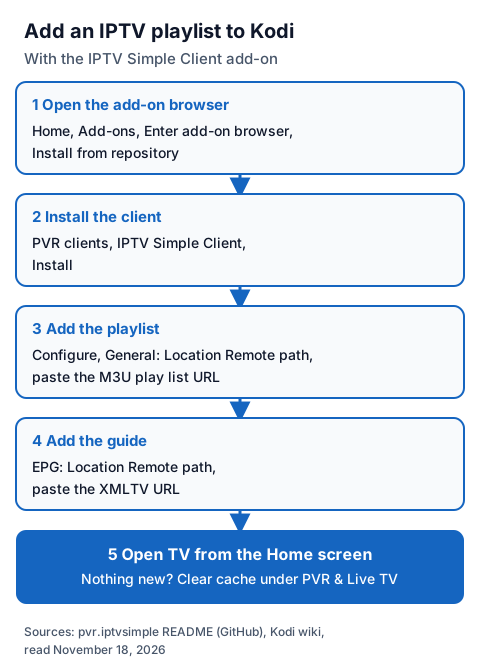
- Open the add-on browser. From the Home screen, choose Add-ons, then Enter add-on browser (or the box icon once you have add-ons installed), then Install from repository.
- Install the client. Kodi's wiki says the PVR add-ons are in the PVR clients section of Kodi's built-in repository. Choose IPTV Simple Client and install it. On Linux, the wiki says PVR add-ons come from your distribution's packages instead.
- Add the playlist. Open the add-on, choose Configure, and under General set Location to Remote path, then paste your link into M3U play list URL. For a file on the device or your network, choose Local path instead.
- Add the guide. Still in Configure, under EPG set Location to Remote path and paste your guide link into XMLTV URL. The next section covers the guide settings.
- Open TV. Confirm with OK, go back to the Home screen and open TV. Channels load from the playlist.
If a setting is missing, raise the settings level: the README says there are four, Basic, Standard, Advanced and Expert, and some settings appear only at the higher ones. If changes do not show, the README's fix is to clear Kodi's cache: Settings, PVR & Live TV, General, Clear cache for channel changes, or PVR & Live TV, Guide, Clear cache for guide changes. Kodi's wiki page for the add-on, which is older than the README, also advises disabling other PVR add-ons before installing this one.
How do you add the TV guide in Kodi?
Paste your provider's XMLTV link into the add-on's EPG settings: set Location to Remote path and fill in XMLTV URL. If you leave the EPG location empty, the add-on uses the guide address in the playlist header (x-tvg-url), when the provider includes one.
The README documents the settings that fix most guide problems:
- EPG time shift moves every programme by -12 to +14 hours, for guides that are out by whole hours.
- Ignore Case for EPG Channel IDs lets a channel match its guide entry when only capital letters differ.
- Cache XMLTV at local storage keeps a copy of a remote guide on the device.
- Auto refresh mode reloads the playlist and guide on a repeated interval, every set number of minutes up to 120, or once per day at an hour you choose. Caching is disabled while auto refresh is on.
The add-on matches each channel to the guide by the playlist's tvg-id, then by tvg-name against the guide's display name, then by channel name. A blank row means none matched. Our guide to fixing an empty or wrong IPTV TV guide walks through each case, player by player.
Can Kodi use an Xtream Codes login?
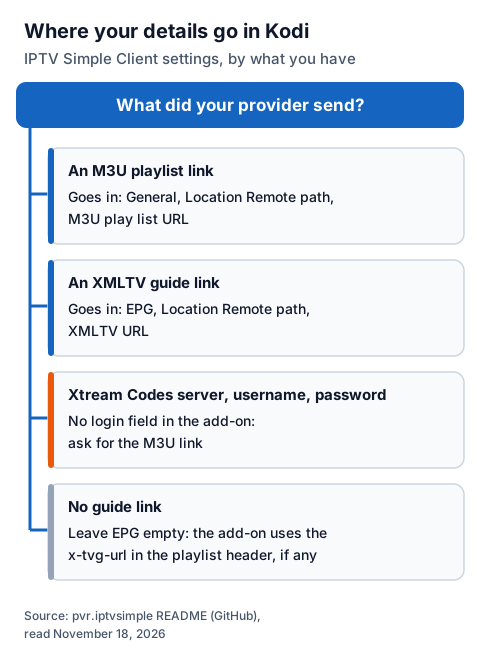
Not as a login. IPTV Simple Client's settings take an M3U location, local or remote; the README describes no field for a server URL, username and password. It does recognise Xtream Codes style stream addresses inside an M3U, and can build catch-up links from them. So if your provider sent Xtream Codes details, ask for the M3U playlist link for the same account, and paste that instead.
Our page on Smart Xtream player apps and login steps explains each part of that login, and which players accept it directly.
| Your provider sent | Where it goes in IPTV Simple Client |
|---|---|
| An M3U playlist link | General: Location Remote path, M3U play list URL |
| An XMLTV guide link | EPG: Location Remote path, XMLTV URL |
| Xtream Codes server URL, username and password | No login field: ask for the M3U link |
| No guide link | Leave EPG empty; the x-tvg-url in the playlist header is used if present |
Which add-ons should you avoid in Kodi?
Anything outside Kodi's own repository that promises channels. Kodi's wiki says manual installs from a ZIP file make compatibility "the user's responsibility", and its page on banned add-ons gives a rule of thumb: if an add-on offers for free something you would normally pay for, it is most likely using pirate feeds. Team Kodi offers no support for installs that include such add-ons.
Kodi's Google Play listing adds that Kodi has no affiliation with any third-party add-on provider and does not endorse streaming copyright material without the holder's permission. Pre-built "builds" and unofficial repositories fall in the same category, so this guide does not cover them. IPTV Simple Client brings no channels of its own; what you can lawfully watch depends on the rights your provider holds, which our page on telling a legal IPTV provider from an illegal subscription explains.
Using an IG IPTV login in Kodi
An IG IPTV login is sent on WhatsApp after payment, as a server URL, username and password, or as playlist and portal details. For Kodi, use the playlist details: paste the M3U link into IPTV Simple Client as in the steps above, then the guide link under EPG. If the grid stays empty, message 24/7 WhatsApp support and say you are using Kodi, so the reply covers the right settings.
The free IG IPTV trial needs no card, so you can check channels and the guide in Kodi before paying. UK plans start from £15 a month, with every price on the page for IPTV in the UK.
Frequently Asked Questions
Does Kodi support IPTV without an add-on?
No. Kodi contains no content and its Live TV section needs a PVR client. For an M3U playlist, that is IPTV Simple Client, from Kodi's own repository.
How do I add an IPTV playlist to Kodi?
Install IPTV Simple Client, open Configure, set General Location to Remote path and paste the link into M3U play list URL. Add the XMLTV link under EPG, then open TV.
Is IPTV Simple Client free?
Yes. Its README gives the licence as GPL-2.0-or-later, and it installs from Kodi's repository at no cost. Your IPTV provider's subscription is separate.
Can I add more than one playlist to Kodi?
Yes, since Kodi 20 (Nexus). In the add-on's settings, choose "Add add-on configuration" and enter the second M3U and XMLTV pair.
Why does my Kodi TV guide show nothing?
The XMLTV link may be missing or wrong, the channel IDs may not match, or the cache holds an old copy. Check the EPG settings, then clear the guide cache under PVR & Live TV.
Sources
- Kodi add-on pvr.iptvsimple README, Piers and Omega branches, and its addon.xml (GitHub, kodi-pvr), read November 18, 2026.
- GitHub releases for xbmc/xbmc and kodi-pvr/pvr.iptvsimple, read November 18, 2026.
- Kodi README (GitHub, xbmc/xbmc), read November 18, 2026.
- Kodi wiki pages "Add-on:PVR IPTV Simple Client", "PVR", "Add-on manager", "Official add-on repository" and "Official:Forum rules/Banned add-ons", read through the wiki's own interface November 18, 2026.
- Google Play listing "Kodi", UK store, read November 18, 2026.
- IG IPTV plan prices and terms (igiptv.tv), read November 18, 2026.
Couldn't read: kodi.tv, including its download, about and add-on pages (all refused our reader, so Kodi's details come from its GitHub, wiki and store pages); kodi.wiki pages in a browser view (also refused, so we used the wiki's own data interface).