Android IPTV Perfect Player: What You Can Install in 2026
If you want the Android IPTV Perfect Player, the original app is hard to get today. When we checked on November 18, 2026, its Google Play address returned "not found" in the UK and US stores, and the developer's website, niklabs.com, showed only a domain-parking page. A different app called "Perfect PLAYER", from another developer, is listed on Google Play and takes Xtream Codes logins only. Most Android TV owners will be better served by a player still listed in the store.
This page belongs to our overview of IPTV player apps. Every app detail below comes from Google Play listings and developer pages as we read them on November 18, 2026; where we could not confirm something, we say so.
Is Perfect Player still on Google Play?
Not the original. The Google Play page for Perfect Player (package com.niklabs.pp) returned "not found" for both the UK and US stores, and a Google Play search for "perfect player" did not show it. The only listing we found with a package name starting com.niklabs is now titled "IPTV Cast - Media Player" and published under a different name, Curved Nebula.
| What we checked | What it showed on November 18, 2026 |
|---|---|
| Google Play page for Perfect Player (com.niklabs.pp) | "Not found" in the UK and US stores |
| niklabs.com, the developer's site | A "coming soon" domain-parking page |
| Google Play search "perfect player" | A different app named "Perfect PLAYER" from another developer |
| Listing under the com.niklabs package prefix | "IPTV Cast - Media Player" by Curved Nebula |
Because neither the store listing nor the developer's site is online, we could not confirm the original app's current version, price or the playlist and guide formats it accepts. Descriptions of those you find elsewhere may be out of date.
Should you install the old Perfect Player APK from another site?
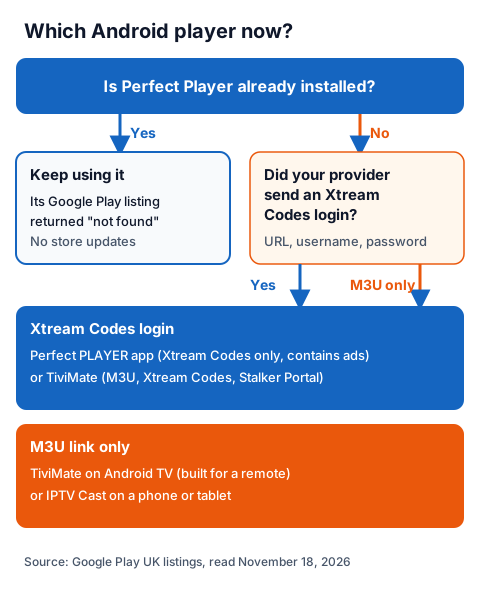
No. With the store listing gone and the developer's site parked, any copy you find is hosted by someone other than the developer, and we do not link to downloads hosted by anyone but the developer. An app installed that way is also not updated through Google Play. If Perfect Player is already on your box and still plays your playlist, you can keep using it; for a new install, choose a player that is listed in the store today.
Our page on choosing an IPTV player for an Android TV box compares players that are still listed, by device and by what they record.
What is the app called Perfect PLAYER on Google Play?
It is a separate, newer app with a similar name. Its Google Play listing describes "a modern and intuitive media player" built for the Xtream Codes API, with login by URL, username and password. We found nothing on the listing that links it to the original Perfect Player, and it does not mention M3U playlists or an XMLTV guide.
From the listing as we read it:
- Login: Xtream Codes credentials only (server URL, username, password).
- Content: live TV, films and series, organised by category.
- Extras: favourites, watch history that syncs playback progress across devices, and gesture controls for volume and brightness.
- Ads: the listing is marked "Contains ads".
- Store data: 5k+ downloads, category Entertainment, last updated 17 June 2026.
The listing does not say whether the app is built for a TV remote or only for touch screens, and we could not test it on Android TV. Its disclaimer says it does not provide any media content, playlists or subscriptions.
Which Android IPTV players are listed on Google Play today?
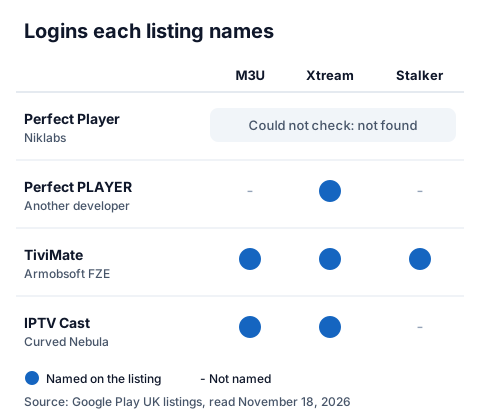
Several players remain listed, and they differ mainly in the login types they accept and whether they are designed for a TV remote or a touch screen. The table sets the original Perfect Player beside four listed apps, using only what each listing says.
| App (publisher) | Logins named on the listing | TV guide | Designed for | Ads or purchases |
|---|---|---|---|---|
| Perfect Player (Niklabs) | Could not check: listing not found | Could not check | Could not check | Could not check |
| Perfect PLAYER (another developer) | Xtream Codes | Not mentioned | Not stated | Contains ads |
| TiviMate IPTV Player (Armobsoft FZE) | M3U, Xtream Codes, Stalker Portal | EPG grid | Android TV and remote control; not optimised for phones or tablets | In-app purchases |
| IPTV Cast - Media Player (Curved Nebula) | M3U, Xtream Codes | XMLTV | Phones and tablets, casting to Chromecast or Google TV | Contains ads and in-app purchases |
| VLC for Android (Videolabs) | Network streams; no IPTV login type named | Not mentioned | Phones, tablets and Android TV | No ads, no in-app purchases |
TiviMate's listing also names multiple playlists, favourites, catch-up, recording, search, parental controls and multiview, and states that a paid upgrade "unlocks application features only". VLC for Android's listing says it is free and open source and plays network streams, which suits testing a single stream link rather than browsing a full channel list with a guide.
How do you set up an IPTV player on an Android TV box?
Install the player from Google Play on the box, then enter the login your provider sent, exactly as written. The steps are the same for any of the apps above; only the menu names differ.
- Open Google Play on the box and search for the player by name. Check the publisher on the listing before you install, because several apps share similar names.
- Choose your login type. If you received a server URL, username and password, pick Xtream Codes; if you received one long link, pick M3U or playlist URL.
- Type the details carefully. One wrong character in a URL or password stops the channels loading.
- Wait for the channel list, then the guide. With an Xtream Codes login many players load the TV guide through the same login. If the grid stays empty, our guide to adding an EPG source to an IPTV player covers XMLTV links.
- Add favourites so the channels you use most sit at the top.
If your provider sent a server URL, username and password and you are not sure which field is which, our walkthrough of the Xtream Codes fields explains each part.
Using an IG IPTV login on an Android player
An IG IPTV login works in any Android player that accepts Xtream Codes or M3U. After payment, the login (server URL, username and password, or playlist and portal details) is sent on WhatsApp, and 24/7 WhatsApp support can help you enter it in your player.
A standard plan streams on one screen at a time; the multi-room upgrade gives 2 to 4 simultaneous streams on one login. Picture quality runs up to 4K where the channel broadcasts it. UK plans start from £15 a month, with no contract, and the 24-hour free trial with no card lets you check your box, your player and the channels you want before paying. When you are ready, the IG IPTV subscription page lists every plan.
Frequently Asked Questions
Why can't I find Perfect Player on Google Play?
On November 18, 2026, the Google Play page for Perfect Player (com.niklabs.pp) returned "not found" in the UK and US stores, and the developer's site showed a parking page. The store does not say why a listing is no longer available.
Is "Perfect PLAYER" on Google Play the same app?
No. It comes from a different developer, accepts Xtream Codes logins only according to its listing, and contains ads. Nothing on its listing connects it to the original.
Does Perfect Player work with M3U playlists?
We could not confirm this today, because no current listing or developer page for the original app was online. TiviMate's and IPTV Cast's listings both name M3U.
Can I use Perfect Player on a Fire TV Stick?
We found no current listing for it in any app store we could read. For Fire TV, our IG IPTV page for the Fire TV Stick covers players and setup.
Is using an IPTV player legal?
A player is a media app and is legal to install; what decides it is whether the service behind your login holds the rights to what it streams. Our page on whether IPTV is legal explains how to check.
Sources
- Google Play, UK store: page for package com.niklabs.pp ("not found", also in the US store), read November 18, 2026.
- Google Play, UK store: searches for "perfect player", "perfect player iptv" and "niklabs", read November 18, 2026.
- Google Play listings, UK store: "Perfect PLAYER", "IPTV Cast - Media Player" (Curved Nebula), "TiviMate IPTV Player" (Armobsoft FZE) and "VLC for Android" (Videolabs), read November 18, 2026.
- niklabs.com and niklabs.com/perfect-player (domain-parking page), read November 18, 2026.
- IG IPTV plan prices and terms (igiptv.tv), read November 18, 2026.
Couldn't read: any current page describing the original Perfect Player's features, version, price or accepted formats (the store listing and the developer's site were both offline); the Amazon Appstore search (it did not load for our reader); whether "Perfect PLAYER" works with a TV remote on Android TV (its listing does not say).