Max IPTV Player: What MaxPlayer Is and How to Set It Up
Max IPTV Player is the name most people use for MaxPlayer, a player app from E Galactic e.U that plays an M3U playlist or Xtream Codes login you already have; it ships with no channels. The developer's site, maxplayer.tv, lists a 7-day free trial with no credit card, then Premium at €1.50 a month for 5 devices or Premium+ at €2.50 a month for 7 devices. The developer lists versions for Android TV, Fire TV, Samsung and LG TVs, iPhone and Apple TV.
This guide is one entry in our roundup of IPTV player apps. Below: what MaxPlayer does, which other apps use "Max" in their name, what it costs, which devices it runs on, how to set it up, and what we could not check.
What is MaxPlayer, the Max IPTV Player?
MaxPlayer is a player for your own IPTV login. It organises the live channels, films, series and catch-up that your provider's login unlocks, with a TV guide, and keeps your playlists in one account that you use on several devices.
The developer is clear that the app is empty. Its site says MaxPlayer "does not provide IPTV subscriptions, channels or streams" and that users must supply their own content; the Google Play listing repeats it and adds that its screenshots do not show real video content.
What the Google Play listing and the developer's site name as features:
- M3U playlists and Xtream Codes logins
- Live TV, films, series and catch-up, where your provider offers them
- A TV guide with scheduled updates, favourites and search
- One account for up to 5 devices and 5 sub-users, each sub-user with a personal profile
- Parental control and several interface languages
That makes it the same kind of app as IPTV Smarters or IPTV Extreme Pro: a front end that is only as useful as the login you load into it. The difference is the account. Your playlists live in a MaxPlayer account, not on one device, so they follow you from the TV to the phone.
Which "Max" IPTV app is which?
"Max player iptv" and "max iptv" searches lead to several different apps. On Google Play, the listing that links to maxplayer.tv is "MaxPlayer: IPTV M3U Player" by E Galactic e.U. At least three other players use "Max" in their name and come from other developers.
| Google Play (UK) listing | Publisher shown | Price shown | Downloads |
|---|---|---|---|
| MaxPlayer: IPTV M3U Player | E Galactic e.U (maxplayer.tv) | Free to install; account plan needed after the trial | 1m+ |
| MAX IPTV | Max tech (maxiptv.app) | Free | 10k+ |
| IPTV Player MAX: Family IPTV | An individual developer | Free, with in-app purchases | 10k+ |
| IPTV Xtream M3U Max | An individual developer | £1.79 | 100+ |
The other three are separate products. MAX IPTV's listing names M3U, Xtream Codes and Stalker portal support; IPTV Player MAX's listing says it needs an Xtream Codes login; IPTV Xtream M3U Max's listing says it is a paid player that needs Android 7.0 or newer. All three say they provide no channels. Check the publisher on the listing before you install or pay, because the setup steps below apply to MaxPlayer only.
How much does MaxPlayer cost?
The app is free to install, but it needs a MaxPlayer account, and the account needs a plan after the trial. The developer's pricing on maxplayer.tv lists three tiers, priced in euros, paid by card through Stripe, with cancellation at any time.
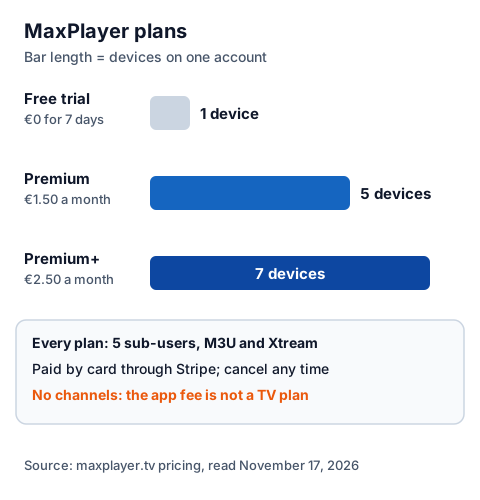
| Plan | Price on maxplayer.tv | Devices | Sub-users |
|---|---|---|---|
| Free trial | €0 for 7 days, no credit card | 1 | 5 |
| Premium | €1.50 a month | 5 | 5 |
| Premium+ | €2.50 a month | 7 | 5 |
Every tier lists M3U and Xtream support, the TV guide, synced content and email notifications. We could not see a price in pounds, so expect the charge in euros; your bank may add a conversion fee. The MaxPlayer fee pays for the player only, separate from what your IPTV provider charges; our UK IPTV price guide, plan by plan puts both together.
Does Max IPTV Player work on a Firestick and smart TVs?
Yes, according to the developer. MaxPlayer's site has install pages for Amazon Fire TV, Android TV, Samsung Tizen and LG webOS TVs, and the app is also on Google Play and Apple's App Store. On every platform you install it from the device's own store and then sign in to your account.
| Device | Store named by the developer | Requirement listed |
|---|---|---|
| Fire TV Stick, Fire TV Cube | Amazon Appstore | Fire TV Stick 2nd generation or newer |
| Android TV, Google TV | Google Play | Android 7.0 or higher |
| Samsung smart TV | Samsung's app store | Tizen, 2017 models or newer |
| LG smart TV | LG Content Store | webOS 4.0 or higher |
| iPhone, iPad, Apple TV | App Store | iOS 15.1 or later for version 1.2.11 |
The developer's blog adds two more: a version for Amazon's new Vega system on the Fire TV Stick 4K Select (version 1.2.13, posted October 11, 2026, which adds phone sign-in with a QR code) and a listing in the Roku Channel Store (posted September 15, 2026). We could not open Amazon's Appstore or the TV stores ourselves, so we have not confirmed those listings directly. If a store search finds nothing, the developer suggests searching "MaxPlayer" as one word. Not every player crosses over like this: if you also use UHF on an iPhone, its developer lists no Fire TV version, as our page on UHF IPTV player support on a Firestick explains.
For the device side, see our IG IPTV Fire TV Stick page, the Samsung and LG smart TV IPTV guide and the device-by-device setup hub.
How do you set up MaxPlayer?
You create an account first, then install the app and link each device to that account with a code. Your playlists are added once to the account and appear on every linked device.
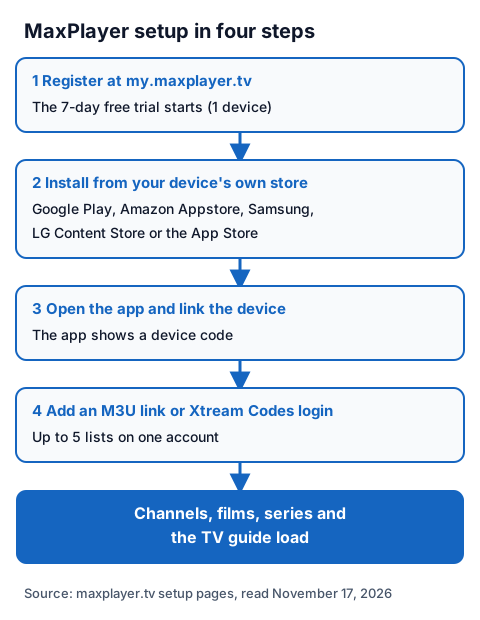
- Register at my.maxplayer.tv. The developer says the 7-day free trial starts automatically.
- Install MaxPlayer from your device's own store: Google Play, Amazon Appstore, Samsung's store, LG Content Store or the App Store.
- Open the app. The developer's Fire TV guide says the first launch shows a device code; use it to link the device to your account.
- Add your playlist: paste an M3U link, or enter an Xtream Codes server URL, username and password. One account holds up to 5 lists.
- Wait for the channels, films, series and TV guide to load.
If an M3U link will not load, the developer's FAQ suggests downloading the playlist and uploading it as a file instead. On Android TV, it says you can switch the video player in the client area at my.maxplayer.tv if a channel does not play. Our page on what goes in each Xtream login field explains where each value comes from.
Is MaxPlayer legal and safe to use?
A player app is legal software; what you load into it decides the legal question. IPTV technology is legal, and a stream is lawful only when the seller holds the rights to what it streams. MaxPlayer's FAQ says the developer is not responsible for content users add.
Our guide to IPTV and the law explains how to tell a seller with rights from one without them. For safety, install MaxPlayer only from a device's official store, check that the publisher is E Galactic e.U, and never paste a free playlist or M3U link found on a forum.
Using MaxPlayer with an IG IPTV login
An IG IPTV login is sent on WhatsApp after payment, as a server URL, username and password, or as playlist details. Those are the two formats MaxPlayer names, so you can test both trials together: MaxPlayer's 7 days and our 24-hour IG IPTV trial, which needs no card.
Use the trial to check, inside MaxPlayer on your own TV, that the channels you care about play. If they do, the prices for UK plans start at £15 a month, with 3, 6 and 12-month plans at £25, £35 and £55, and the 12-month plan includes 2 free months. Picture quality goes up to 4K where the channel broadcasts it.
MaxPlayer's 5 devices and an IPTV plan's streams are different limits. A standard IG IPTV plan streams on one screen at a time, and the multi-room upgrade adds 2 to 4 streams on one login.
Frequently Asked Questions
Is Max IPTV Player free?
The app is free to install, and maxplayer.tv lists a 7-day free trial on one device with no credit card. After that, Premium costs €1.50 a month for 5 devices and Premium+ €2.50 a month for 7 devices.
Does MaxPlayer come with channels?
No. The developer says MaxPlayer does not provide IPTV subscriptions, channels or streams. You add an M3U link or Xtream Codes login from a provider, and the provider's rights decide what you can lawfully watch.
Does Max IPTV Player work on a Firestick?
The developer says yes: its Fire TV page names the Amazon Appstore and a Fire TV Stick of the 2nd generation or newer, or a Fire TV Cube. We could not open Amazon's Appstore to confirm the listing ourselves.
Is MAX IPTV the same app as MaxPlayer?
No. MAX IPTV on Google Play is published by Max tech with the website maxiptv.app. MaxPlayer is published by E Galactic e.U with the website maxplayer.tv.
How many devices can I use with MaxPlayer?
One device during the trial, 5 on Premium and 7 on Premium+, all on one account. That is separate from how many streams your IPTV plan allows at the same time.
Sources
- maxplayer.tv home page, pricing and FAQ, read November 17, 2026.
- maxplayer.tv install pages for Amazon Fire TV, Android TV, Samsung Tizen and LG webOS, read November 17, 2026.
- maxplayer.tv blog posts on Firestick setup (June 11, 2026), Roku (September 15, 2026) and Amazon Vega (October 11, 2026), read November 17, 2026.
- Google Play listing "MaxPlayer: IPTV M3U Player" (E Galactic e.U), UK store, read November 17, 2026.
- Apple App Store data for "MaxPlayer: IPTV M3U Player" (E Galactic e.U), UK store, read through Apple's lookup service November 17, 2026.
- Google Play listings "MAX IPTV" (Max tech), "IPTV Player MAX: Family IPTV" and "IPTV Xtream M3U Max", UK store, read November 17, 2026.
- IG IPTV plan prices and terms (igiptv.tv), read November 17, 2026.
Couldn't read: the Apple App Store web page (it refused our reader, so we used Apple's lookup data instead); Amazon Appstore search (did not load); the Samsung, LG and Roku stores (not readable from a browser, so those listings are described only from the developer's pages); prices in pounds (maxplayer.tv shows euros only).