MXL TV: What the App Is and How to Set It Up Safely
MXL TV is a free video player app for Android, not a TV service or an IPTV seller: it plays an M3U playlist that you already have, and it ships with no channels. Its developer, MXL Apps, publishes it at mxl-apps.io, where the page says the app is free thanks to in-app ads and that a licence bought through PayPal removes them on up to 2 devices. The developer's page also says it is not available for iPhone.
Because MXL TV only plays what you load into it, the real decision is the playlist, and our guide to buying an IPTV subscription covers how to check a seller before you pay. Below: who makes MXL TV, where the genuine app comes from, how to add a playlist and what we could not verify.
What is MXL TV?
MXL TV, also searched as MXL IPTV, is a media player. The developer's page describes it as a multimedia player that handles common streaming protocols (http, https, mms, rtsp and rtmp) and loads M3U lists automatically. You add a list; the app sorts and plays it.
The features the developer's page names:
- Adding an M3U list straight from a URL
- A list manager to add, select and delete several M3U lists
- Search, favourites and content sorted by name and category
- A choice of player: the built-in one by default, or MX Player or VLC
- Notifications about new versions
The app does not sell anything to watch. On first launch it asks for an M3U list URL, and the tutorial on mxl-apps.io says the list comes either from you or from your IPTV provider. That puts MXL TV in the same family as other empty players such as XCIPTV and IPTV Smarters; our round-up of IPTV player apps sets them side by side.
Who makes MXL TV, and which download is genuine?
The developer is MXL Apps, at mxl-apps.io, a Spanish-language site whose DMCA page is titled "MXL IPTV". The Android package name is tv.mxliptv.app. Any app with the MXL TV name but a different package or publisher is not the developer's app.
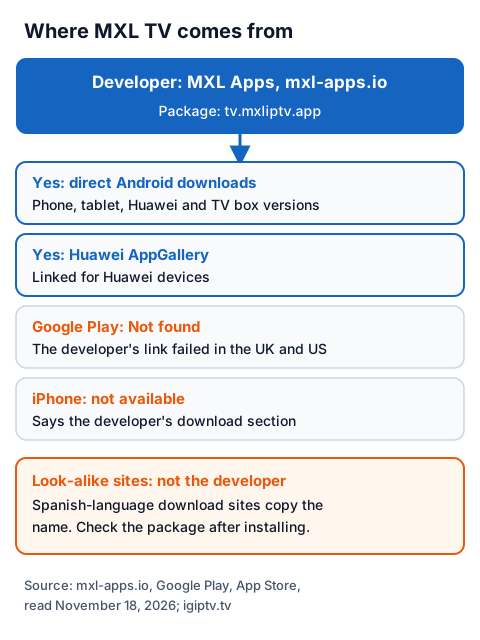
| Where | What we found on November 18, 2026 |
|---|---|
| mxl-apps.io (developer) | MXL TV page with Android phone, tablet, Huawei and TV box downloads, plus a Fire TV Downloader code |
| Google Play | The developer's link to tv.mxliptv.app returned "Not found" in the UK and US stores |
| Huawei AppGallery | Linked from the developer's page for Huawei devices; we could not load the listing |
| Apple App Store | The developer's page says MXL TV is not available for iPhone; a UK store search showed no MXL TV app |
| Look-alike sites | At least two Spanish-language sites offer MXL TV downloads; one calls itself the official download, another says it is independent of MXL Apps |
The developer's tutorial still tells readers to search Google Play for MXL TV, but its own Play link did not open a listing when we read it. Store searches turn up other apps with similar names, such as "MXL Movies" from a different developer, which is a film information app built on The Movie Database. If you install from anywhere other than mxl-apps.io, you cannot be sure who built the file.
We do not link download files here. If you decide to install MXL TV, go to mxl-apps.io yourself, and after installing check that the app's package name is tv.mxliptv.app.
Does MXL TV work on Fire TV Stick?
Yes, according to the developer: the MXL TV page tells Fire TV Stick, Android TV and Google TV owners to install the Downloader app from their device's store, then enter the short code shown on mxl-apps.io. That is a sideload: the developer does not point to Amazon's Appstore, and we could not check the Appstore ourselves.
Take the code only from the developer's page, not from a list on another site, because a code copied elsewhere can point to any file. The developer adds that if the app says "not compatible" on your device, you should install the Android phone version instead. Our Fire TV Stick IPTV page shows the Amazon Appstore setup route, and our list of Downloader codes for Fire TV explains how those codes work.
How do you add an M3U playlist to MXL TV?
You paste the M3U link your provider sent into the "URL m3u" field, save the list, and wait while the app loads and processes it. That is the whole setup the developer's tutorial describes.
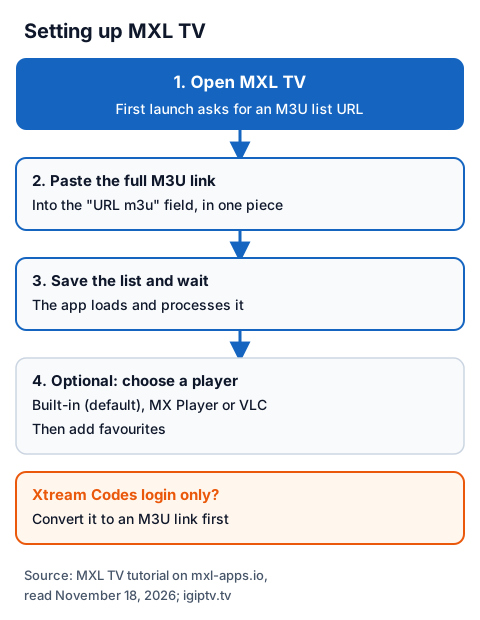
- Open MXL TV. On first launch it asks for an M3U list URL.
- Paste the full M3U link from your provider into the "URL m3u" field, in one piece.
- Save the list and give it a few seconds to load and process.
- Optional: in settings, choose your player. The developer recommends the built-in player, with MX Player or VLC as alternatives.
- Mark channels as favourites so they are first when you open the app.
The developer's page names M3U lists only. If your provider sent an Xtream Codes login (server URL, username and password), ask it for the M3U version, or see which Smart Xtream players take that login directly. If a list loads but channels show sound and no picture, our guide to common IPTV faults walks through the decoder settings.
How much does MXL TV cost?
MXL TV is free to download and use, with ads inside the app. The developer's page says you can buy a licence through PayPal to remove the ads, that the licence covers up to 2 devices, and that you restore it by entering the email address you paid with.
The developer's page does not show the licence price, so we cannot quote one. It also warns that ad blockers can stop the app working properly. The licence pays for the player only; whatever you watch through it comes from the playlist, which is a separate purchase from a separate seller.
Is MXL TV legal and safe to use?
A player app is legal software, and the playlist decides the legal question. IPTV technology is legal; a stream is lawful only when the seller holds the rights to it. MXL's own terms put that responsibility on whoever supplies the content.
The developer's EULA says MXL "no se hace responsable" (is not responsible) for the content users reach, and that content belongs to whoever makes it available. Its DMCA page calls MXL "a simple video viewer". The same developer also offers MXL Movies, an app whose page describes a catalogue of series and films with downloads; that page does not say who licenses those titles, and we could not verify it.
For safety, three habits matter most:
- Install only from mxl-apps.io and check the package name is tv.mxliptv.app.
- Never paste a free M3U list found on a forum or a download site; you do not know who runs it or whether it has rights.
- If Android or your phone's security scan blocks the file, stop and check where it came from before overriding the warning.
Our guide to whether IPTV is legal in the UK explains how to tell a seller with rights from one without.
Using MXL TV with an IG IPTV playlist
An IG IPTV login is sent on WhatsApp after payment, as a server URL, username and password, or as playlist details, so you can ask for an M3U link to paste into MXL TV. The 24-hour free trial needs no card, which lets you check that MXL TV plays the channels you care about on your own device before paying.
If they do, the UK plan prices start at £15 a month, with 3, 6 and 12-month plans at £25, £35 and £55; the 12-month plan includes 2 free months. Plans do not auto-renew, and a standard plan streams on one screen at a time.
Frequently Asked Questions
Is MXL TV free?
Yes. The developer's page says MXL TV is free because it shows ads, and that a licence paid through PayPal removes them on up to 2 devices. The page does not state the licence price.
Is MXL TV on Google Play?
Not that we could find. The developer's page still links a Google Play listing for tv.mxliptv.app, but on November 18, 2026 that link returned "Not found" in the UK and US stores. The developer offers direct downloads and a Huawei AppGallery listing instead.
Is MXL TV available on iPhone?
No. The download section of the developer's MXL TV page says the app is not available for iPhone, and a UK App Store search showed no MXL TV app.
Does MXL TV come with channels?
No. On first launch it asks for an M3U list URL, and the developer's tutorial says the list comes from you or your IPTV provider. Its terms say content belongs to whoever makes it available.
Is MXL IPTV the same as MXL TV?
Yes. The developer's DMCA page is titled "MXL IPTV" and the Android package is tv.mxliptv.app; both refer to the MXL TV player from MXL Apps.
Sources
- MXL Apps home page, MXL TV page, EULA and DMCA pages (mxl-apps.io), read November 18, 2026.
- MXL Movies page (mxl-apps.io/movies), read November 18, 2026.
- Google Play listing link for tv.mxliptv.app (UK and US stores, returned "Not found"), read November 18, 2026.
- Google Play listing "MXL Movies" (com.azlla.mxlmovies, a different developer), UK store, read November 18, 2026.
- Apple App Store search for "mxl" and "mxl tv", UK store, read November 18, 2026.
- Two Spanish-language MXL TV download sites (not named or linked here), read November 18, 2026, for the look-alike check only.
- IG IPTV plan prices and terms (igiptv.tv), read November 18, 2026.
Couldn't read: Huawei AppGallery listing for MXL TV (page did not load for our reader); Amazon Appstore (not checked); the price of the MXL TV ad-free licence (not shown on the developer's page).