BuzzTV L1 Review: The Linux BuzzTV IPTV Box, Spec by Spec
The BuzzTV L1 is a BuzzTV IPTV box that runs a customised Debian Linux system instead of Android, built to play one IPTV service through the BuzzTV 6 Linux app. BuzzTV's comparison chart lists a Rockchip RK3528 chip, 2GB of RAM, 8GB of storage, 10/100 Ethernet and an IR-55 remote. It offers time shift but no PVR recording and no app store, and it comes with no channels: you add your own IPTV subscription.
This review sits inside our guide to IPTV on every device. Every spec below comes from BuzzTV's own pages and its L1 manual; where BuzzTV does not say something, we say so rather than guess.
What is the BuzzTV L1?
The L1 is a set-top box from BuzzTV that BuzzTV calls the "L1 Linux Player": a media player for people who want a simple IPTV box rather than a general Android device. It plays the IPTV service you bring; BuzzTV says it sells hardware only and does not sell or advise on streaming services.
BuzzTV's case for Linux is that dropping Android's extra apps and customisation leaves more of the processor for streaming. On its L1 page it says the lighter system gives faster channel switching, lower resource use and better stability than most Android devices. Those are the maker's claims; we have not tested an L1.
The operating system is, in BuzzTV's words, a customised Linux Debian system designed for IPTV. The trade-off follows from that: asked whether you can download apps from an app store or sideload more, BuzzTV answers that the Linux OS does not support any app stores and that some popular apps are included. It does not list which.
BuzzTV L1 specs
BuzzTV's Streaming Player Comparison Chart gives the L1 a Rockchip RK3528 processor, 2GB of RAM, 8GB of internal storage, 10/100 Ethernet and dual-band AC Wi-Fi. The back panel, per the L1 manual, has IR, USB, HDMI, Ethernet and a DC 5V power input.
| Spec | BuzzTV L1 (as BuzzTV lists it) |
|---|---|
| Operating system | Customised Linux Debian |
| Processor | Rockchip RK3528 |
| RAM | 2GB |
| Internal storage | 8GB |
| Wired network | 10/100 Ethernet |
| Wi-Fi | Dual band + AC |
| Bluetooth on the box | None listed |
| Recording | No PVR, no PVR+; time shift yes |
| Audio | Select audio pass-through |
| Remote | IR-55 |
| Ports (manual) | IR, USB, HDMI, Ethernet, DC 5V |
| App | BuzzTV 6 Linux app |
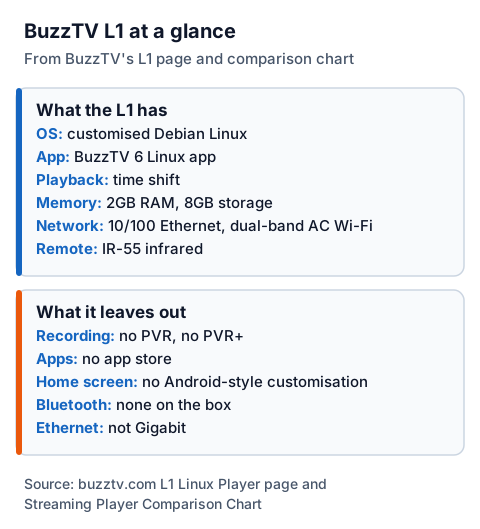
Two gaps worth knowing. We found no maximum output resolution for the L1 on the BuzzTV pages we read, so we cannot say whether it outputs 4K. And the 10/100 port tops out at 100 Mbps; if you are unsure whether your line keeps up, our guide to why IPTV freezes covers the speed checks.
What the BuzzTV 6 Linux app keeps and drops
The L1 runs the BuzzTV 6 Linux app, a cut-down version of the Android BuzzTV 6 app. BuzzTV says the Linux version removes PVR recording and the home screen customisation of the Android app, and keeps the core IPTV features.
On the L1 page, BuzzTV lists what the Linux app does have: universal search, an updated info bar, redesigned screens, and a home screen with a picture-in-picture player and shortcuts to favourite channels. Its comparison chart marks time shift as supported on the L1 and both PVR and PVR+ as not supported.
If recording matters, that is the deciding line. On BuzzTV's chart, the E5 has PVR, and the G-Series gets recording through the BuzzTV 6 app from the Play Store. If you would rather choose your own player app, an Android box gives you that choice; our IPTV player comparison lists the common ones.
The IR-55 remote
The L1 ships with BuzzTV's IR-55 remote, which works by infrared. The L1 manual's troubleshooting table tells you to aim the remote directly at the sensor on the front of the box, so it needs a line of sight.
The manual's button list includes a number pad, a "Buzz Live TV" key, last channel, search, information, page up and down, and the four colour buttons. It also describes a learning zone: hold the power key there for 5 seconds, hold your TV remote head to head no more than 3cm away, and the remote can learn the TV's power and volume keys, so one remote runs both.
How the L1 compares with other BuzzTV boxes
On BuzzTV's own chart, the L1 is the only Linux model; the B5 and E5 run Android 11 and the G-Series runs Android 14 for TV. The L1 matches the B5 and E5 on RAM and Ethernet but has the least storage of the four; like the B5, it has time shift but no PVR.
| Model | OS | Chip | RAM / storage | Ethernet | Recording | Remote |
|---|---|---|---|---|---|---|
| L1 | Linux Debian | Rockchip RK3528 | 2GB / 8GB | 10/100 | Time shift only | IR-55 |
| B5 | Android 11 | Amlogic S905W2 | 2GB / 16GB | 10/100 | Time shift only | IR-100 |
| E5 | Android 11 | Amlogic S905X4 | 2GB / 32GB | 10/100 | PVR and time shift | IR-200 |
| G-Series | Android 14 for TV | Amlogic S905X5M | 4GB / 64GB | Gigabit (1 GB) | PVR, PVR+ and time shift via the BuzzTV 6 app | G21 |
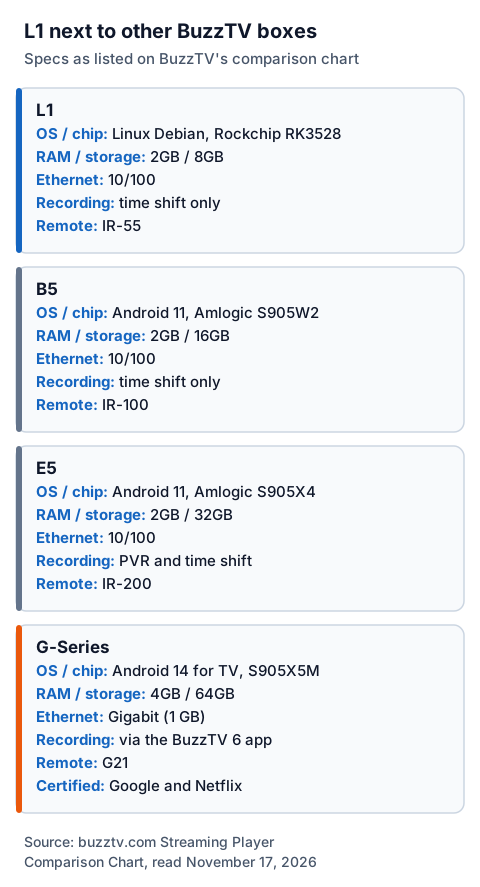
The chart also marks the G-Series as Google and Netflix certified, which none of the other three are listed as. For other devices, see our IPTV setup guides by device and the guide to choosing and setting up an Android box IPTV player.
Setting up an IPTV service on the BuzzTV L1
You connect the L1 by HDMI, power it on, run the first-time setup, then add your provider's server in the BuzzTV 6 Linux app. BuzzTV's L1 video guides cover each step, from "First Time Setup Walkthrough" to "Adding a Server".
- Connect it. The manual says to connect the HDMI cable from the box to the TV, power on the box, and set the TV to that HDMI input. Plug in Ethernet now if you use it.
- Run first-time setup. BuzzTV publishes a first-time setup video for the L1.
- Add your server. Enter the login your provider sent. BuzzTV's L1 guides include "Adding a Server" and a "Multi Server Update".
- Load the guide. Open live TV and let the programme guide fill; our EPG explainer helps if it stays empty.
- Keep it updated. BuzzTV's L1 guides include updating the firmware and the app, plus backup and restore.
With IG IPTV, the login arrives on WhatsApp after payment: a server URL, username and password, or playlist or portal details. We have not tested IG IPTV on an L1, so use the 24-hour free trial, no card needed, to check on your own box that the channels you want play before you pay. Plans start at £15 a month; the plans and checkout page lists £25 for 3 months, £35 for 6 and £55 for 12 months plus 2 free, with no contract.
Price, warranty and where to buy
BuzzTV's L1 page sends buyers to BuzzTVDirect.com. That store refused our requests on November 17, 2026, so this page gives no price; check it there on the day you buy.
BuzzTV's general warranty page covers North America: most products are covered for 12 months from purchase, the warranty is non-transferable, and you pay the shipping to return an item to BuzzTV. A claim needs proof of purchase with the model, serial number and MAC address. The BuzzTV pages we read do not say whether the L1 is sold in the UK or what warranty applies there.
Who the L1 suits, and who it doesn't
BuzzTV pitches the L1 at people who want a simple, single-purpose IPTV box. Going by BuzzTV's own specs, it fits a household that watches one IPTV service live and does not record. It does not fit anyone who needs PVR recording, other apps from an app store, Bluetooth accessories on the box or Gigabit Ethernet.
The box itself is legal hardware. Whether what you watch on it is lawful depends on the service and whether the seller holds the rights, which our explainer on when IPTV is legal covers.
Frequently Asked Questions
Is the BuzzTV L1 an Android box?
No. BuzzTV says the L1 runs a customised Linux Debian system designed for IPTV. Its comparison chart lists the B5, E5 and G-Series as Android models.
Can the BuzzTV L1 record live TV?
Not with PVR. BuzzTV says the BuzzTV 6 Linux app removes the PVR function of the Android app, and its chart lists no PVR or PVR+ for the L1. Time shift is listed as supported.
Does the BuzzTV L1 come with channels?
No. BuzzTV says you need to provide your own IPTV subscription, and that it does not sell or advise on streaming services.
Can I install apps on the Buzz TV L1?
BuzzTV says the L1's Linux OS does not support any app stores, and that some popular apps are included. It does not list which apps.
Does the BuzzTV L1 have Bluetooth?
BuzzTV's comparison chart lists no Bluetooth on the L1, and the box ships with the IR-55 infrared remote.
Sources
- BuzzTV, L1 Linux Player page and FAQ (buzztv.com/l1-linux-player), read November 17, 2026.
- BuzzTV, Streaming Player Comparison Chart (buzztv.com/compchart.html), read November 17, 2026.
- BuzzTV, L1 user manual PDF (buzztv.com, linked from Quick Start Guides), read November 17, 2026.
- BuzzTV, Quick Start Guides and L1 video guide list (buzztv.com/quick-start-guide-links), read November 17, 2026.
- BuzzTV, BuzzTV 6 App page (buzztv.com/buzztv-6-app), read November 17, 2026.
- BuzzTV, Warranty Terms and Conditions (buzztv.com/warranty-terms-conditions), read November 17, 2026.
- IG IPTV plans and terms (igiptv.tv), read November 17, 2026.
Couldn't read: the BuzzTVDirect.com L1 store page (rate-limited, HTTP 429), so no price or stock information is given.