Chillio App: What It Does, Where It Runs and What It Costs
The Chillio app is a media player from Lumos Labs, not a TV service: it plays IPTV logins (Xtream Codes or M3U playlists) and other sources you already have, and it says plainly that it provides no content. On Google Play it is listed for Android TV only, free with optional paid upgrades. Its website also names Apple TV, iPhone, iPad and Mac, but the App Store link on that site returned a "not found" page when we checked on November 17, 2026.
Chillio comes up often next to the services in our guide to free live TV apps, but it belongs to a different category: it carries no channels of its own. Below is what the developer's own pages and the app stores said today, and what we could not confirm.
What is the Chillio app?
Chillio is a player app, and people searching for an "app Chillio IPTV" service are usually looking for this one. It gives you a TV guide, a library and playback controls, and you supply what it plays: an IPTV subscription, a cloud or home server, or another source you have the rights to.
Its Google Play listing, published by Lumos Labs LLC, puts it directly: "Chillio does not supply TV channels, movies, or media. Users must provide their own content sources and are responsible for ensuring they have the legal rights to access and view their content." The website says the same in shorter words: "Chillio is a media player — not a content provider."
What the Google Play listing names as features:
- Xtream Codes API logins and M3U or M3U8 playlists
- WebDAV and FTP servers
- One library across several playlists or accounts
- A TV guide (EPG) with a live channel preview
- Favourites and continue watching
- Multiview, to watch more than one channel at once
- Pause and catch-up, when your source provides them
The website also warns about look-alikes: card payments for Chillio go only through the Apple App Store or Google Play, and "other companies use a similar name and are not affiliated with us". If anyone else asks you to pay for Chillio, that is worth knowing.
Which devices does Chillio run on?
Today, Android TV is the one platform we could confirm in an official store. Chillio's own site adds a developer-run install route for Android TVs and boxes without Google Play, and it lists Apple devices, but Apple's store did not show the app when we checked.
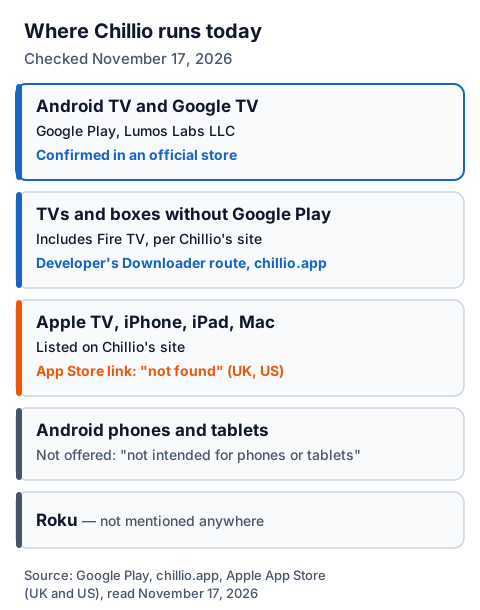
| Device | Where to get it | What we found on November 17, 2026 |
|---|---|---|
| Android TV and Google TV | Google Play | Listed by Lumos Labs LLC, updated October 18, 2026, 10k+ downloads |
| Android phones and tablets | Not offered | The listing says Chillio "is not intended for phones or tablets" |
| Android TVs and boxes without Google Play | The developer's own Downloader route on chillio.app | Described on Chillio's site, which lists Fire TV among the devices it covers |
| Apple TV, iPhone, iPad, Mac | App Store | The site's App Store link returned "not found" in the UK and US stores, and Apple's search did not list it |
| Roku | None | Not mentioned on any page we read |
The developer's Android TV route. Chillio's site has a page titled "Chillio for Android TV, now outside Google Play". It uses the free Downloader app, which the page says is on the Play Store and on Fire TV, and a code it gives on that page. We do not repeat the code here; take it only from chillio.app. The page says that if you already have the Google Play copy you can keep it, but to switch you must uninstall it first, because the two are signed differently.
Apple devices. We cannot tell from the outside whether the Apple version was withdrawn, moved to a new listing or is unavailable only in some regions. If you use Apple TV, check the App Store yourself, and look at our device-by-device IPTV setup guide or our page on whether the Apple-only UHF player runs on a Fire TV.
Is the Chillio app free?
Yes, the core app is free: the Google Play listing says there are no ads and no watermarks, and that optional premium upgrades unlock extra customisation and settings. The Android TV version from Chillio's own site works differently, with 7 days free and then a paid Premium activation.
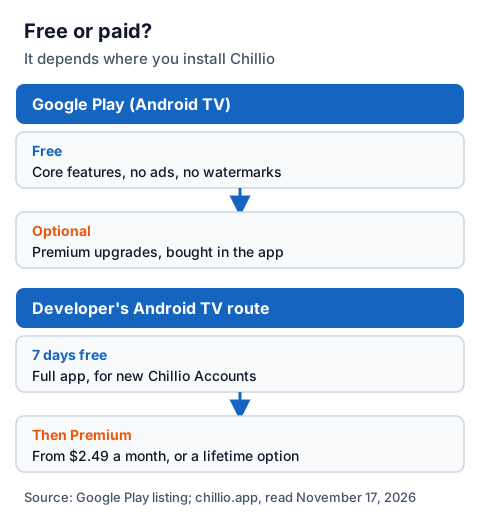
| Version | Free part | Paid part |
|---|---|---|
| Google Play (Android TV) | Core features, no ads, no watermarks | Optional premium upgrades, bought in the app |
| Developer's Android TV route | New Chillio Accounts get the full app free for 7 days | Then the TV is added to a Premium bundle at account.chillio.app |
Chillio's own comparison pages list Premium from $2.49 a month, plus a lifetime option. Those figures are in US dollars; the price in the UK store can differ, so read the amount on screen before you confirm. Refunds follow the store you paid through: Chillio's refund page sends App Store and Google Play buyers to Apple's and Google's own refund routes, and warns that crypto payments made on its website cannot be reversed once confirmed.
How do you add an IPTV login to Chillio?
You sign in with a Chillio Account, choose Add Account, and enter either your Xtream Codes login or your M3U link. Chillio then builds one library from everything you add, with the TV guide if your provider supplies one.
- Sign in. On the TV, Chillio shows a code: scan it or type the pairing code on your phone or computer, so you do not type a password with the remote.
- Add Account. Choose Xtream Codes and enter the server URL, username and password, or paste your M3U or M3U8 link.
- Wait for the first load. A large channel list takes time to load the first time; let it finish.
- Check the guide. Chillio applies an XMLTV guide; if a few channels show the wrong listings, our EPG explainer covers why.
You can add more than one account, and Chillio merges them into a single library. Our walk-through of what goes in each Xtream login field explains where each one comes from and the usual typing mistakes.
Is the Chillio app legal and safe?
A player is legal software. Whether what you watch is legal depends on the source: IPTV technology is legal, and a stream is lawful only when the seller holds the rights to it. Chillio's listing makes you responsible for having those rights.
Chillio can also connect add-ons and cloud sources. We could not see what any add-on carries, so the same rule applies: only load sources you know have the rights. Our guide to legal IPTV providers in the UK explains how to check a seller.
For safety, install Chillio only from Google Play or from the developer's own page on chillio.app, never from an APK mirror, and pay only through the store or Chillio's own account portal. If you want free TV without any login, the legal free services in our free live TV apps guide need nothing loaded into a player.
Using Chillio with an IG IPTV login
An IG IPTV login is sent on WhatsApp after payment, as a server URL, username and password, or as playlist details, which matches the two IPTV formats Chillio's listing names. On an Android TV with Chillio installed, you can test that before paying.
Start the 24-hour IG IPTV trial, which needs no card, add the trial login to Chillio, and check that the channels you care about play on your own TV. If they do, UK plans start at £15 a month, with 3, 6 and 12-month plans at £25, £35 and £55; the 12-month plan includes 2 free months. A standard plan streams on one screen at a time, and the multi-room upgrade gives 2 to 4 streams on one login if you use Chillio in more than one room.
Frequently Asked Questions
Is the Chillio app free?
The core app is free on Google Play, with no ads and no watermarks; optional premium upgrades cost extra. The Android TV version from Chillio's own site is free for 7 days for new accounts, then needs Premium.
Does Chillio work on Firestick?
Chillio's site describes a Downloader install for TVs and boxes without Google Play and lists Fire TV among them. Its pages link to Google Play and the App Store only, not to an Amazon Appstore listing.
Is Chillio on the App Store?
We could not confirm it. On November 17, 2026, the App Store link on Chillio's website returned "not found" in the UK and US stores, and Apple's search did not list the app.
Does Chillio come with channels?
No. Its Google Play listing says Chillio does not supply TV channels, films or media. You add your own sources and are responsible for having the rights to them.
Who makes the Chillio app?
The Google Play listing names Lumos Labs LLC. Chillio's website warns that other companies use a similar name and are not connected to it.
Sources
- Google Play listing for Chillio (Lumos Labs LLC), UK store, read November 17, 2026.
- chillio.app: home page, How it works, Android TV install page, TV setup guide, refund policy and comparison pages, read November 17, 2026.
- Chillio v6.0.0 announcement on chillio.app, read November 17, 2026.
- Apple App Store: the listing linked from chillio.app, UK and US stores, and Apple's app search, checked November 17, 2026.
- IG IPTV plan prices and terms (igiptv.tv), read November 17, 2026.
Couldn't read: the Apple App Store listing (it returned "not found" in the UK and US stores); account.chillio.app (sign-in only, so Premium bundle prices there are not described).