PiqoTV: What the IPTV Player Is and How to Install It
PiqoTV is an IPTV player app for Android TV and Fire TV that plays an M3U playlist or Xtream Codes login you already have; its developer's site, piqotv.com, says the app "does not include any content". It is not in Google Play or Amazon's UK Appstore. The site offers two builds through the Downloader app, one for Android TV and one for Fire TV, and says you need a PiqoTV account to use the app. We found no price on the site.
This guide is one entry in our roundup of IPTV player apps. Below: what PiqoTV does, where its two builds come from, how to install it on a Fire TV Stick, how to add a playlist, what the developer says it stores about you, and what we could not check.
What is PiqoTV?
PiqoTV is a media player for your own IPTV login. It sorts the live channels, films and series that your provider's playlist unlocks into a TV-style menu with a programme guide, and it adds film details from an outside database. The app itself contains nothing to watch.
The developer is clear about that. Its home page says the demo images use "trending data from TMDB" and that "PiqoTV does not include any content"; users must "provide their IPTV playlist". Its terms, last updated February 16, 2026, call it "a general-purpose media player" and say the developer does not "host, provide, distribute, or stream any media content".
What piqotv.com names as features:
- M3U playlist links and Xtream Codes API logins, with several playlists at once
- Removing unwanted categories, plus background playlist sync
- A live TV view with a guide that shows what is airing now and up to 24 hours ahead
- Resume playback, multiple audio tracks, subtitles, and 4K HDR and Dolby audio playback where the stream carries them
- Setup by QR code, so you can avoid typing with the remote
- Global search across all playlists, favourites and watch history
- IMDb and Rotten Tomatoes ratings and cast pictures pulled in through TMDB
That makes PiqoTV the same kind of app as MaxPlayer or XCIPTV: a front end that is only as useful as the login you load into it. The site lists a search by actor or director name as "coming soon".
Where can you download PiqoTV?
Only from the developer's own site. piqotv.com lists two builds and gives a Downloader code for each; a search for PiqoTV in Google Play (UK), Amazon's UK Appstore and Apple's UK App Store found no listing.
| Where we looked | What we found |
|---|---|
| piqotv.com, build "Android TV v8 (ARM64)" | Downloader code 7557082 |
| piqotv.com, build "Android TV v7 (Fire TV)" | Downloader code 7828403 |
| Google Play, UK store | No PiqoTV listing in the search results |
| Amazon Appstore, UK | "No results" for PiqoTV |
| Apple App Store, UK | No PiqoTV app in the search results |
The site labels the second build for Fire TV and the first for Android TV boxes with a 64-bit (ARM64) chip. If the build you pick will not open, try the other one. Codes copied from lists on other sites can point to anything, so read the code from piqotv.com yourself on the day you install; our guide to using Downloader codes safely explains why.
We could not find a company name, a postal address or a price anywhere on piqotv.com. The privacy policy gives a support email, and the home page links to a Discord community for help and feedback.
How do you install PiqoTV on a Fire TV Stick?
You install the free Downloader app, allow it to install apps, type PiqoTV's Fire TV code, then sign in with a PiqoTV account. The whole route uses the developer's own file, not a store listing.
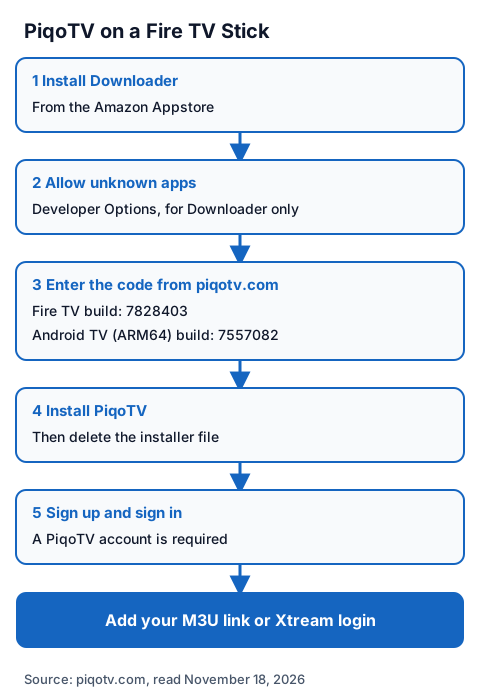
- Install Downloader from the Amazon Appstore on your Fire TV.
- Go to Settings, then My Fire TV, then Developer Options, and allow Install unknown apps for Downloader.
- Open Downloader and enter the code piqotv.com lists for Fire TV: 7828403. On an Android TV box with a 64-bit chip, the site's code is 7557082.
- Install the file when asked, then delete the installer to free space.
- Open PiqoTV. The site says "SignUp required to access the application once installed", so create the account and sign in.
Fire TV menu names change between models, so follow the labels on your screen. On a Google TV device, see our page on getting IPTV onto each Chromecast model for where the unknown-apps switch sits.
How do you add a playlist to PiqoTV?
You add either an M3U link or an Xtream Codes login: a server URL, a username and a password. The developer names both, plus a QR code option so you can paste the details from your phone instead of typing them with the remote.
Xtream Codes is usually the better choice when your provider offers it, because the login brings in films, series and the guide along with the channels. Our page on how an Xtream login is laid out explains where each value comes from and the common typing mistakes.
One point matters if you use several screens. The terms say all IPTV server details, credentials and playlists "are stored locally on your device", and the privacy policy says the developer does not collect or store your playlists. Your PiqoTV account signs you in, but it does not carry your playlist from the TV to another device: expect to add the playlist on each one.
If the guide stays empty after the playlist loads, the fault is usually in the guide data rather than the app; our EPG explainer shows how to check.
What does PiqoTV collect about you?
Little, according to its own policies. The account holds your email address and password through Google Firebase; the app also sends anonymous usage data, crash reports and basic device details. Playlists, server addresses and viewing habits stay on your device.
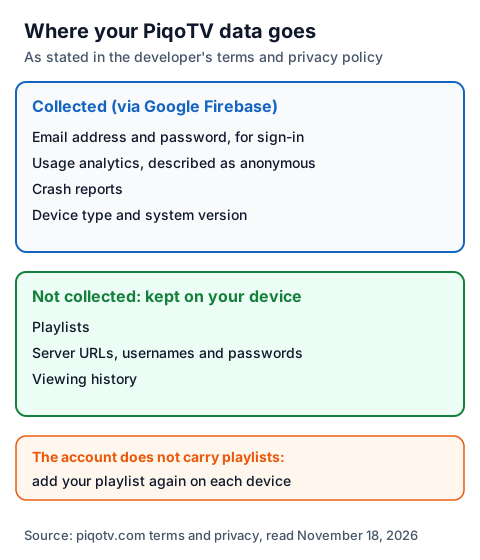
| Data | Where the developer says it goes |
|---|---|
| Email address and password | Collected for sign-in, through Google Firebase |
| Usage analytics | Collected, described as anonymous |
| Crash reports and device type | Collected to fix problems |
| Playlists, server URLs and logins | Not collected; stored only on your device |
| Viewing history | Not collected or tracked |
The privacy policy is dated May 15, 2024 and is titled for "PiqoTV Server"; the terms are dated February 16, 2026. We could not check the app's behaviour ourselves.
Is PiqoTV legal and safe to use?
A player app is legal software; what you load into it decides the legal question. IPTV technology is legal, and a stream is lawful only when the seller holds the rights to what it streams. PiqoTV's terms put that on the user and forbid using the app to "access content you do not have legal rights to view".
The terms also say the developer can close accounts of repeat infringers, and that the app comes "as is" with no promise that it is free of faults. Our guide to whether IPTV is legal shows how to tell a seller with rights from one without them. For safety, take the Downloader code only from piqotv.com, and never paste a free playlist or M3U link found on a forum.
Using PiqoTV with an IG IPTV login
An IG IPTV login is sent on WhatsApp after payment, as a server URL, username and password, or as playlist details. Those are the two formats PiqoTV names, so you can test the pair with our 24-hour free trial, which needs no card.
Use the trial to check, inside PiqoTV on your own TV, that the channels you care about play. If they do, the IG IPTV UK prices start at £15 a month, with 3, 6 and 12-month plans at £25, £35 and £55; the 12-month plan includes 2 free months, and there is no contract. Picture quality goes up to 4K where the channel broadcasts it. A standard plan streams on one screen at a time; the IG IPTV multi-room upgrade adds 2 to 4 streams on one login.
Frequently Asked Questions
Is PiqoTV free?
We could not find a price on piqotv.com, and the app is not in any store we checked, so no store price is shown either. The site only says a PiqoTV account is required once the app is installed.
Does PiqoTV come with channels?
No. The developer says PiqoTV "does not include any content" and that you must provide your own IPTV playlist. The seller's rights decide what you can lawfully watch.
What is the PiqoTV Downloader code?
On November 18, 2026, piqotv.com listed 7828403 for the Fire TV build and 7557082 for the Android TV (ARM64) build. Check the codes on the developer's site on the day you install.
Is PiqoTV on Google Play or the Amazon Appstore?
Not in the UK stores we searched. Google Play, Amazon's UK Appstore and Apple's UK App Store showed no PiqoTV listing, so the developer's Downloader codes are the only route we found.
Does PiqoTV sync my playlists between devices?
The developer says it does not. Its terms and privacy policy say playlists and server details stay on your device, so you add them again on each TV.
Sources
- piqotv.com home page (features, builds and Downloader codes), read November 18, 2026.
- piqotv.com terms and conditions (last updated February 16, 2026), read November 18, 2026.
- piqotv.com privacy policy (last updated May 15, 2024), read November 18, 2026.
- Google Play UK search for "piqotv", read November 18, 2026.
- Amazon.co.uk Appstore search for "piqotv", read November 18, 2026.
- Apple App Store UK search data for "piqotv", read through Apple's search service November 18, 2026.
- IG IPTV plan prices and terms (igiptv.tv), read November 18, 2026.
Couldn't read: the PiqoTV sign-up page (the /signup address returned a 404, and we did not create an account); the app itself (we did not install it, so menu names and in-app prices are not described); any company name or address for the developer (none is published on piqotv.com).