Flex IPTV: What the App Is, What Pro Costs and How to Set It Up
Flex IPTV is a player app for iPhone, iPad and Apple TV that plays a playlist you already have; it ships with no channels. Its UK App Store listing shows a free install with two one-off in-app purchases, Pro Version for iOS at £5.99 and Pro Version for tvOS at £5.99. The same developer has published it since December 2016. Features named on the listing include remote and local playlists, an XMLTV TV guide, auto-reconnect and recording of live streams.
This guide is one entry in our round-up of IPTV player apps. Below: what the Flex IPTV app does, which store listings with "Flex" in the name are different apps, what Flex IPTV Pro costs, how to add a playlist, and what we could not check.
What is the Flex IPTV app?
The Flex IPTV player is a front end for an IPTV playlist: it lists the channels in the playlist you load, plays them, and shows a TV guide if you add one. It does not sell or include TV channels.
The App Store listing is plain about that. Its disclaimer says Flex IPTV "does not supply or include any media or content" apart from one Creative Commons demo film, that "users must provide their own content", and that you should check your content is legal and that you have the rights to use or record it.
What the listing names as features:
- Remote and local playlists, with automatic updates from external sources
- A player for common stream formats, with subtitle and audio-track switching and a video equaliser
- Auto-reconnect for unstable sources
- A history of watched channels and a favourites list
- XMLTV EPG (TV guide) support
- Recording of live streams
The listing describes playlists rather than logins: it does not mention Xtream Codes. If your provider sends a server URL, username and password, ask it for the playlist version of your login, or see how an Xtream login is laid out and which players take it directly. The app is offered in English and 13 other languages.
Which "Flex" app is Flex IPTV?
Only one App Store listing is called Flex IPTV: the iPhone, iPad and Apple TV app from the developer that first released it on December 28, 2016. Several Android apps also use "Flex" in their names, but they come from other developers and are separate products.
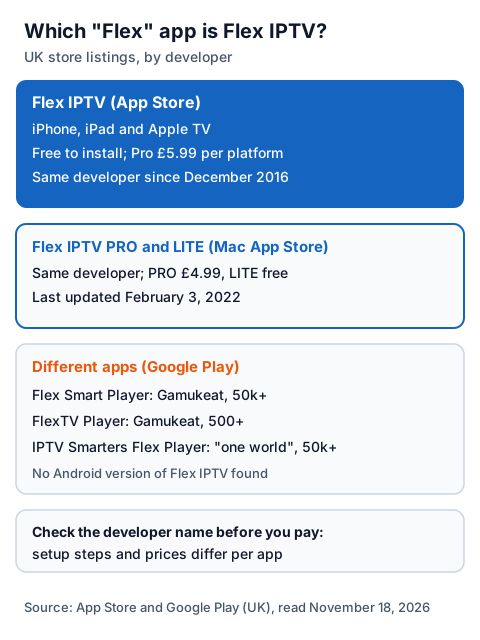
| UK store listing | Store | Publisher shown | What the listing says |
|---|---|---|---|
| Flex IPTV | App Store | The Flex IPTV developer | Free; Pro £5.99 for iOS and £5.99 for tvOS; version 2.15.2, updated June 11, 2026 |
| Flex IPTV PRO and Flex IPTV LITE | Mac App Store | The same developer | PRO £4.99, LITE free; version 1.5.1, last updated February 3, 2022 |
| Flex Smart Player | Google Play | Gamukeat (flex-ip.tv) | Free with ads; optional subscription; 50k+ downloads |
| FlexTV Player | Google Play | Gamukeat (flex-ip.tv) | Free with ads and in-app purchases; 500+ downloads |
| IPTV Smarters Flex Player | Google Play | Shown as "one world" | In-app purchases; 50k+ downloads |
We found no Android version of Flex IPTV from its developer. Flex Smart Player's listing says it ships empty and needs your own playlist or portal login, like Flex IPTV, but it is a different app with its own subscription, so the prices and steps on this page do not apply to it. Check the developer name on the listing before you install or pay.
What does Flex IPTV Pro cost?
The app is free to install. The UK App Store lists two in-app purchases: Pro Version for iOS at £5.99 and Pro Version for tvOS at £5.99. They are separate one-off purchases, so unlocking Pro on an iPhone and an Apple TV costs £11.98 in total.
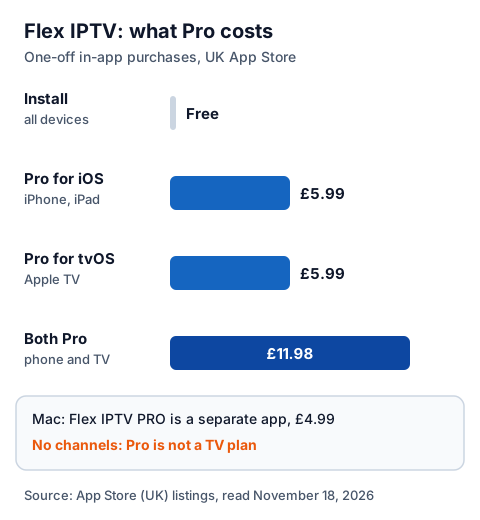
| Item | UK App Store price | Type |
|---|---|---|
| Flex IPTV install | Free | App download |
| Pro Version for iOS | £5.99 | One-off in-app purchase |
| Pro Version for tvOS | £5.99 | One-off in-app purchase |
| Flex IPTV PRO for Mac | £4.99 | Separate paid app |
The listing does not say which features the Pro purchases add, and we could not open the app's in-app screens, so we do not list Pro features here. Read the purchase screen in the app before you pay. Whatever you spend on Flex IPTV pays for the player only; your IPTV provider charges separately, and our explainer on what IPTV costs in the UK puts both together.
Which devices does Flex IPTV run on?
According to the App Store, Flex IPTV runs on iPhone and iPad with iOS or iPadOS 17.4 or later, and on Apple TV with tvOS 26.0 or later. The Mac has the older, separate Flex IPTV PRO and LITE apps; there is no Flex IPTV listing for Android, Fire TV or smart TV stores that we could find.
| Device | Listing | Requirement shown |
|---|---|---|
| iPhone | Flex IPTV | iOS 17.4 or later |
| iPad | Flex IPTV | iPadOS 17.4 or later |
| Apple TV | Flex IPTV | tvOS 26.0 or later |
| Mac | Flex IPTV PRO or LITE | Separate apps, last updated February 3, 2022 |
The tvOS requirement matters: an Apple TV that cannot update to tvOS 26 will not install the current version. Check the tvOS version in the Apple TV's settings before you buy Pro. Our setup guide for every device and the guide to IPTV on iPhone and iPad cover the device side, and the IPTV on Windows and Mac guide covers computers.
How do you add a playlist to Flex IPTV?
Install the app from the App Store on each device, add your provider's playlist link (or a playlist file), then add the TV guide link if your provider gives one. The app shows the channels once the playlist loads.
- Open the App Store on the iPhone, iPad or Apple TV and search for Flex IPTV. Check that the listing is the one first released in December 2016.
- Open the app and choose to add a playlist. Menu names change between versions, so follow the words on your screen.
- Paste the playlist (M3U) link exactly as your provider sent it, in one piece, or load a local playlist file.
- If your provider gives a separate XMLTV guide link, add it so programme names appear next to the channels.
- Turn on automatic playlist updates if you want channel changes from your provider to arrive without re-adding the list.
If the list never loads, check the link for a missing character or a stray space first. Our EPG explainer covers guide links that stay empty.
Is Flex IPTV legal and safe to use?
Flex IPTV is legal software from the App Store; what you load into it decides the legal question. IPTV technology is legal, and a stream is lawful only when the seller holds the rights to what it streams. The developer's disclaimer puts that check, including the right to record, on the user.
Our guide to whether IPTV is legal in the UK explains how to tell a seller with rights from one without them. For safety, install Flex IPTV only from Apple's App Store, check the developer before paying, and never paste a free playlist or M3U link found on a forum or video page: you cannot tell who runs it or what it carries.
Using Flex IPTV with an IG IPTV login
An IG IPTV login is sent on WhatsApp after payment, as a server URL, username and password, or as playlist details. Because Flex IPTV works with playlists, ask for the playlist details and paste that link into the app.
You can test the pairing before you pay. Our one-day free trial needs no card: load the trial playlist into Flex IPTV on your own Apple TV or iPhone and check that the channels you care about play there. If they do, the UK plan prices start at £15 a month, with 3, 6 and 12-month plans at £25, £35 and £55, and the 12-month plan includes 2 free months. Picture quality goes up to 4K where the channel broadcasts it.
A standard plan streams on one screen at a time, so watching in Flex IPTV on the iPhone while the Apple TV plays will stop one of them; the IG IPTV multi-room upgrade adds 2 to 4 screens on one login. For other Apple-only players, compare Snappier IPTV and iMPlayer.
Frequently Asked Questions
Is Flex IPTV free?
The app is free to install. The UK App Store lists Pro Version for iOS at £5.99 and Pro Version for tvOS at £5.99 as one-off in-app purchases, separate from each other.
Does Flex IPTV come with channels?
No. The App Store listing says Flex IPTV does not supply any media or content apart from one demo film, and that users must provide their own content. The provider's rights decide what you can lawfully watch.
Is Flex IPTV on Android or Firestick?
We found no Android or Fire TV version from the Flex IPTV developer. Android apps such as Flex Smart Player use a similar name but come from other developers.
Does Flex IPTV support Xtream Codes?
The App Store listing names remote and local playlists and does not mention Xtream Codes. Ask your provider for the playlist (M3U) version of your login.
Is the Flex IPTV Pro purchase shared between iPhone and Apple TV?
The listing shows two separate purchases, one for iOS and one for tvOS, at £5.99 each. Budget £11.98 if you want Pro on both.
Sources
- Apple App Store listing "Flex IPTV" (UK store): description, compatibility, in-app purchases and version history, read November 18, 2026, plus Apple's lookup data the same day.
- Apple lookup data for the Mac App Store apps "Flex IPTV PRO" and "Flex IPTV LITE" (UK store), read November 18, 2026.
- Google Play listings "Flex Smart Player" and "FlexTV Player" (Gamukeat) and "IPTV Smarters Flex Player", UK store, read November 18, 2026.
- Google Play search for "flex iptv", UK store, read November 18, 2026.
- IG IPTV plan prices and terms (igiptv.tv), read November 18, 2026.
Couldn't read: a developer website for Flex IPTV (the App Store listing links none); the app's in-app purchase screens (so Pro features are not listed); the Mac App Store pages for Flex IPTV PRO and LITE (described from Apple's lookup data only).