Snappier IPTV: What the Player Does, What Premium Costs and How to Set It Up
Snappier IPTV is a player app for iPhone, iPad, Apple TV and Mac that plays the IPTV subscription you already have; its developer says plainly that it provides no channels or content. The app is free to install, and the UK App Store lists Premium as an in-app purchase from £2.49 for 1 month to £139.99 for Lifetime. The listing names provider logins and M3U playlists, two playback engines, a TV guide, catch-up, recordings and a multi-screen view of up to 9 streams.

This guide belongs to our IPTV player apps comparison. Below: what the Snappier app does, what each Premium option costs, which devices it needs, how to add a playlist, and what we could not check.
What is Snappier IPTV?
The Snappier IPTV app is a front end for your own IPTV login or playlist. It sorts your provider's live channels, films and series into menus with a TV guide, and adds tools for organising them. Its site, run under the name Snappy Code, says: "Snappier IPTV is a player app — bring your own IPTV subscription. We do not provide channels or content."
What the App Store listing and snappieriptv.app name as features:
- Provider logins (the site names Xtream Codes) and M3U playlists, with short playlist links and external EPG links
- Two built-in players, KSPlayer and AetherEngine; the site adds an option to open streams in the Infuse or VLC apps
- Live TV, films, series and catch-up in SD, HD or 4K, depending on your source
- A multi-screen view of up to 9 streams at once, and picture-in-picture on iPhone and iPad
- Several playlists, "Super Playlists" that combine them, custom categories, renaming and hiding
- User profiles, each with favourites, watch history and parental settings
- Scheduled recordings and downloads for supported streams, where your source allows them
- Cloud sync of favourites and progress across Apple devices
The site also describes a built-in TV guide service that can fill gaps in a provider's guide for "supported providers", plus a fixtures and league-table view; we could not check which providers or competitions those cover.
What does Snappier IPTV Premium cost?
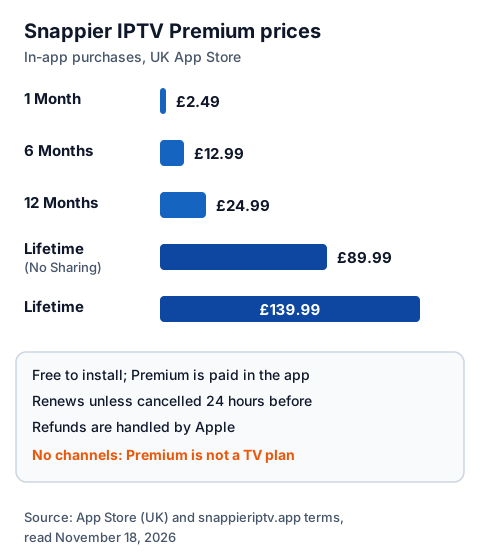
The app is free to install. Premium is an in-app purchase, and the UK App Store lists five options: 1 Month at £2.49, 6 Months at £12.99, 12 Months at £24.99, Lifetime (No Sharing) at £89.99 and Lifetime at £139.99.
| Option on the UK App Store | Price | What the terms say |
|---|---|---|
| 1 Month | £2.49 | Renews unless cancelled at least 24 hours before the period ends |
| 6 Months | £12.99 | Renews the same way |
| 12 Months | £24.99 | Renews the same way |
| Lifetime (No Sharing) | £89.99 | One payment |
| Lifetime | £139.99 | One payment |
The listing adds that some purchases and subscriptions may be shareable through Family Sharing; the cheaper Lifetime option is named "No Sharing". Twelve single months at £2.49 would cost £29.88, so the 12-month option is the cheaper way to pay for a year. Snappier's terms, last updated March 2026, add that free trials convert to paid subscriptions unless you cancel before the trial ends, that you manage subscriptions in your Apple ID settings, and that refunds are handled by Apple. The listing does not say exactly which features are free and which need Premium; the latest release notes say the purchase screen now compares them, so read it before you pay.
Any Snappier price pays for the player only. Your IPTV provider charges separately; our explainer on what IPTV costs in the UK puts the two together.
Which devices does Snappier IPTV run on?
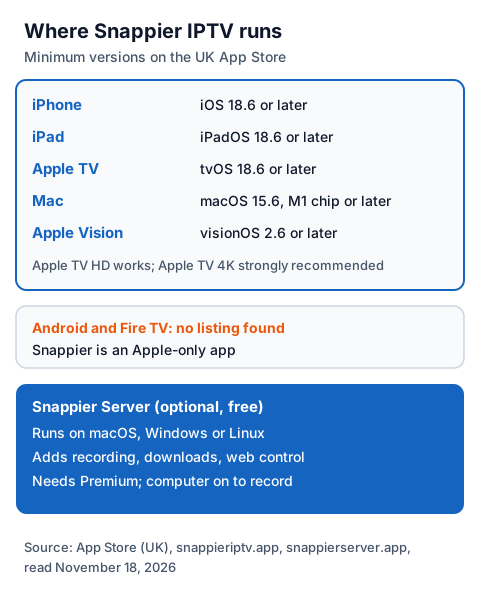
Snappier is Apple-only. The UK App Store lists iPhone, iPad, Apple TV, Mac and Apple Vision, each with a minimum system version, and we found no Google Play listing, so there is no Android or Fire TV version.
| Device | Requirement on the UK App Store | Note |
|---|---|---|
| iPhone | iOS 18.6 or later | Picture-in-picture supported |
| iPad | iPadOS 18.6 or later | Picture-in-picture supported |
| Apple TV | tvOS 18.6 or later | Apple TV HD supported; Apple TV 4K "strongly recommended" |
| Mac | macOS 15.6 or later, Apple M1 chip or later | The iPad app; Apple marks it "not verified for macOS" |
| Apple Vision | visionOS 2.6 or later | Listed by the App Store |
The developer also offers Snappier Server, a free companion app for macOS, Windows and Linux. Its site says it adds recording, downloads and web management, needs Snappier IPTV Premium on your Apple device, and runs on your own computer, which must be on when a recording is due. Our all-devices IPTV guide and our guide to IPTV on iPhone and iPad cover the device side.
How do you add a playlist to Snappier?
Install Snappier from the App Store, open it, choose to add a playlist, then enter either your provider's login or an M3U link. The channels, films, series and TV guide load after that.
- Open the App Store on your iPhone, iPad or Apple TV, search for Snappier IPTV and check that the developer website shown is snappieriptv.app.
- Open the app and choose to add a playlist. Menu names change between versions, so follow the words on your screen.
- For a provider login, enter the server URL with its
http://orhttps://and port, then the username and password. For a playlist, paste the whole M3U link in one piece. - If your provider gives a separate guide link, add it as the external EPG.
- Wait while live TV, films, series and the guide load; large playlists take longer.
If a channel will not play, the listing's two players give you a second try: switch between KSPlayer and AetherEngine in the app's settings. Our guide to typing in an Xtream login explains each value, and the EPG explainer covers a guide that stays empty.
Is Snappier IPTV legal and safe to use?
Snappier is legal software sold through Apple's App Store; what you load into it decides the legal question. IPTV technology is legal, and a stream is lawful only when the seller holds the rights to what it streams. Snappier's terms say you must only use IPTV services you are legally entitled to access.
Our guide to whether IPTV is legal in the UK explains how to tell a seller with rights from one without them. Install Snappier only from the App Store, and never paste a free playlist or M3U link found on a forum or video page: you cannot tell who runs it or what it carries.
Using Snappier with an IG IPTV login
An IG IPTV login is sent on WhatsApp after payment, as a server URL, username and password, or as playlist details. Snappier accepts both, so you can enter whichever you receive.
Test the pairing first with our IPTV free trial, which needs no card: add the trial login to Snappier on your own Apple TV or iPhone and check that the channels you care about play. If they do, the UK plan prices start at £15 a month, with 3, 6 and 12-month plans at £25, £35 and £55, and the 12-month plan includes 2 free months. Picture quality goes up to 4K where the channel broadcasts it.
Snappier's multi-screen view can show up to 9 streams, but each one uses a connection from your IPTV plan. A standard IG IPTV plan streams on one screen at a time, and a multi-room plan adds 2 to 4 streams on one login. For other Apple players, see Flex IPTV and iMPlayer.
Frequently Asked Questions
Is Snappier IPTV free?
It is free to install. Premium is an in-app purchase on the UK App Store: £2.49 for 1 month, £12.99 for 6 months, £24.99 for 12 months, £89.99 for Lifetime (No Sharing) or £139.99 for Lifetime.
Does Snappier IPTV come with channels?
No. Its developer says Snappier does not provide channels or content and that you bring your own IPTV subscription. The provider's rights decide what you can lawfully watch.
Is Snappier on Android or Firestick?
No. Snappier is listed only on Apple's App Store, for iPhone, iPad, Apple TV, Mac and Apple Vision; we found no Google Play listing.
Can I get a refund on Snappier Premium?
Snappier's terms say purchases go through the App Store and refunds are handled by Apple under its refund policy.
Does Snappier support Xtream Codes?
Yes. The App Store listing names credentials supplied by your provider and M3U playlists, and the developer's site names Xtream Codes logins.
Sources
- Apple App Store listing "Snappier IPTV", UK store: description, compatibility, in-app purchases and version 5.7.4 release notes, read November 18, 2026, plus Apple's lookup data the same day.
- snappieriptv.app home page and terms of service (last updated March 2026), read November 18, 2026.
- snappierserver.app home page, read November 18, 2026.
- Google Play search for "snappier iptv", UK store, read November 18, 2026 (no Snappier listing found).
- IG IPTV plan prices and terms (igiptv.tv), read November 18, 2026.
Couldn't read: the app's purchase screen (so which features need Premium is not listed); snappieriptv.app device guides (the address we tried returned a not-found page); the providers and competitions covered by the built-in guide and fixtures features.