TIVRA IPTV Player: What Tivra Is and How to Set It Up
Tivra IPTV, written TIVRA by its developer, is a player app for Android TV, Google TV, Fire TV and Android phones that plays an M3U playlist, Xtream Codes login or Stalker portal you already have; it ships with no channels. The developer's site, tivratv.com, lists a 7-day free trial with no card, then plans from $2.49 a month or $9.99 a year for one device, up to a one-time Lifetime licence. You install it from Google Play or the developer's own download.
This guide is one entry in our roundup of IPTV player apps. Below: what Tivra does, which other "Tivra" products are unrelated, what each plan costs, how to install it, how to add a login, and what we could not check.
What is the TIVRA IPTV player?
TIVRA is a front end for your own IPTV login. It arranges the live channels, films, series and catch-up that your provider's login unlocks into a TV guide and menus built for a TV remote, and it adds a web dashboard so you can set things up from a phone or laptop instead of typing long addresses with a remote.
The developer is clear that the app is empty. Its compliance page says TIVRA "does not provide, host, aggregate, or facilitate access to any television channels", and that payments are "for software application licenses only". The Google Play listing repeats it: "You bring your own IPTV provider; TIVRA plays it."
What the developer's site and the Google Play listing name as features:
- M3U and M3U8 playlists, Xtream Codes logins and Stalker portal (MAC) logins; Stalker portals are live TV only
- A full TV guide, catch-up, and pause and rewind on live TV
- Recording to the device, a USB drive or a network drive (NAS)
- Multi-View, several channels on one screen: the website says up to 8 for version 3.4.2, the Google Play text says up to 4
- A library view for your own Jellyfin or Emby server or a NAS share, next to live TV
- Profiles, a parental PIN, and Trakt and SIMKL sync
- A Sports Hub with scores and schedules that it matches to channels your own provider already carries; it adds no channels
That puts TIVRA in the same category as TiviMate and MaxPlayer: a player that is only as useful as the login you load into it.
Which "Tivra" is the IPTV player?
Search "tivra" and you meet several unrelated products. The player's own website is tivratv.com, and its Google Play listing is "TIVRA IPTV Player & Sports Hub", published under the name putdownapps; the developer's pages call the company TIVRA Media.
| Name you may find | What it is | Related to the player? |
|---|---|---|
| tivratv.com | The developer's site: downloads, pricing, help, web dashboard | Yes |
| TIVRA IPTV Player & Sports Hub (Google Play) | The player, 1k+ downloads, in-app purchases | Yes |
| tivra.app | A different web product, not a TV player | No |
| TIVRA VPN, Tivra - Timeboxing (App Store) | Unrelated iPhone apps from other developers | No |
Apple's UK App Store showed no TIVRA player when we searched, so there is no iPhone, iPad or Apple TV version; for those devices, see our guide to IPTV on every device.
How much does Tivra IPTV cost?
The app is free to install, but it needs a TIVRA account and a plan after the trial. The developer's pricing page lists four plans, priced in US dollars and paid through Stripe, and says every plan has every feature; only the number of devices and the way you pay change.
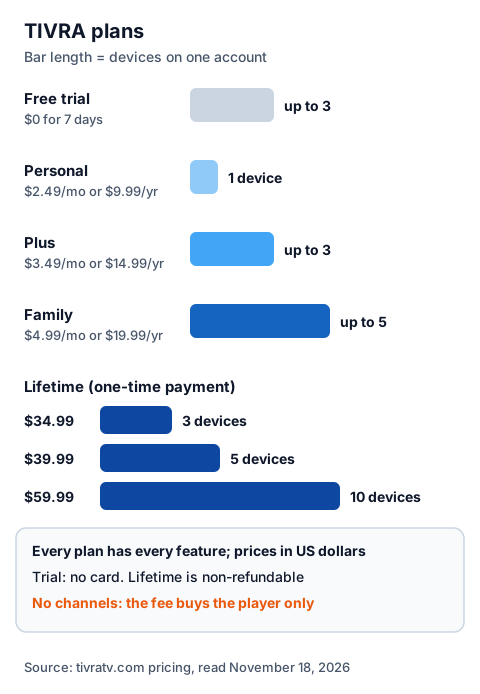
| Plan | Price on tivratv.com | Devices |
|---|---|---|
| Free trial | $0 for 7 days, no card | Up to 3 |
| Personal | $2.49 a month or $9.99 a year | 1 |
| Plus | $3.49 a month or $14.99 a year | Up to 3 |
| Family | $4.99 a month or $19.99 a year | Up to 5 |
| Lifetime | One-time $34.99, $39.99 or $59.99 | 3, 5 or 10 |
Four points from the developer's terms and pricing FAQ are worth reading before you pay:
- Monthly and yearly plans renew automatically until you cancel, from your account or the Stripe portal.
- Lifetime is final and non-refundable, "including if TIVRA is discontinued", unless your local law or the store you bought through requires a refund. "Lifetime" means the life of the service, not a set period.
- Refunds on monthly and yearly plans are at the developer's discretion; purchases made on Google Play fall under Google's refund policy first.
- Prices are the same on Google Play and the website, but promo codes work only at the website checkout.
We saw no price in pounds, so expect a dollar charge; your bank may add a conversion fee. The fee pays for the player only, separate from what your IPTV provider charges; our explainer on how much a UK IPTV plan costs each month adds the two together. You must be 18 or older to open an account.
Which devices does Tivra run on?
TIVRA runs on Android TV, Google TV, Fire TV, and Android phones and tablets with Android 7.0 or newer, according to the developer. The developer's pages list no version for Samsung or LG TV systems, Roku or Apple devices.
| Device | Route named by the developer | What we could check |
|---|---|---|
| Android TV, Google TV | Google Play, or the developer's download | Google Play listing read; version 3.3.9, updated October 26, 2026 |
| Fire TV Stick, Fire TV Cube | The developer's download through the Downloader app | Amazon's Appstore did not load for us |
| Android phones and tablets | Google Play or the developer's download | Same app, mobile layout |
The website gets each release first: on November 18, 2026 it offered version 3.4.2 while Google Play had 3.3.9.
How do you install Tivra and add your login?
You create a TIVRA account, install the app, sign in, then add your provider's login in the app or from the web dashboard. The whole route takes four steps, then a wait while your lists load.
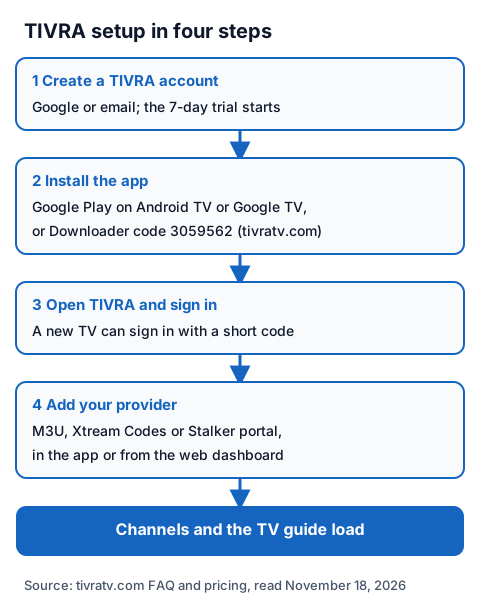
- Create an account on tivratv.com with Google or an email address. The 7-day trial starts at once.
- Install the app. On Android TV or Google TV, search Google Play for TIVRA. On a box without Google Play, such as a Fire TV Stick, install the free Downloader app and enter the code the developer publishes on tivratv.com: 3059562 on November 18, 2026. Allow Downloader to install apps when asked.
- Open TIVRA and sign in. The Google Play listing says a new TV can sign in with a short code.
- Add your provider. In the app, go to Settings, then Providers & Guide, then the Providers tab, and enter an M3U link, an Xtream Codes server, username and password, or a Stalker portal address and MAC. Or add it from the web dashboard in a phone browser, and it syncs to the TV.
- Wait for the channels and the TV guide to load.
Take the Downloader code only from tivratv.com on the day you install; codes copied from lists on other sites can point anywhere. Our guide to Downloader codes on a Firestick explains the checks, and our guide on how a server URL, username and password are entered shows where each value comes from.
Is TIVRA legal and safe to use?
A player app is legal software; what you load into it decides the legal question. IPTV technology is legal, and a stream is lawful only when the seller holds the rights to what it streams. TIVRA's terms tell users to play only "content you are entitled to watch", and the developer takes no responsibility for what a provider delivers.
Our guide to whether IPTV is legal explains how to tell a seller with rights from one without them. For safety, install TIVRA only from Google Play or tivratv.com, check that the app you open names TIVRA, and never paste a free playlist or M3U link found on a forum.
Using TIVRA with an IG IPTV login
An IG IPTV login is sent on WhatsApp after payment, as a server URL, username and password, or as playlist details. TIVRA accepts both formats, so you can run the two trials side by side: TIVRA's 7 days and our 24-hour free trial, which needs no card.
Use the trial to check, inside TIVRA on your own TV, that the channels you care about play. If they do, the prices for UK plans start at £15 a month, with 3, 6 and 12-month plans at £25, £35 and £55, and the 12-month plan includes 2 free months. Picture quality goes up to 4K where the channel broadcasts it.
TIVRA's device count and an IPTV plan's streams are different limits. Multi-View plays several channels at once, and each one uses a connection from your provider. A standard IG IPTV plan streams on one screen at a time, and the multi-room add-on raises that to 2 to 4 streams on one login.
Frequently Asked Questions
Is Tivra IPTV free?
The app is free to install, and tivratv.com lists a 7-day free trial on up to 3 devices with no card. After that, plans start at $2.49 a month or $9.99 a year for one device, or a one-time Lifetime licence from $34.99.
Does Tivra work on a Firestick?
The developer names Fire TV and gives a route through the Downloader app with a code published on tivratv.com. We could not open Amazon's Appstore, so we have not seen a store listing for Fire TV.
Can I get a refund on a TIVRA Lifetime plan?
The developer's terms say Lifetime purchases are final and non-refundable, even if TIVRA is discontinued, unless your local law or the store you bought through requires a refund.
Sources
- tivratv.com home page, pricing page and pricing FAQ, read November 18, 2026.
- tivratv.com FAQ and user guide, compliance page and terms of service (dated October 26, 2026), read November 18, 2026.
- Google Play listing "TIVRA IPTV Player & Sports Hub" (putdownapps), UK store, read November 18, 2026.
- Apple App Store search data for "tivra", UK store, read through Apple's search service November 18, 2026.
- tivra.app home page, read November 18, 2026.
- IG IPTV plan prices and terms (igiptv.tv), read November 18, 2026.
Couldn't read: Amazon's UK Appstore (the search did not load), so Fire TV is described only from the developer's pages; the developer's Fire TV and Android TV builds were not installed by us; prices in pounds (tivratv.com shows US dollars only).