Sparkle TV IPTV: What the Player Is and How to Set It Up
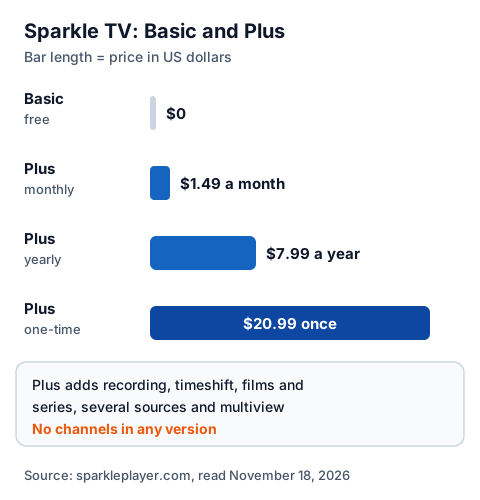
Sparkle TV IPTV is a player app, not a seller: Sparkle TV Player, published on Google Play by HKAB, plays a playlist or login you already have and, in its own words, "does not provide any channels, sources or media". The developer's site, sparkleplayer.com, names Android TV, Google TV and Fire TV. The Basic version is free; Sparkle TV Plus costs $1.49 a month, $7.99 a year or $20.99 once, and adds recording, timeshift, films and series, and multiview.

This guide is one entry in our roundup of IPTV player apps, where the IPTV player Sparkle TV sits beside PiqoTV and MaxPlayer. Below: what Sparkle does and does not sell, what Plus adds, which sources and devices it supports, how to set it up, and what we could not check.
Is Sparkle TV a player app or an IPTV seller?
A player app. Sparkle sells no channels and no IPTV subscription; the only thing it sells is Sparkle TV Plus, an upgrade that unlocks more of the app's own features. You bring the content from a provider or from your own TV tuner or media server.
The developer says so on both its site and its Google Play listing: Sparkle "has no affiliation with any content provider" and "does not support streaming of copyrighted material without permission from the copyrighter". The Play listing calls it a "DVR/PVR player" that lets you "watch Live TV from your provider".
People also search for "Sparkle IPTV", and a seller can use any name it likes. If a page offers a "Sparkle IPTV" subscription with channels, it is not the app described here; check who runs it with our guide to buying an IPTV subscription, which lists what to ask any seller before paying.
What is free in Sparkle TV and what needs Plus?
The Basic version plays your sources with a programme guide, search, subtitles and themes. Plus adds the features most people install a DVR player for: recording, pausing live TV, films and series, several sources at once and multiview.
| Feature named by the developer | Basic (free) | Plus |
|---|---|---|
| M3U, Xtream Codes and XMLTV support | Yes | Yes |
| Programme guide with logos and images | Yes | Yes |
| Search, subtitles, audio tracks, sleep timer | Yes | Yes |
| Favourites, sorting and hiding channels | No | Yes |
| Timeshift (pause and rewind live TV) | No | Yes |
| DVR recording, scheduled from the guide | No | Yes |
| Films, series and catch-up | No | Yes |
| Several sources at the same time | No | Yes |
| Multiview (several streams at once) | No | Yes |
sparkleplayer.com lists three ways to pay for Plus: $1.49 a month, $7.99 a year, or $20.99 once. The prices are in US dollars, so a UK card may see a conversion fee. The Play listing says the mobile version can be used to buy Plus for compatible devices, and HKAB also publishes Sparkle Assistant, a phone app for managing Plus that says plainly it "is not an iptv player". One difference: the site marks parental controls as Plus-only, while the Play listing does not.
Which sources and devices does Sparkle TV support?
Sparkle runs on Android TV, Google TV and Fire TV, and it reads 12 kinds of source, from IPTV playlists to home TV tuners and media servers. The Play listing adds that "most app features are only available on Android TV/Google TV".
| Source type | Named by the developer |
|---|---|
| IPTV logins and playlists | Xtream Codes API, Playlist (m3u/m3u8 and xmltv), Stalker Portal |
| TV tuners and recorders | HdHomeRun (gen 4+), Enigma2, DVBLink (6.x+), DVBViewer, TVMosaic |
| TV servers | Tvheadend (4.2+), Tvheadend HTSP (api 24+) |
| Media servers | Plex, Jellyfin |
That source list is what sets Sparkle apart from a plain IPTV player: an aerial tuner on your home network and an IPTV login can feed the same guide. For a straight IPTV player with recording, TiviMate is the app Sparkle is most often compared with.
On devices, the Play listing is the store route for Android TV and Google TV; it showed version 2.4.0, updated on November 5, 2026, and 100k+ downloads. Amazon's UK Appstore returned "No results" for Sparkle TV Player, so on a Fire TV the developer's route is the "Download APK" button on sparkleplayer.com. We found no Sparkle app for iPhone or Apple TV in Apple's UK App Store.
How do you set up Sparkle TV IPTV?
Install it from Google Play on an Android TV or Google TV device, or from the developer's own site on a Fire TV, then add a source with the login your provider sent you.
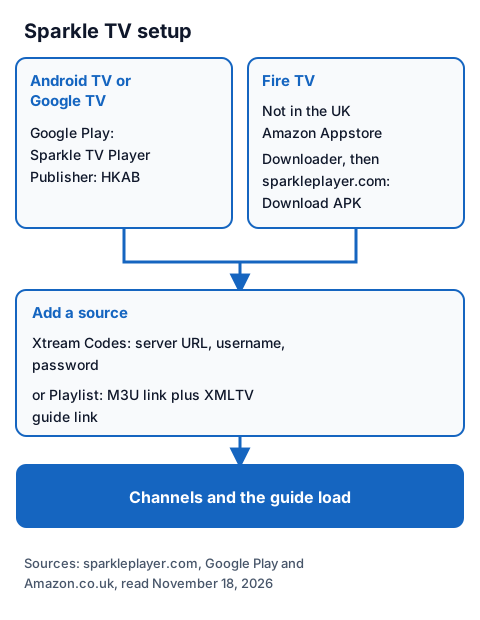
- Android TV or Google TV: open Google Play, search Sparkle TV, and check that the publisher is HKAB before you install.
- Fire TV: install Downloader from the Amazon Appstore, allow it to install unknown apps, then type sparkleplayer.com into Downloader's address bar and choose Download APK on the developer's page. Never take the file from a mirror site.
- Open Sparkle and add a source. Choose Xtream Codes if your provider sent a server URL, username and password, or a playlist if you have an M3U link and a separate XMLTV guide link.
- Wait for the channels and the guide to load. If the guide stays empty, our EPG explainer shows how to check the guide link.
We did not install the app, so we do not describe its menu names. Our walk-through of the three Xtream login fields explains each one and the usual typing mistakes.
What changed in Sparkle TV version 2.4.0?
The Google Play listing's "What's new" for version 2.4.0 names a new channel list, recording with options, more multiview layouts, a "Go live" button, two new themes, filtering of film and series categories, an updated internal player, and support for several Shared Plus accounts with the same email and password.
Shared Plus is how one Plus purchase reaches other devices. If a device asks for a Shared Plus login after an update, sign in with the email and password used for the purchase; for anything else, the listing gives the developer's support email and the site links a Sparkle community on Reddit.
Is Sparkle TV legal to use?
A player app is legal software; what you load into it decides the legal question. IPTV technology is legal, and a stream is lawful only when the seller holds the rights to what it streams. Sparkle's own disclaimer says all content is provided by the user and that it does not support streaming copyrighted material without permission.
Our guide to legal IPTV providers in the UK shows how to tell a seller with rights from one without them. Install Sparkle only from Google Play or the developer's site, and never paste a free playlist or M3U link found on a forum.
Using Sparkle TV with an IG IPTV login
An IG IPTV login is sent on WhatsApp after payment, as a server URL, username and password, or as playlist details, which matches the Xtream Codes and playlist sources Sparkle names. You can test the pair with our 24-hour free trial, which needs no card.
Use the trial to check, inside Sparkle on your own TV, that the channels you care about play. If they do, the UK subscription prices start at £15 a month, with 3, 6 and 12-month plans at £25, £35 and £55; the 12-month plan includes 2 free months, and there is no contract. Picture quality goes up to 4K where the channel broadcasts it. Sparkle's multiview plays several streams at once, while a standard plan streams on one screen at a time; the multi-room upgrade adds 2 to 4 streams on one login.
Frequently Asked Questions
Is Sparkle TV free?
The Basic version is free and includes the programme guide, search and subtitles. Sparkle TV Plus, which adds recording, timeshift, films and series and multiview, costs $1.49 a month, $7.99 a year or $20.99 once on sparkleplayer.com.
Does Sparkle TV IPTV come with channels?
No. The developer says Sparkle "does not provide any channels, sources or media". You add a login or playlist from a provider, or a source such as an HdHomeRun tuner or a Plex server.
Is Sparkle IPTV a seller or an app?
The Sparkle TV Player app is not a seller. A page selling a "Sparkle IPTV" subscription with channels is a separate business; check its terms, refund policy and rights before you pay.
Is Sparkle TV on the Amazon Appstore?
Not in the UK store we searched, which returned "No results". On a Fire TV, the developer's site offers its own APK download, which you open through the Downloader app.
Does Sparkle TV work on iPhone or Apple TV?
We found no Sparkle app in Apple's UK App Store. The developer names Android TV, Google TV and Fire TV.
Sources
- sparkleplayer.com home page (features, supported sources, Plus prices and disclaimer), read November 18, 2026.
- Google Play listing "Sparkle TV Player" (HKAB), UK store, including version 2.4.0 notes, read November 18, 2026.
- Google Play listing "Sparkle Assistant" (HKAB), UK store, read November 18, 2026.
- Amazon.co.uk Appstore search for "sparkle tv player", read November 18, 2026.
- Apple App Store UK search data for "sparkle tv", read through Apple's search service November 18, 2026.
- IG IPTV plan prices and terms (igiptv.tv), read November 18, 2026.
Couldn't read: the app itself (we did not install it, so menu names and in-app prices in pounds are not described); the Sparkle community on Reddit (not opened); any company address for the developer (not published on sparkleplayer.com or the listing pages we read).