Yes IPTV: The Player App, the Seller and What to Check
Yes IPTV is a name shared by unrelated things. Most often it means YES IPTV Player, an App Store app for iPhone, iPad, Apple TV and Mac that plays an M3U playlist or Xtream login you already have; it ships with no channels and is free, with Monthly £1.99, Annual £9.99 and Lifetime £29.99 upgrades. A second App Store app is called ipYes TV. Separately, yesiptv.com is a French-language seller site trading as IPTV YES.

This guide sits in our roundup of IPTV player apps, because the name most often means the player. Below: how to tell the three apart, what the YES IPTV Player app does and costs, how to set it up on an Apple TV, what the seller site shows, and what we could not check.
Is Yes IPTV a player app or a seller?
Both, under three unrelated names. Two are player apps with no channels, from different developers; the third is a website that sells IPTV plans. None of the three pages we read links to the others.
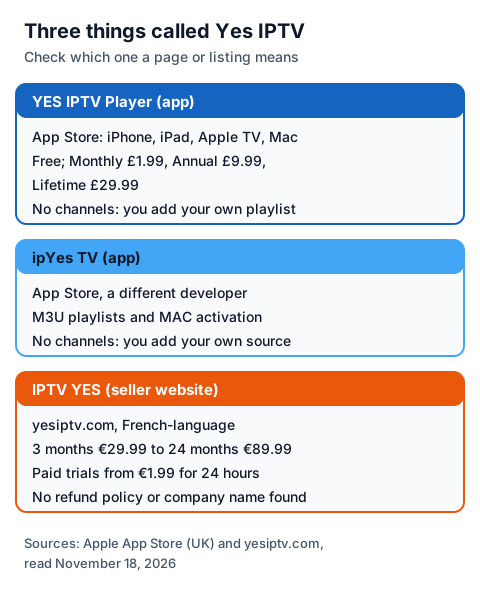
| Name | What it is | Where it is | Comes with channels? |
|---|---|---|---|
| YES IPTV Player | Player app from an individual developer, website yesiptvplayer.com | Apple App Store | No |
| ipYes TV | Player app from a different individual developer | Apple App Store | No |
| IPTV YES | Seller of IPTV plans, French-language site | yesiptv.com | Sells access; see below |
A Google Play UK search for "yes iptv" showed no app with that name, so neither player has an Android version that we could find. On Android, a player such as TiviMate, IPTV Smarters or another app from our comparison of IPTV players does the same job.
What is the YES IPTV Player app?
YES IPTV Player is a player for your own IPTV login on Apple devices. It plays live TV, films and series from an Xtream login or an M3U playlist, and its App Store listing says in capitals that it "DOES NOT PROVIDE ANY CONTENT"; you must add your own playlist. The developer's site, yesiptvplayer.com, adds that it does not support "the unauthorized use of copyrighted material."
What the App Store listing and the developer's site name as features:
- Unlimited playlists in Xtream and M3U formats
- Live TV with catch-up where your provider offers it, a TV guide and programme reminders
- Downloads for watching offline
- A choice of three playback engines: VLCKit, KSPlayer and AetherEngine
- Picture-in-picture and background playback
- Parental lock on categories with a PIN
- Film and series details from TMDb, Trakt sync and OpenSubtitles search
- iCloud sync between your devices, and Family Sharing for the subscription
- VoiceOver support and 19 interface languages
The App Store listing showed version 1.17, released November 2, 2026; the app first appeared on the store on May 5, 2025. It is the same kind of app as UHF or 9Xtream: only as useful as the login you load into it.
How much does YES IPTV Player cost?
The app is free to download, and the developer says the free version has no ads or watermarks. Extra features sit behind in-app purchases, which the UK App Store page listed in pounds.
| In-app purchase | UK App Store price |
|---|---|
| Monthly | £1.99 |
| Annual | £9.99 |
| Lifetime | £29.99 |
The listing does not say which features each purchase unlocks. In a reply to a review on the App Store, the developer says picture-in-picture with KSPlayer needs Premium and that the annual subscription includes a 7-day free trial, to be cancelled before it ends to avoid a charge. Purchases go through Apple, so Apple's own refund route applies. The app fee pays for the player only; our explainer on what IPTV costs adds a player and a provider plan together.
How do you set up YES IPTV Player on an Apple TV?
You install it from the App Store, add your provider's login, and wait for the lists to load. The App Store page says the Apple TV version needs tvOS 18.0 or later; iPhone needs iOS 18.0, iPad iPadOS 18.0, and a Mac macOS 15.0 with an Apple M1 chip or later.
- On the Apple TV, open the App Store, search for YES IPTV Player, and check that the developer's website on the listing is yesiptvplayer.com.
- Open the app and add a playlist: an Xtream server, username and password, or an M3U link.
- Wait for live TV, films and series to load, then set the TV guide and any parental lock.
- If you also use the iPhone app, the developer says iCloud sync carries favourites, history and settings across, and that you can send a title from the phone to the Apple TV.
Our IPTV guide for all your devices and our iPhone and iPad IPTV guide cover the device side, and our page on entering an Xtream login on a TV shows where each value comes from.
What does the IPTV YES seller site show?
yesiptv.com is a French-language site that sells IPTV plans under the name IPTV YES. It is not connected to either player app, as far as its pages show. Here is only what its own pages said on November 18, 2026.
| Item on yesiptv.com | What the page shows |
|---|---|
| One-screen plans | 3 months €29.99, 6 months €39.99, 12 months €59.99, 24 months €89.99 |
| Trials | Paid: 24 hours €1.99, 7 days €7.99, 1 month €13.99 |
| Payment | Bank card or a Wise account |
| Refund policy, terms | None found |
| Company name or address | None found; the FAQ page had no answers |
| Rights statement | None found |
The plan cards also make channel-count, picture-quality and reliability claims, which we could not check. A site that names no company, shows no refund policy and says nothing about the rights it holds leaves a buyer with little to go on.
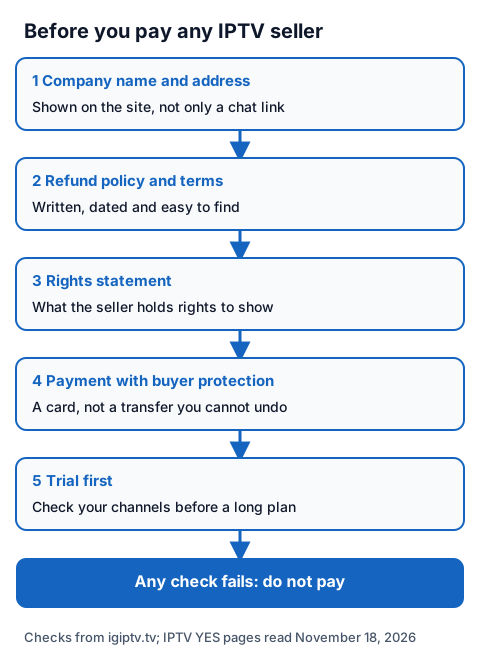
The same five checks work for any seller, ours included. Our page on buying an IPTV subscription shows what our own plans include, and our guide to whether IPTV is legal explains why the seller's rights decide the legal question: IPTV technology is legal, and a stream is lawful only when the seller holds the rights to what it streams.
Using a Yes IPTV player with an IG IPTV login
An IG IPTV login is sent on WhatsApp after payment, as a server URL, username and password, or as playlist details. YES IPTV Player takes both formats, so you can load it on an Apple TV during our 24-hour free trial, which needs no card.
Use the trial to check that the channels you care about play in the app on your own TV. If they do, the UK plan prices start at £15 a month, with 3, 6 and 12-month plans at £25, £35 and £55, and the 12-month plan includes 2 free months. Picture quality goes up to 4K where the channel broadcasts it. A standard plan streams on one screen at a time, and the multi-room upgrade adds 2 to 4 streams on one login.
Frequently Asked Questions
Is Yes IPTV a provider or an app?
Both names exist. YES IPTV Player and ipYes TV are App Store player apps with no channels; IPTV YES at yesiptv.com is a separate website that sells IPTV plans.
Is YES IPTV Player free?
It is free to download, with in-app purchases on the UK App Store of £1.99 a month, £9.99 a year or £29.99 for Lifetime. The developer says the annual plan includes a 7-day free trial.
Does YES IPTV Player work on Apple TV?
Yes. The App Store page lists Apple TV with tvOS 18.0 or later, beside iPhone, iPad, Mac and Apple Vision.
Is there a Yes IPTV app for Android or Firestick?
Not that we found. A Google Play UK search for "yes iptv" showed no app with that name, and neither developer lists an Android version.
Does YES IPTV Player include channels?
No. Its listing says it does not provide any content and that you must supply your own playlist. The provider's rights decide what you can lawfully watch.
Sources
- Apple App Store page and lookup data for "YES IPTV Player", UK store, including in-app purchase prices, requirements and developer replies, read November 18, 2026.
- yesiptvplayer.com home page, read November 18, 2026.
- Apple App Store lookup data for "ipYes tv iptv", UK store, read November 18, 2026.
- yesiptv.com home, subscription, trial and FAQ pages, read November 18, 2026.
- Google Play search for "yes iptv", UK store, read November 18, 2026.
- IG IPTV plan prices and terms (igiptv.tv), read November 18, 2026.
Couldn't read: which features each YES IPTV Player purchase unlocks (not on the listing); ipYes TV prices (the UK App Store page showed none); any refund policy, terms or company details for yesiptv.com (none found on the site); yesiptv.com multi-screen prices (the page did not show them in full).