IPTV Expired: How to Check, Confirm and Renew
When IPTV says expired, your provider's server has stopped accepting your login because the plan's end date has passed. The date sits on the server, not in your app, so reinstalling changes nothing. Confirm it first: some players show an expiry date on the account screen, and many Xtream Codes servers answer an account check in a web browser. If the date has not passed, the fault is something else, such as a changed server address or a full connection limit. If it has, renew the plan.

This guide is part of our explainer on how much IPTV costs. It covers confirming the date, ruling out look-alike faults, and what each renewal length costs per month.
What 'expired' actually means
"Expired" means the provider's server has reached the end date stored against your username and now refuses that login. Nothing on your device has broken, and nothing on your device can extend the date.
That is why the usual home fixes do nothing here. Reinstalling the app, clearing its cache, restarting the router or re-entering the same details all send the same username to the same server, which gives the same answer. The message may read "expired", "account expired", "line expired" or a generic "failed to authorize", depending on the player.
IG IPTV plans are prepaid for a fixed period, with no contract. A free trial works the same way: the 24-hour free trial ends 24 hours after it starts, and a player then shows the same kind of message.
How to check your expiry date
You can usually find the end date in one of three places: the player's account or user-info screen, an account check in a web browser for Xtream Codes logins, or the message your provider sent when the plan started.
| Where to look | Works for | What you see |
|---|---|---|
| The player's account or user-info screen | Xtream Codes logins in players that show account details | An end date, if the player displays one |
| An account check in a web browser | Xtream Codes logins | Account details, often with the end date as a Unix timestamp |
| Your activation message | Every plan | The plan length and start date you were given |
| Your provider's support | Every plan, including M3U-only setups | The date as the server holds it |
In the player. Some players, including several that log in with Xtream Codes details, show the account's end date on an account or user-info screen. Where it sits varies by player and version, so look in the settings or account menu rather than on the channel list.
In a web browser. Many Xtream Codes servers answer an account check typed into a browser, using your server address, username and password. Our Xtream Codes setup guide shows the address format. If the reply shows your end date as a long number, usually ten digits, it is a Unix timestamp: the number of seconds since 1 January 1970 (UTC). Paste it into a converter such as unixtimestamp.com to read it as a normal date. Keep that address private, because it contains your password.
From support. If neither works, message support with your username and ask for the end date. For an IG IPTV plan, that is our 24/7 WhatsApp support.
Expired, or something else?
An expired plan rejects your login on every device, and the end date is in the past. If the date is still in the future, or the failure only happens on one device, the cause is something else.
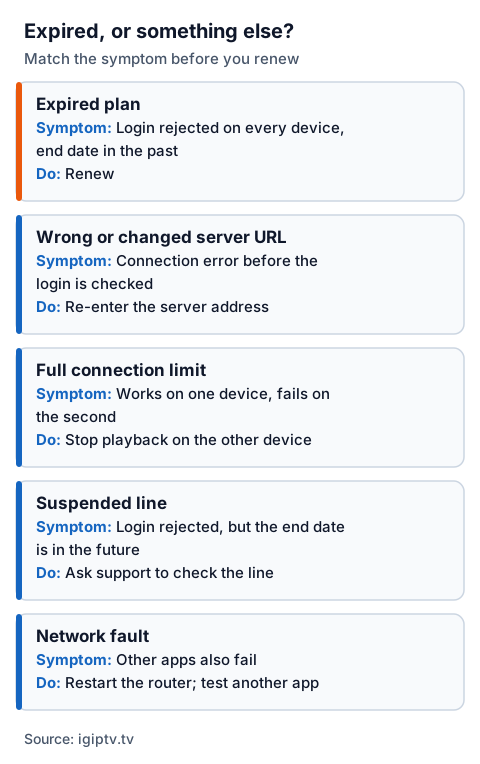
| What you see | Likely cause | What to do |
|---|---|---|
| Login rejected on every device, end date in the past | Expired plan | Renew |
| Connection error before the login is even checked | Wrong or changed server URL | Re-enter the server address; ask support if it changed |
| Works on one device, fails on the second | Full connection limit | Stop playback on the other device |
| Login rejected, but the end date is in the future | Suspended line or account problem | Ask support to check the line |
| Other apps also fail on the same device | Network fault | Restart the router; test another app |
If you have just paid and the player still says expired, the player may still be holding the old account details, or the new period may not be on the server yet. Close the player fully, reopen it and log in again. If the message stays, send support your username so they can check the date the server holds.
The connection limit is the easiest to mistake for expiry. A standard plan allows one stream at a time, and a second device trying to play while the first is watching can fail with a login error. Our guide to single and multiple IPTV connections explains the limit, and the IPTV Smarters "failed to authorize" fixes cover the credential errors that look like expiry. For everything else, the wider IPTV troubleshooting guide works symptom by symptom.
If you only have an M3U playlist link
An M3U playlist cannot show an expiry date, because it is only a list of channel addresses; the end date stays on the provider's server. When the plan ends, the playlist link usually stops loading or comes back empty, and the player may say the playlist has expired or failed to load.
Your M3U link usually carries the same username and password as an Xtream Codes login, built into the address. If it does, you can try the browser account check above with those details. If not, ask the provider for the date. A playlist that fails while the date is still in the future points to a changed link or server address, not expiry.
Renewing with IG IPTV
To renew or change your plan length, message support on WhatsApp and say which plan length you want. Support is available 24/7.
Before you pay, ask support two things in the same message: whether your current login details carry on after renewal, and, if you renew before the end date, whether the new period is added to your current end date. Get the answers in writing so you know exactly what you are buying.
If you are coming from another provider instead, a new IG IPTV plan is activated over WhatsApp, typically within 5 minutes. The no-contract IPTV page explains how prepaid plans work, and the UK pricing page lists every plan length side by side.
Which plan length to renew on
The longer the plan, the less each month of access costs: from £15.00 a month on the 1-month plan down to £3.54 on the 24-month plan. The trade-off is how much you pay up front.
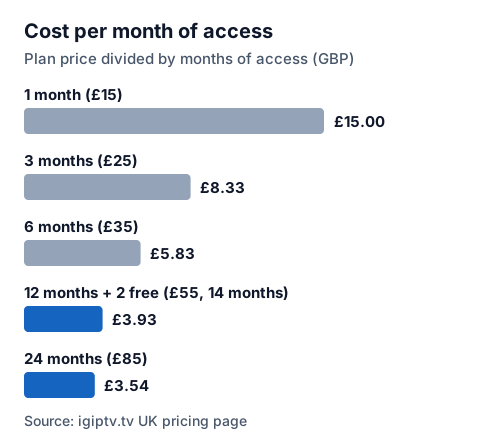
| Plan | Price | Months of access | Cost per month of access |
|---|---|---|---|
| 1 month | £15 | 1 | £15.00 |
| 3 months | £25 | 3 | £8.33 |
| 6 months | £35 | 6 | £5.83 |
| 12 months + 2 free | £55 | 14 | £3.93 |
| 24 months | £85 | 24 | £3.54 |
The cost per month is the plan price divided by the months of access. The 12-month plan includes 2 free months, so £55 buys 14 months of access; the 12-month IPTV subscription page has the details.
If you are unsure whether you will still want the service in a year, a shorter plan costs more per month but less up front. If you already know you will keep watching, the longer plans cost the least per month.
How to stop it running out mid-match
Put your end date in your phone's calendar with a reminder a few days before, and renew before the day of any match or event you do not want to miss.
Before renewing early, ask support whether the new period is added to your current end date, so you know whether the days you have left carry over. If you only need a few more days, the 1-month plan at £15 bridges the gap without committing to a longer period.