IPTV No Sound: Find Where the Silence Is, Then Fix It
When IPTV plays a picture with no sound, the cause depends on where the silence is. Silence on some channels only usually means those channels carry Dolby audio (AC3 or E-AC3) that your device or player cannot decode: switch the player to software audio decoding or turn off passthrough. Silence on a film often means the wrong audio track is selected. Silence only through a soundbar or receiver points to the HDMI audio setting. Silence on everything is usually a device setting, not the stream.
This page is part of our IPTV troubleshooting guide. Find your pattern below, try the first fix for it, and change one setting at a time so you know which one worked.
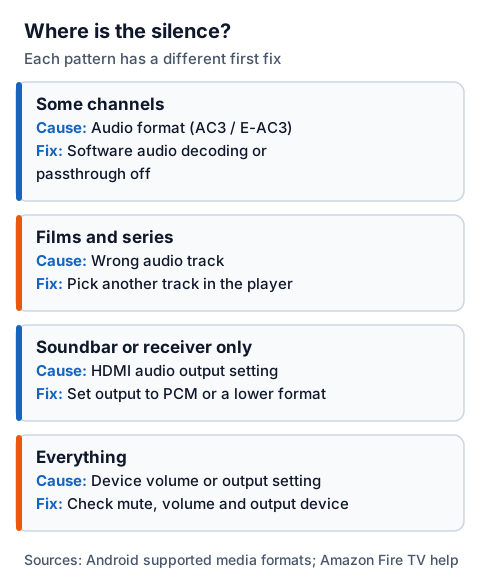
Where is the silence?
The place the sound disappears tells you which part of the chain lost it. Check whether the silence is on some channels, on films and series, only through a soundbar or receiver, or on everything the device plays.
| Where the silence is | Likely cause | First fix |
|---|---|---|
| Some channels | Audio format (AC3 / E-AC3) | Software audio decoding or passthrough off |
| Films and series | Wrong audio track | Pick another track in the player |
| Soundbar or receiver only | HDMI audio output setting | Set output to PCM or a lower format |
| Everything | Device volume or output setting | Check mute, volume and output device |
If YouTube or another app on the same device is also silent, the IPTV stream is not the problem: start with the "everything" row and the device's own sound settings. If instead you have sound but a black picture, see what causes a black screen with sound.
No sound on some channels: the audio format
Silence on some channels and sound on others usually comes down to the audio format. Some channels carry Dolby Digital (AC3) or Dolby Digital Plus (E-AC3) audio instead of AAC, and whether you hear it depends on three separate things: the player's decoder, the device's passthrough setting and what your TV or soundbar accepts.
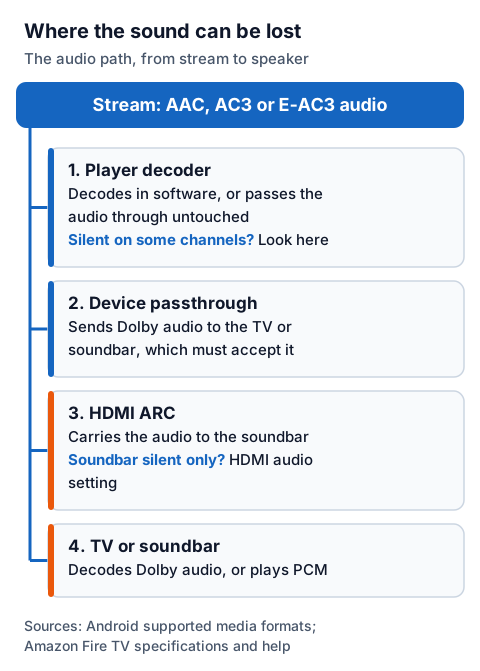
The player's decoder. Android's own list of the audio formats the platform supports names AAC, MP3, Opus, FLAC and others, but not AC3 or E-AC3. Dolby support on an Android device is added by its maker or by the player app, so two players on the same box can behave differently with the same channel.
The device's passthrough setting. Instead of decoding Dolby audio itself, a player or device can pass it through untouched over HDMI for the TV or soundbar to decode. Amazon's specifications list HDMI audio pass-through for Dolby Digital and Dolby Digital Plus on its Fire TV sticks.
What the TV or soundbar accepts. Passthrough only works if the equipment at the end of the cable can decode the format. If it cannot, the result is silence rather than an error.
So the fix is to make one link in the chain do the decoding:
- In the player's audio or playback settings, switch audio decoding to software, or turn audio passthrough off. The player then decodes the Dolby track and sends ordinary audio on.
- If the player has no such setting, set the device's own audio output to a simpler format (see the device section below).
- If you use a soundbar or receiver that does decode Dolby, try the reverse: turn passthrough on so the soundbar does the work.
Some player makers treat passthrough as a per-format setting for this reason. The developers of the Channels app, for example, describe Android TV negotiating the available audio formats with the connected TV or receiver, and let users switch passthrough off for one format when it misbehaves.
No sound on films and series
Silence on a film or series, when live channels play normally, usually means the player has picked an audio track you cannot hear. Films and series often carry more than one track: different languages, a commentary, or the same soundtrack in stereo and in a surround format.
Open the player's audio track menu during playback (often under an "audio", "tracks" or speaker icon) and choose another track. A stereo or AAC track is the safest choice if you are listening through TV speakers. If every track is silent, apply the "some channels" fix above, since a film's surround track meets the same decoder and passthrough limits as a live channel.
No sound through a soundbar or AV receiver
If sound plays through the TV speakers but not through the soundbar or receiver, the stream and the player are fine; the problem is the HDMI audio link or the format being sent down it. A Dolby track passed through to a soundbar that cannot decode it, or a connection that cannot carry it, ends in silence.
Work through these in order:
- Set the output format lower. In the streaming device's or TV's audio settings, choose stereo or PCM instead of a Dolby or automatic setting. PCM is uncompressed audio that any soundbar accepts.
- Check the cable route. Amazon's help pages note that optical cables do not fully support surround sound and recommend a high-speed HDMI cable, with the Fire TV connected directly to the soundbar's or receiver's HDMI input, or the soundbar connected to the TV's HDMI ARC input.
- Check what the equipment reports. On a Fire TV, Amazon's Audio/Video Diagnostics tool shows which audio formats the connected equipment supports. If a format is not detected, it cannot be played with that setup.
Fixes by device
The first place to look depends on the device: on a Fire TV Stick, Amazon's built-in audio diagnostics; on an Android TV box, the player's audio decoder setting; on a Samsung or LG TV, the TV's digital audio output format.
| Device | First thing to try | Then |
|---|---|---|
| Fire TV Stick | Settings > Display & Sounds > Audio and Video Diagnostics > Troubleshoot Audio/Video Issues > No Audio | Switch the player to software audio decoding or turn passthrough off |
| Android TV box | The player's audio decoder or passthrough setting | Try a second player on the same box |
| Samsung or LG TV | The TV's digital audio output format: try PCM | Update or reinstall the IPTV app |
Fire TV Stick. Amazon's own route for silence is Settings > Display & Sounds > Audio and Video Diagnostics > Troubleshoot Audio/Video Issues > No Audio, then follow the on-screen recommendations. Amazon notes that the tool is not available on every Fire TV device; its surround-sound advice is to change the audio format to a lower setting in the same Display menu, which some of its pages call Display & Audio. Our Fire TV Stick IPTV setup guide covers the player side, and the IPTV for Firestick page explains what a plan for the stick includes.
Android TV box. Because Dolby decoding varies between boxes and players, the player's own setting is the quickest lever. If one player stays silent, try another; our roundup of the best IPTV players lists alternatives, and the SOPlayer guide covers its audio track options.
Samsung and LG TVs. The IPTV app plays through the TV's own decoders. If sound is missing only through a soundbar, set the TV's digital or HDMI audio output to PCM in its sound settings.
One test: is it the player or the stream?
Play the same channel in a second player on the same device. If it has sound there, the stream is fine and the first player's audio setting is the fix; if it is silent in every player, the channel itself has lost its audio.
Sound in a second player means the audio reached your device intact, so the fix is in the first player's settings. If it is silent in every player, report the channel to support.
Silent in every player? Send the channel name and your device to our 24/7 WhatsApp support. Not a customer yet? The 24-hour free trial lets you check the channels you watch most on your own TV and soundbar before you pay.